The report queue#
Reports, dashboards and Explore are answered by the server's query threads. A server has one to four of them: half its processor cores, at least one, at most four, unless Threads per report in Preferences, Reporting says otherwise. A server with two cores has one. When the threads are busy, the next question waits its turn.
The Queue section of the Reports app shows what is running and what is waiting, for how long, and lets you cancel.
Opening it#
- Queue in the section bar of the Reports app. Everyone who may run reports or see dashboards has it.
- See the queue on a panel that is waiting (below). It opens the queue in a new tab, because leaving a report cancels it.
- Report queue in the search at the top of the app (⌘K).
What it shows#
The line at the top counts the threads and the questions:
| Line | Means |
|---|---|
| "1 query thread, idle. Nothing is waiting." | nothing to wait for |
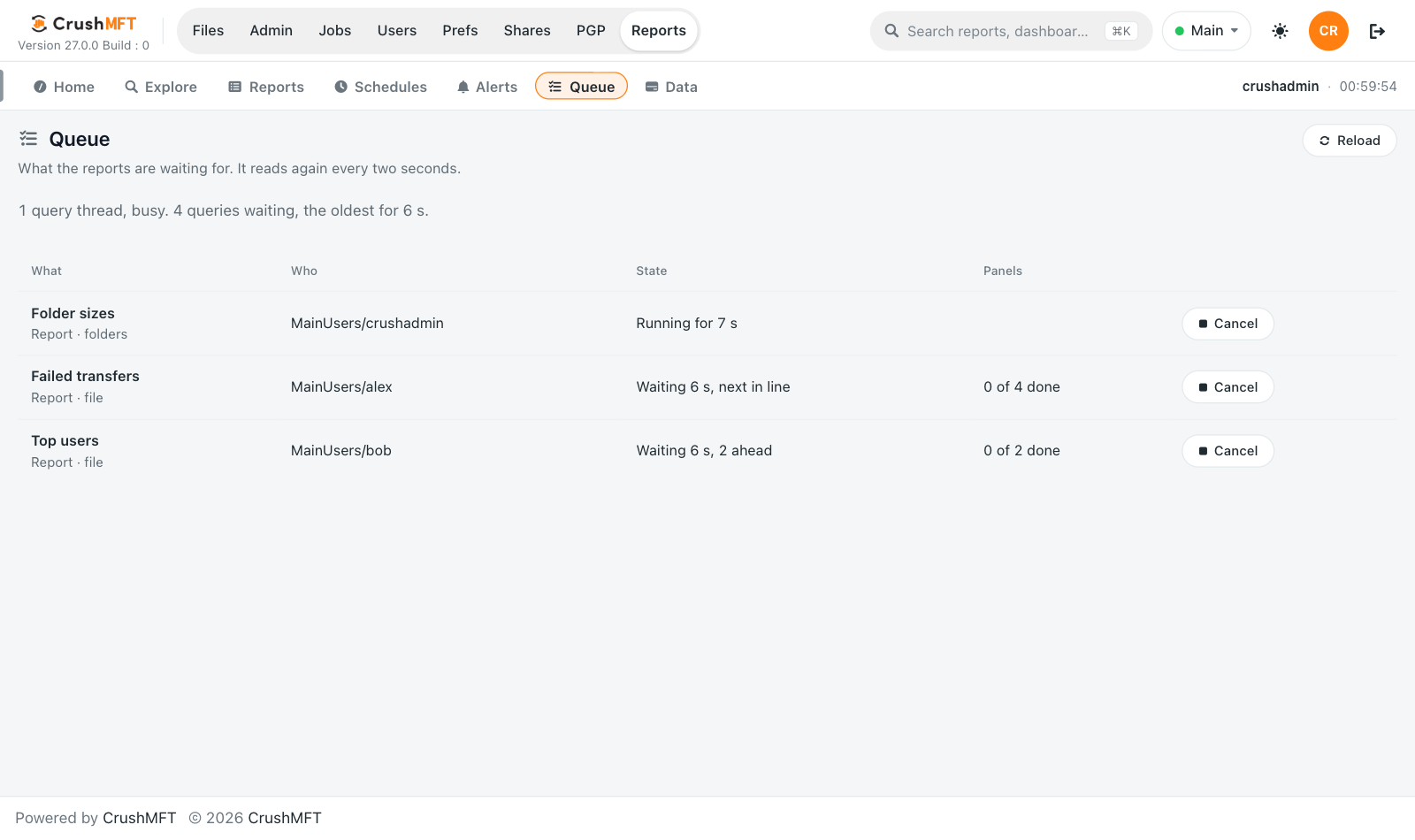
| "1 query thread, busy. 4 queries waiting, the oldest for 24 s." | the thread is in use; four questions are in line. A report asks one question per panel, so one report can be several of the four. |
| "4 query threads, 2 busy." | two threads are free |
Below it, one row per report, dashboard or query, in the order they are served: the running ones first, then the waiting ones in line.
| Column | Shows |
|---|---|
| What | the report or dashboard, and under it its kind (Report, Dashboard, Explore, Scheduled report, Other query) and the data it reads. Your own reports and dashboards open from here. |
| Who | whose it is: connection group and user name |
| State | "Running for 25 s"; "Waiting 24 s, next in line"; "Waiting 24 s, 2 ahead"; "Cancelled, still stopping (running for 35 s)" |
| Panels | how far a report of several panels is: "0 of 4 done" |
| Cancel | stops it (see Cancel) |
The page reads the queue again every two seconds while it is open; Reload reads it at once.
Other query is a question that is not a report: the names offered while typing a filter, a user's own My Activity, the history of a folder, and the server checking its report alerts and expected files. They wait in the same line.
Whose rows you see#
| You are | You see | You may cancel |
|---|---|---|
| anyone who may run reports or see dashboards | your own rows in full; everybody else's as "Another user's report" or "Another user's query" by "another user", with their state and times, so you can see how long the line is | your own reports and dashboards |
a full administrator, or a role holder with the permission to manage the reporting data (reports.data.manage, in none of the built-in roles) |
every row in full | every row, the other queries too |
Cancelling somebody else's report asks first: "Cancel "Failed transfers" of MainUsers/alex? Its panels end now and say who cancelled them." with Keep it and Cancel it. That person's panels then say "Cancelled by crushadmin." Every cancel made in the queue is written to the server log; one made by an administrator also to the access audit log.
A report that waits#
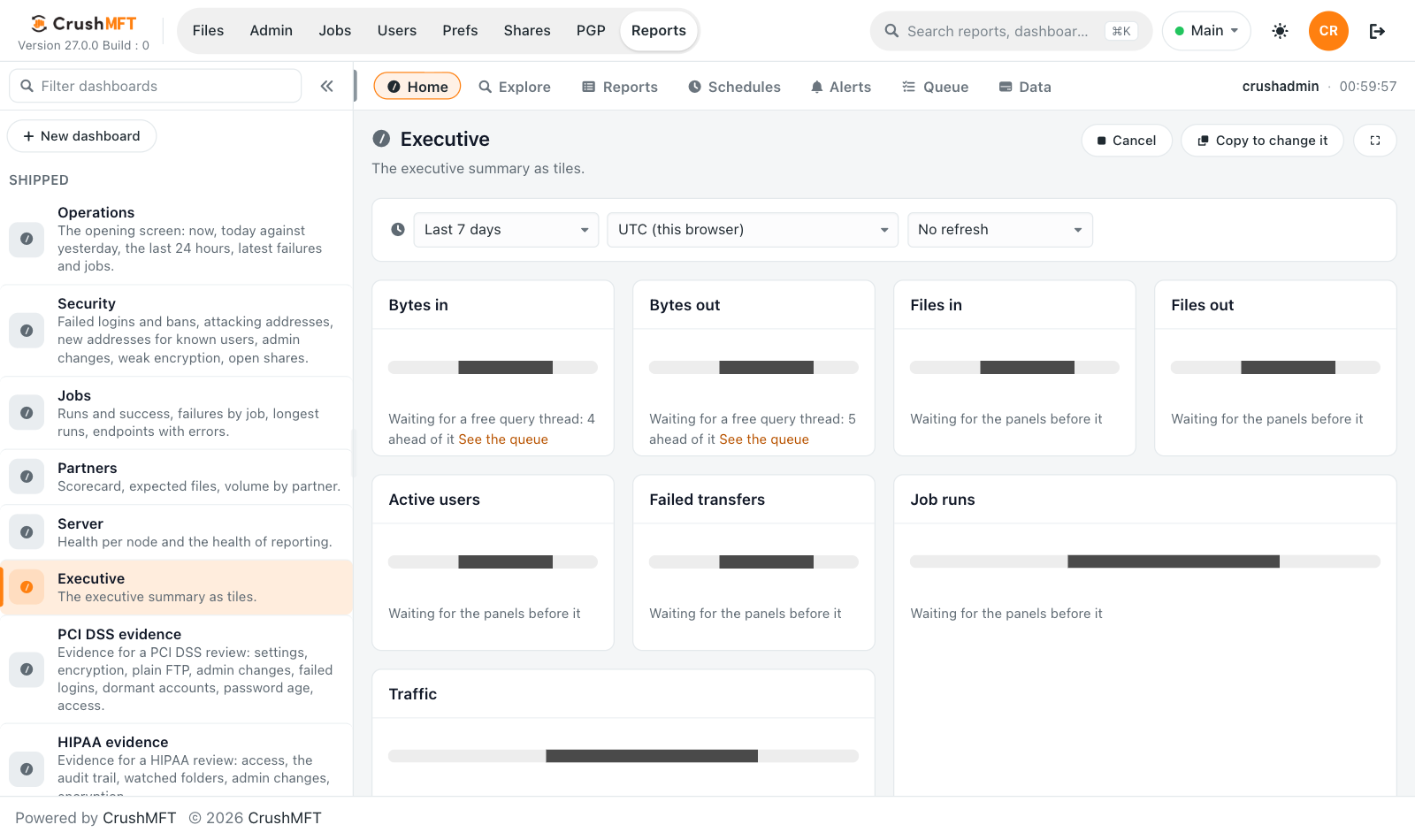
A panel that has not started says what it is waiting for:
| The panel says | Means |
|---|---|
| "Waiting for a free query thread: 4 ahead of it" | it is in line; four questions are before it. See the queue shows whose they are. |
| "Next in line for a query thread" | it goes next |
| "Waiting for the panels before it" | a report runs two of its own panels at a time; this one comes after those |
| "Reading part 3 of 12, 2,040 rows so far" | it is running |
| "Working" | it is running and cannot tell how far it is (the server's live state, a walk over folders) |
Cancel#
Cancel is on a report's run bar, at the top of a dashboard and of Explore while they run, and in the queue.
- A question still in line leaves it at once.
- A running question stops at its next check, usually within a second.
- The panels say "Cancelled." at once, and the report no longer counts against the limits: two reports at once per person, four on the server from screens (Reports at once in Preferences, Reporting). A third report of the same person is refused with "you have two reports running already: wait for one to finish, or cancel one in Reports, Queue".
- Leaving a report or a dashboard, or closing the page, cancels its run. A run nobody looks at for ten minutes is cancelled by the server.
- A scheduled report cancelled in the queue is not sent. Its run counts as failed, with "it was cancelled from the report queue" (or "… cancelled by crushadmin …"): see Scheduled reports.
A question that does not stop when it is cancelled keeps its thread. The queue shows it as "Cancelled, still stopping", and 30 seconds after the cancel the server log gets one line about it, with what its thread is doing:
SERVER|11/26/2026 23:44:37.820|REPORT: a query cancelled 32 seconds ago is still running: "Explore" panel query (...), for MainUsers/crushadmin, running 35 seconds on thread Activity query. Its thread:
	at ...
Send that line to CrushMFT Support: it says where the server is stuck. Until the question ends, the others wait; a restart of the server ends it.
Time limits#
- A report's question may run for the Time limit of Preferences, Reporting, 120 seconds unless you change it, counted from when it starts running. Time waiting in line does not count. A scheduled report has 30 minutes.
- Anything that waits without a screen (the names offered while typing, a user's My Activity, alerts and expected files) gives up after that limit and half a minute more, rather than waiting for ever: "the reporting engine is busy: the query waited 150 seconds for a free query thread and was given up".
On the test server#
The pictures are of a test server with one query thread. The administrator ran Folder sizes of a large folder, which walks the disk for about half a minute; a moment later alex ran Failed transfers (four panels) and bob Top users (two). Both waited behind it: alex next in line, bob with two of alex's panels ahead. The Executive dashboard opened then waited too, its first tiles four and five questions back, the rest behind its own first two.
Things to know#
- More threads let more reports run side by side: Threads per report in Preferences, Reporting. Each runs at low priority, but each also takes memory for its totals; on a small server one is enough when the reports are quick.
- Long reports are the ones that read the disk (Folder sizes, New files), the server's live state of many users, or years of events without totals. A filter or a shorter range makes them shorter for everyone behind them.
- Each server has its own queue. In a cluster, a report runs on the server you are signed in to and waits only for that server's threads.
- Programs read a run's state from
GET /reports/runs/{id}: a panel that waits has the statewaiting, withwait(queueorrun) andahead, and the run haswaitingandqueue_threads. The queue itself is a screen of the Reports app, not part of the API.