Languages#
The login page and the WebInterface can be shown in 17 languages. Which language a visitor gets, and whether they can choose, is set in the Languages card on the Login Page tab of the WebInterface section of Preferences.
The settings#
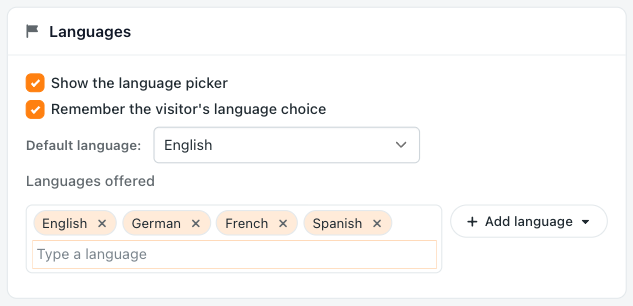
A new server shows only Show the language picker, unticked. Ticking it shows the rest.
| Setting | What it does | Default |
|---|---|---|
| Show the language picker | puts a language picker at the top right of the login page | off |
| Remember the visitor's language choice | the language a visitor picked is kept in their browser and used again on their next visit | on |
| Default language | the language for a visitor who has not picked one | English |
| Languages offered | the languages in the picker. With none listed, every language is offered. | none listed: all |
To offer only some languages, type a name under Languages offered and press Enter, or pick it with Add language. The × on a language takes it off again.
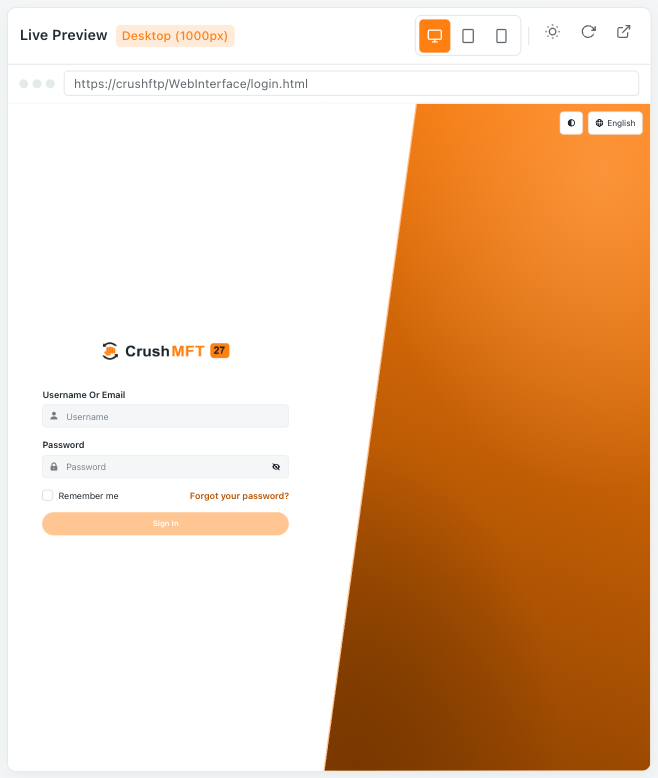
The live preview beside the settings shows the picker as visitors will see it:
Which language a visitor gets#
The server decides in this order:
- The language the visitor picked before, when Remember the visitor's language choice is on and their browser still has it.
- The Default language.
- English.
The choice is kept in the visitor's browser, not on the user's account. The same person on another machine starts with the default language again.
Without the picker, every visitor gets the Default language. So to run the whole server in one language, tick the picker to reach the setting, choose that language as the default, and untick the picker again.
The languages#
Bulgarian, Chinese, Czech, Danish, Dutch, English, French, German, Hungarian, Italian, Korean, Polish, Romanian, Russian, Slovak, Spanish, Swedish.
How much of each is translated, the language a user gets after login, and how to change the wording of a text: Languages. The picker also holds Brazilian Portuguese, which this card does not offer by name.
Saving#
The picker in the preview follows what you set at once. Visitors see it after you press Save at the bottom of the page (saving).