PGP keys#
The server can encrypt every file as it is stored and decrypt it as it is read, with PGP, so that what lies on the disk is of no use to anyone who takes it from there. In CrushMFT 27 this is set on users, in the User Manager, where the default user sets it for everyone. The Files tab of the Encryption section of Preferences is where earlier versions set it for the whole server, and it is only open on a server that still has such a setting.
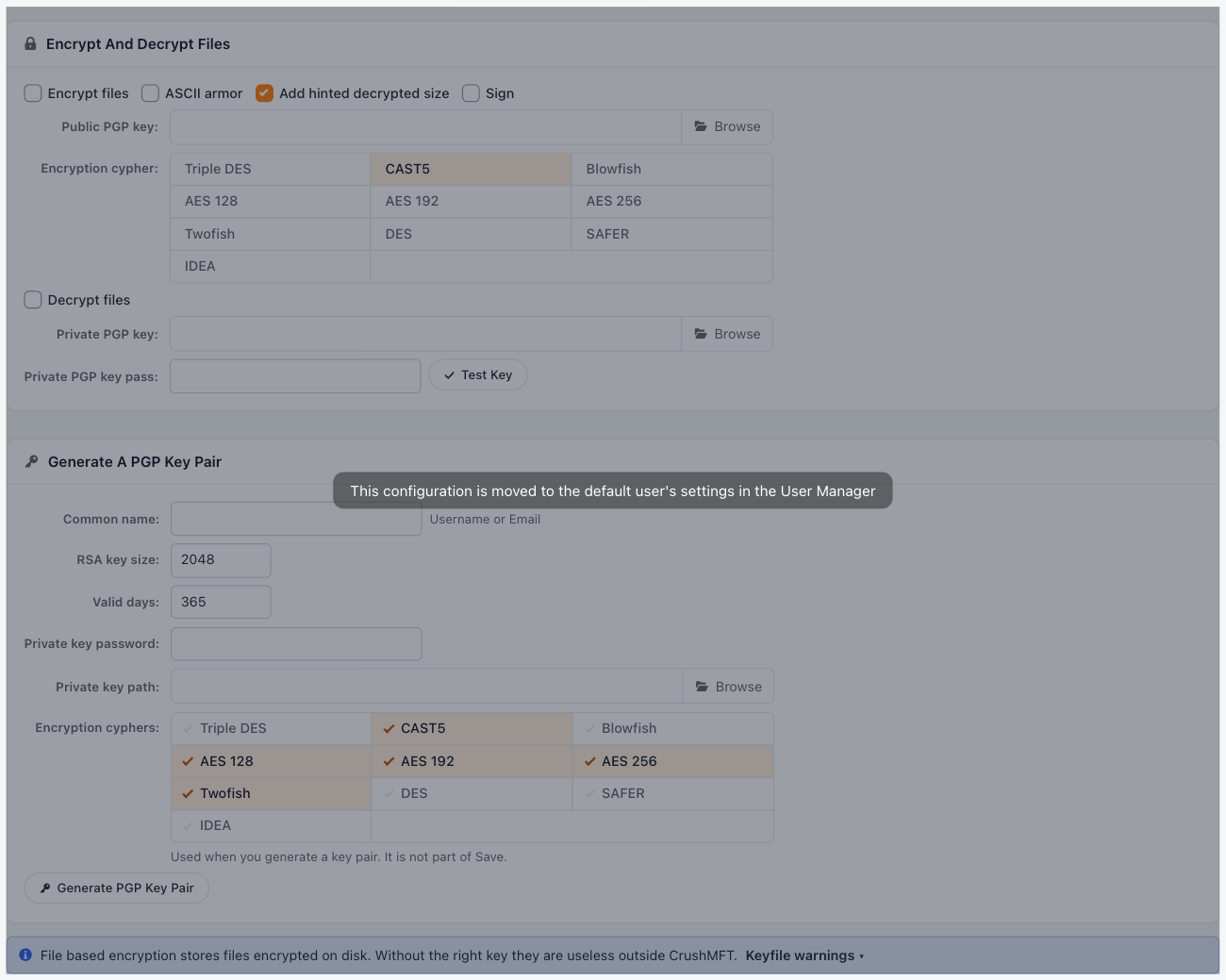
On a new server#
The tab is covered by the message "This configuration is moved to the default user's settings in the User Manager", and nothing on it can be changed. Set PGP encryption on the default user, or on single users and groups, in the User Manager under Restrictions.
On a server that brought the setting along#
A server that was upgraded with a server-wide PGP key in its settings shows the tab as before, so that the files it has encrypted stay readable and the setting can be changed or moved.
Encrypt And Decrypt Files#
| Setting | What it does | Default |
|---|---|---|
| Encrypt files | every uploaded file is encrypted with the public key as it is written | off |
| ASCII armor | encrypted files are written as text, not as binary data. Larger, but they survive being passed through systems that only take text. | off |
| Add hinted decrypted size | the size of the file before encryption is noted with it, so that listings and downloads can show the real size | on |
| Sign | encrypted files are also signed | off |
| Key location (legacy), Remove | shown only when the server still has a key in the form of very old versions. Remove takes it out of the settings. | |
| Public PGP key | the public key file to encrypt with, on the server machine. Browse picks it. | empty |
| Encryption cypher | the cipher: Triple DES, CAST5, Blowfish, AES 128, AES 192, AES 256, Twofish, DES, SAFER or IDEA | CAST5 |
| Decrypt files | every downloaded file is decrypted with the private key as it is read | off |
| Private PGP key | the private key file to decrypt with | empty |
| Private PGP key pass | the password of the private key. It is stored encrypted. | empty |
| Test Key | checks that the keys can be read with that password, and says so |
A key that a user has of their own, in the User Manager, is used before the server-wide one.
Generate A PGP Key Pair#
Makes a new pair of keys on the server machine. It acts at once and is not part of Save.
| Field | What it is | Default |
|---|---|---|
| Common name | whose key it is: a user name or an email address | |
| RSA key size | in bits | 2048 |
| Valid days | how long the key is valid | 365 |
| Private key password | the password that protects the private key | |
| Private key path | the folder on the server machine to write the two key files to | |
| Encryption cyphers | the ciphers the key says it accepts | CAST5, AES 128, AES 192, AES 256, Twofish |
| Generate PGP Key Pair | writes the private and the public key file and says where |
The warnings on the tab#
The tab ends with warnings, and they are meant:
- Encrypted files are useless without the key. Guard the key files, and keep a copy somewhere else.
- Changing the key after files have been encrypted makes those files unreadable. To change it safely: download the encrypted files through CrushMFT, so that they are decrypted; change the key; upload them again, so that they are encrypted with the new one.
- If any of this is unclear, do not turn it on. A mistake can leave files encrypted for good.
Where else PGP is#
| For | See |
|---|---|
| encrypting the files of one user or group | the User Manager, Restrictions |
| encrypting or decrypting single files in a job | the PGP task |
| making, importing and retiring PGP keys in the browser | the PGP app in the app bar |