OneDrive#
An item of a VFS of the type OneDrive points at the OneDrive of a Microsoft 365 user, at a personal OneDrive, or at a folder somebody shared. The server reaches it through Microsoft Graph, as an app that you register in Microsoft Entra ID.
At Microsoft: an app registration#
-
In the Microsoft Entra admin center, open App registrations and make a New registration.
-
Under Redirect URI, choose the platform Web and enter the address of your server's web interface followed by
register_microsoft_graph_api/:https://files.example.com/register_microsoft_graph_api/ -
Under Certificates & secrets, make a New client secret and copy its value at once: it is shown only then.
-
From Overview, note the Application (client) ID and the Directory (tenant) ID.
-
Under API permissions, add a permission of Microsoft Graph, as below, and grant admin consent.
Two ways to act#
| Way | Graph permission | The server acts as | Use it for |
|---|---|---|---|
| Delegated Permission | Files.ReadWrite.All, delegated |
the person who signs in once | one person's OneDrive; a personal OneDrive |
| Application Permission | Files.ReadWrite.All, application |
the app itself, with nobody signed in | the OneDrive of any user of the organization |
The application permission reaches the files of every user of the tenant. It needs an administrator's consent, and it should be given only to a server you trust that far.
Delegated#
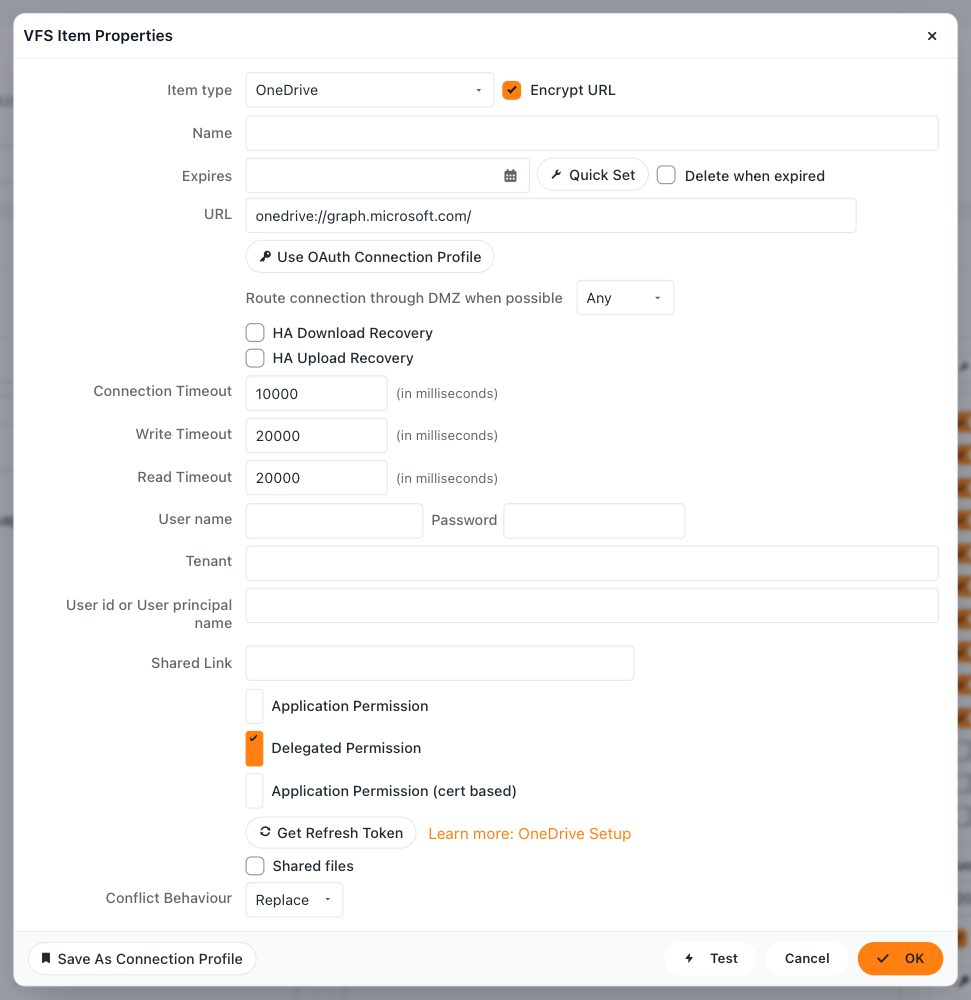
- In the item, choose Delegated Permission and press Get Refresh Token.
- Enter Client ID, Client Secret and Tenant.
commonas the tenant allows personal accounts and any organization. Behind a reverse proxy under a path, enter the Reverse Proxy Path. - A Microsoft window opens: sign in as the user whose OneDrive it is, and accept.
A personal OneDrive works only this way.
Application#
- Choose Application Permission. A window asks for Client ID, Client Secret and Tenant.
- The item's User name becomes
app_permission~and the client ID, and the Password the secret. - Under User id or User principal name, name the user whose OneDrive it is, such as
alex@example.com.
Application Permission (cert based) is the same with a certificate instead of a secret: it asks for the Thumbprint of the certificate you uploaded to the app registration, and its Private Key. See SharePoint: an app with a certificate.
Which folder#
| Field | What it is |
|---|---|
| the folder in the URL | onedrive://graph.microsoft.com/Projects/ gives the user only that folder |
| Shared Link | the easy way: in OneDrive in the browser, right-click the folder, Copy link, and paste it here. The server looks up where it leads. |
| Shared files | the item shows what others have shared with the user, instead of the user's own files |
Options#
| Option | What it does | New item |
|---|---|---|
| Conflict Behaviour | what happens when an upload meets a file of the same name: Replace it, Rename the new one, or Fail | Replace |
| Use OAuth Connection Profile | uses a sign-in kept in a connection profile: see Special types |
The connection is routed through a DMZ server when one is there: Route connection through DMZ is set to Any for this type. See Advanced options of a VFS item.
A server behind a proxy or a strict firewall must be let out to login.microsoftonline.com and graph.microsoft.com.
When it does not work#
| What you see | Usually |
|---|---|
| "AADSTS50011: the redirect URI … does not match" | the redirect URI of the registration is not exactly your browser's address plus register_microsoft_graph_api/ |
| "AADSTS7000215: invalid client secret" | the secret's value is needed, not its ID; or it has expired |
| "access denied" with the application way | admin consent was not granted; or the permission was added as delegated |
| the wrong person's files | User id or User principal name |
| it stopped after some months | the client secret ran out: make a new one and enter it again |
Client secrets expire, by default after six months to two years. Note the date.