CrushDuo#
CrushDuo adds Duo Security as a second step to logins. The user gives their name and password as always; then Duo asks them to approve the login on their phone, or to type a code.
It needs an Enterprise licence: "Enterprise only feature". On another licence the plugin skips itself: "CrushDuo plugin is an enterprise license feature. Skipping plugin configuration."
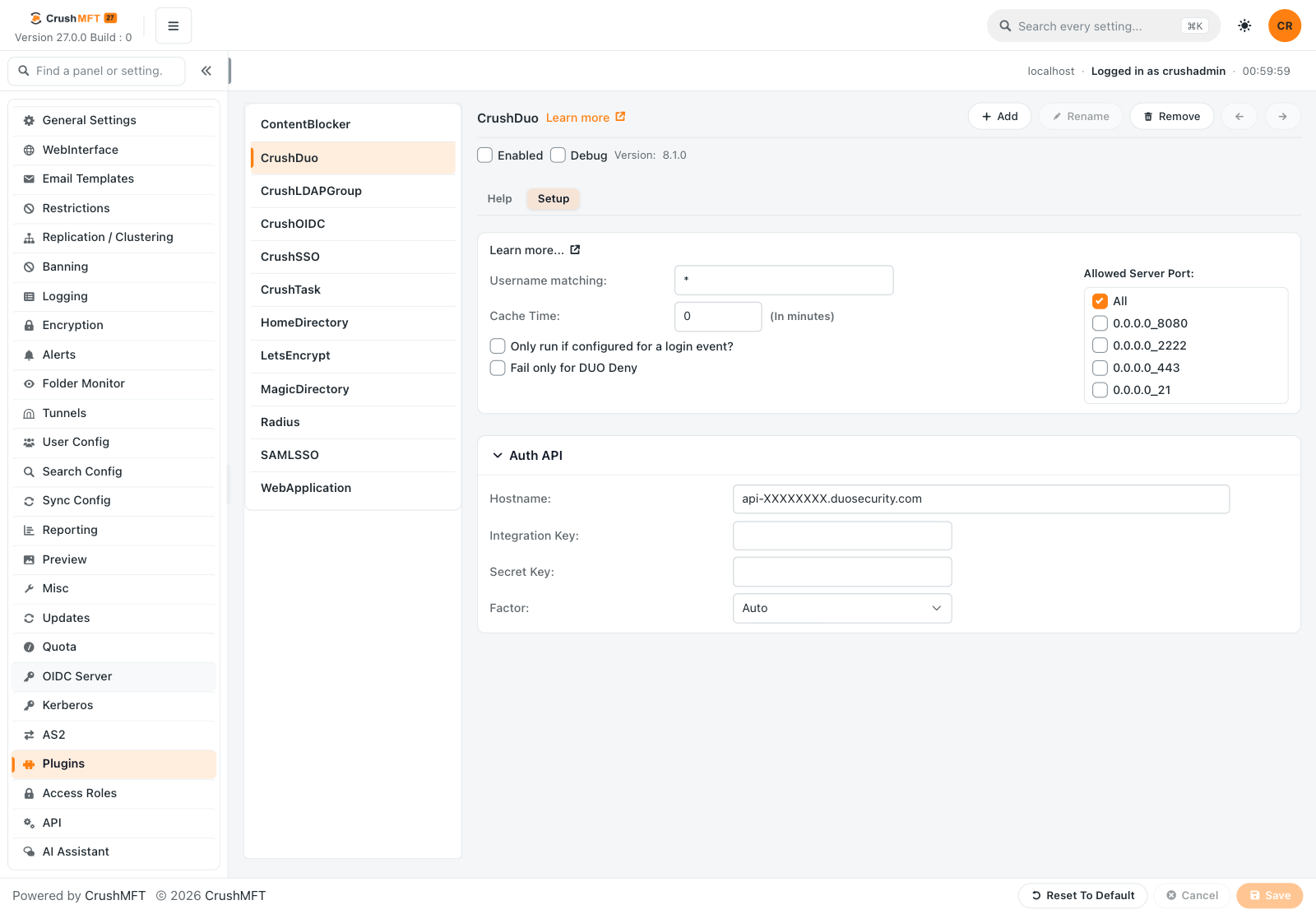
The plugin is set up in Preferences › Plugins › CrushDuo. It comes with the server.
The server has a second factor of its own that needs no outside service: Two-factor sign-in. CrushDuo is for organisations that already use Duo for everything else.
At Duo#
In Duo's admin panel, protect an application of the kind Auth API. Duo shows three values for it: the API hostname, the integration key and the secret key. They go into the plugin.
Settings#
| Setting | Is | On a new server |
|---|---|---|
| Enabled, Debug | as for every plugin | off |
| Allowed Server Port | the listeners it works for: see what login plugins share | All |
| Username matching | the users it asks. * is everybody. |
* |
| Cache Time (in minutes) | for this long after an approved login, the same user is not asked again. 0: asked every time. | 0 |
| Only run if configured for a login event? | the plugin does nothing by itself; it asks only users who have a login event that runs it. This is how Duo is given to one group and not to another. | off |
| Fail only for DUO Deny | the login fails only when Duo says no. When Duo cannot be reached, or does not know the user, the login goes through. Off: anything but a yes fails the login. | off |
| Hostname | the API hostname from Duo | api-XXXXXXXX.duosecurity.com |
| Integration Key, Secret Key | from Duo | empty |
| Factor | how Duo asks: Auto (what Duo thinks best for the user's device), Push, Passcode, SMS, Phone | Auto |
What a user sees#
| Factor | The user |
|---|---|
| Push | types name and password. The login waits. The Duo app on the phone asks; a tap on Approve lets the login go on. With Duo's verified push, the app shows a code to type on the phone. |
| Phone | is called, and presses a key |
| Passcode, SMS | is asked for a code after the password: "Enter DUO verification code:". In the browser that is a second field. |
The user name is what Duo is asked about: the names on the server and at Duo must be the same.
Programs that cannot ask a second question#
FTP and many SFTP programs send a name and a password and nothing more.
- With Push or Phone they need nothing more: the login simply waits until the phone has answered. Give the program a long enough timeout.
- A code can be sent with the password, in the form the server uses for every second factor: see Two-factor sign-in: on other protocols.
- Scripts and machines that sign in by themselves cannot use a phone. Leave them out with Username matching, or give them a listener of their own and name the others under Allowed Server Port.
Things to know#
- Duo is asked after the password was right. A wrong password never causes a push.
- If Duo cannot be reached, nobody gets in, unless Fail only for DUO Deny is on. Decide which you want before the day it happens.
- The server must reach Duo over HTTPS, port 443, at the API hostname. Behind a proxy, set the server's proxy.
- Users must exist at Duo with a phone. Somebody Duo does not allow is refused: "The DUO user … is not permitted to authenticate!"
- Cache Time trades safety for comfort. While it runs, the password alone is enough for that user.
Not tried for this page#
Nothing was run against Duo: no Duo account was used. The page is written from the plugin's screen and from what the plugin's file says it does. Check the first setup with one test user and Debug on.