AI Assistant#
The AI Assistant section of Preferences is a chat with an AI model about your own server: why a user cannot log in, what a job does, what the log says, what a thread dump means. The server does not come with a model. It sends the question to an AI service that you choose and have a key for, and it cleans what it sends first.
Three things hold for everything the assistant does:
- It works with the rights of the administrator who asks. It reads the server through the server's own API with that administrator's login, and never sees or does more than that person could.
- It changes nothing on its own. At most it suggests a change, which waits until an administrator approves it.
- Secrets never leave the server. Passwords, keys and tokens are removed from everything that is sent, and names can be replaced with placeholders.
It is off on a new server, and nothing is sent anywhere while it is off.
| Tab | Holds |
|---|---|
| Ask | the chat, earlier conversations, and the changes that wait for you |
| Service | the two switches, the AI service, its key and the model |
| Rules | what the assistant may do and read, and the limits |
| Cleaning | what is replaced before anything is sent |
The three settings tabs are part of Save at the bottom (saving).
Turning it on#
- On the Service tab, turn on The server's API is on and Turn the AI assistant on.
- Choose the AI service and the Model.
- Paste your key into API key and press Save key.
- Press Test.
- Press Save.
Without a key the Ask tab says "No API key is saved. Add one in the Service tab.", and Test and List models answer "Type the key, or save one first."
Service#
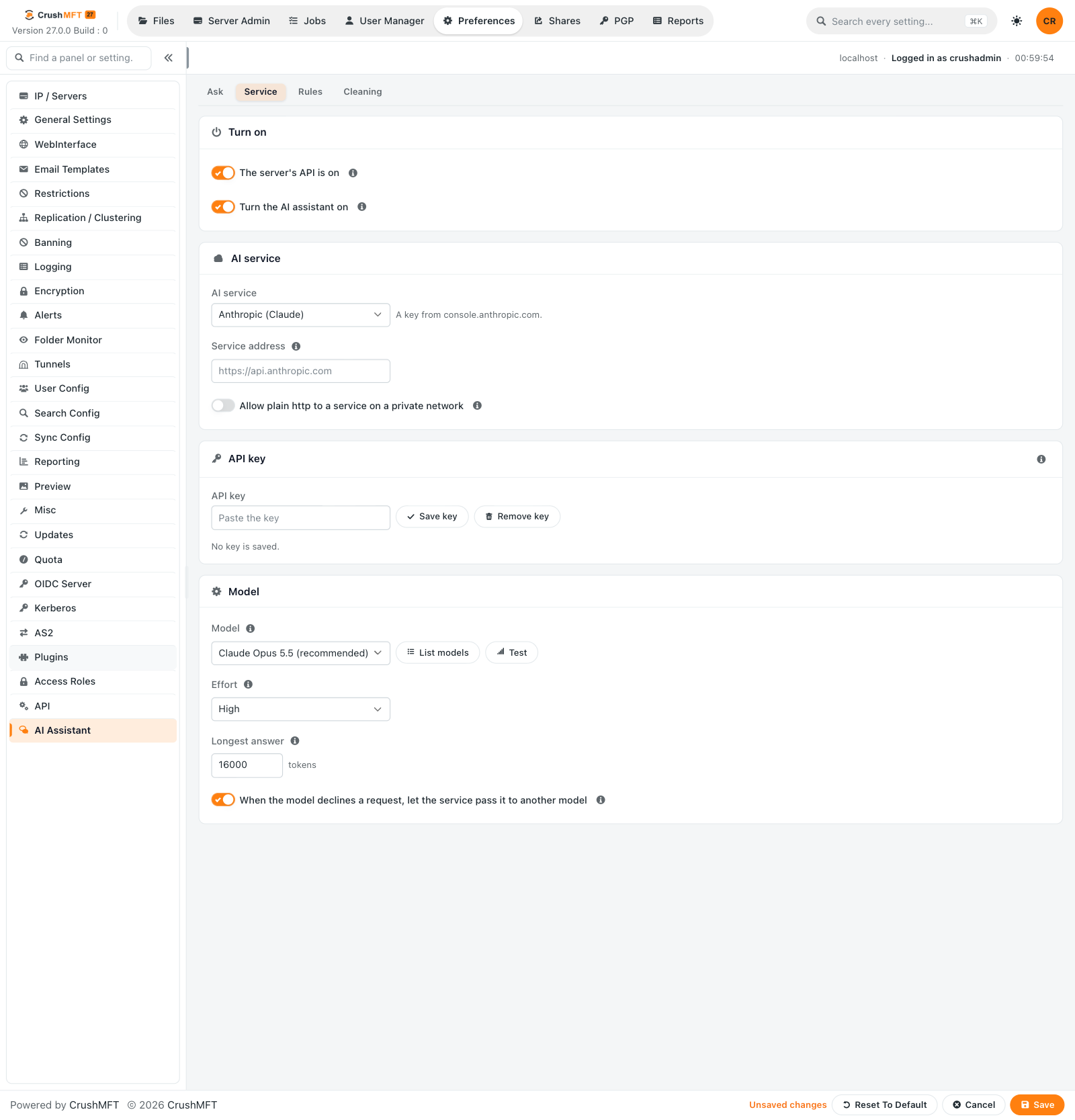
Turn on#
| Setting | Key | What it does | Default |
|---|---|---|---|
| The server's API is on | api_enabled |
the same switch as on the API settings page. The assistant reads the server through the API, so it works only while the API is on. Remember that the API then also answers scripts and tools that log in; Addresses that may call it there limits from where. | off |
| Turn the AI assistant on | ai_enabled |
Off: nothing is sent anywhere, and the Ask tab only says so. The key and the rules stay as they are. | off |
AI service#
| Setting | Key | What it is | Default |
|---|---|---|---|
| AI service | ai_provider |
Anthropic (Claude), OpenAI (ChatGPT), Google Gemini, Azure OpenAI, Mistral, or Other service with an OpenAI-compatible API, which is also the choice for a model you run yourself | Anthropic (Claude) |
| Service address | ai_base_url |
empty: the service's own address, shown greyed. Fill it in for Azure, for a service of your own, or for a proxy. It must be https, unless the service runs on the server machine itself or the next setting allows it. |
empty |
| Allow plain http to a service on a private network | ai_allow_http_private |
for a model you run on another machine of your own network without https (Ollama, LM Studio, vLLM). The address must lie in 10.0.0.0/8, 172.16.0.0/12, 192.168.0.0/16 or fc00::/7. | off |
API key#
Paste the key and press Save key. It is stored sealed like the server's other secrets, is never shown again, and is sent only to the service's address. Remove key deletes it.
A key is bound to the address it was saved for. After you change Service address, save the key again.
Model#
| Setting | Key | What it is | Default |
|---|---|---|---|
| Model | ai_model |
one of the common models of the service, or Other: type the name for one that is newer than the list. List models asks the service for every model your key may use. | Claude Opus 5.5 |
| Test | checks the key, the address and the model. With Claude it spends no tokens; with the other services it sends one short request. | ||
| Effort | ai_effort |
how hard the model thinks before it answers: the model's own default, Low, Medium, High, Extra high or Max. Higher costs more tokens and time. Other services than Claude get Extra high and Max as High, and a model that takes no such setting is sent none. | High |
| Longest answer | ai_max_output |
tokens per reply of the model, its thinking included | 16000 |
| When the model declines a request, let the service pass it to another model | ai_fallbacks |
Claude's own fallback for refusals | on |
Rules#
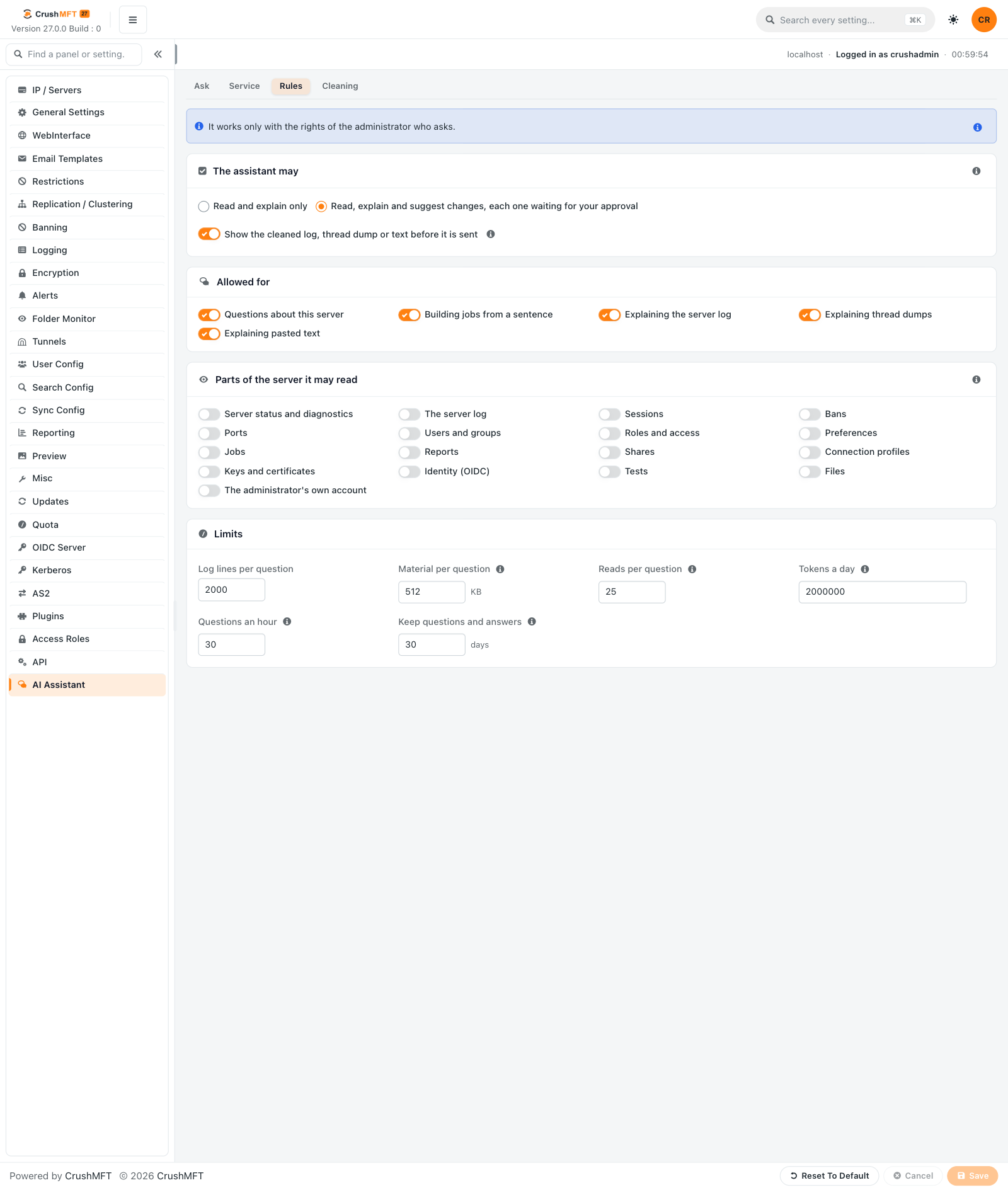
Who may ask: the full administrators, and accounts whose roles hold the permission server.ai.use.
| Setting | Key | What it does | Default |
|---|---|---|---|
| The assistant may | ai_writes |
Read and explain only, or Read, explain and suggest changes, each one waiting for your approval. There is no setting that lets it change anything on its own. | suggest changes |
| Show the cleaned log, thread dump or text before it is sent | ai_preview_required |
the administrator sees exactly what leaves the server and sends it with a second click | on |
| Allowed for | ai_scenarios |
which kinds of question are offered: questions about this server, building jobs from a sentence, explaining the server log, explaining thread dumps, explaining pasted text | all five |
| Parts of the server it may read | ai_areas |
tick parts to keep the assistant to them: server status and diagnostics, the server log, sessions, bans, ports, users and groups, roles and access, preferences, jobs, reports, shares, connection profiles, keys and certificates, identity (OIDC), tests, files, the administrator's own account. None ticked: every part the administrator who asks may read. | none ticked |
Keys and certificates hold no secrets in what the assistant reads, but you may still keep them out.
Limits#
| Setting | Key | What it limits | Default |
|---|---|---|---|
| Log lines per question | ai_max_log_lines |
how many of the newest log lines a question may take along | 2000 |
| Material per question | ai_max_send_kb |
KB of log, dump or text per question, after cleaning. Roughly four characters make a token. | 512 |
| Reads per question | ai_max_tool_calls |
how many times the assistant may look something up on the server before it has to answer | 25 |
| Tokens a day | ai_daily_budget |
for the whole server, input and output together. 0: no limit. | 2,000,000 |
| Questions an hour | ai_questions_per_hour |
per administrator. 0: no limit. | 30 |
| Keep questions and answers | ai_history_days |
days the conversations are kept, encrypted, in the file ai_history.XML. 0: keep nothing. |
30 |
The Ask tab shows how much of the day's tokens is used.
Cleaning#
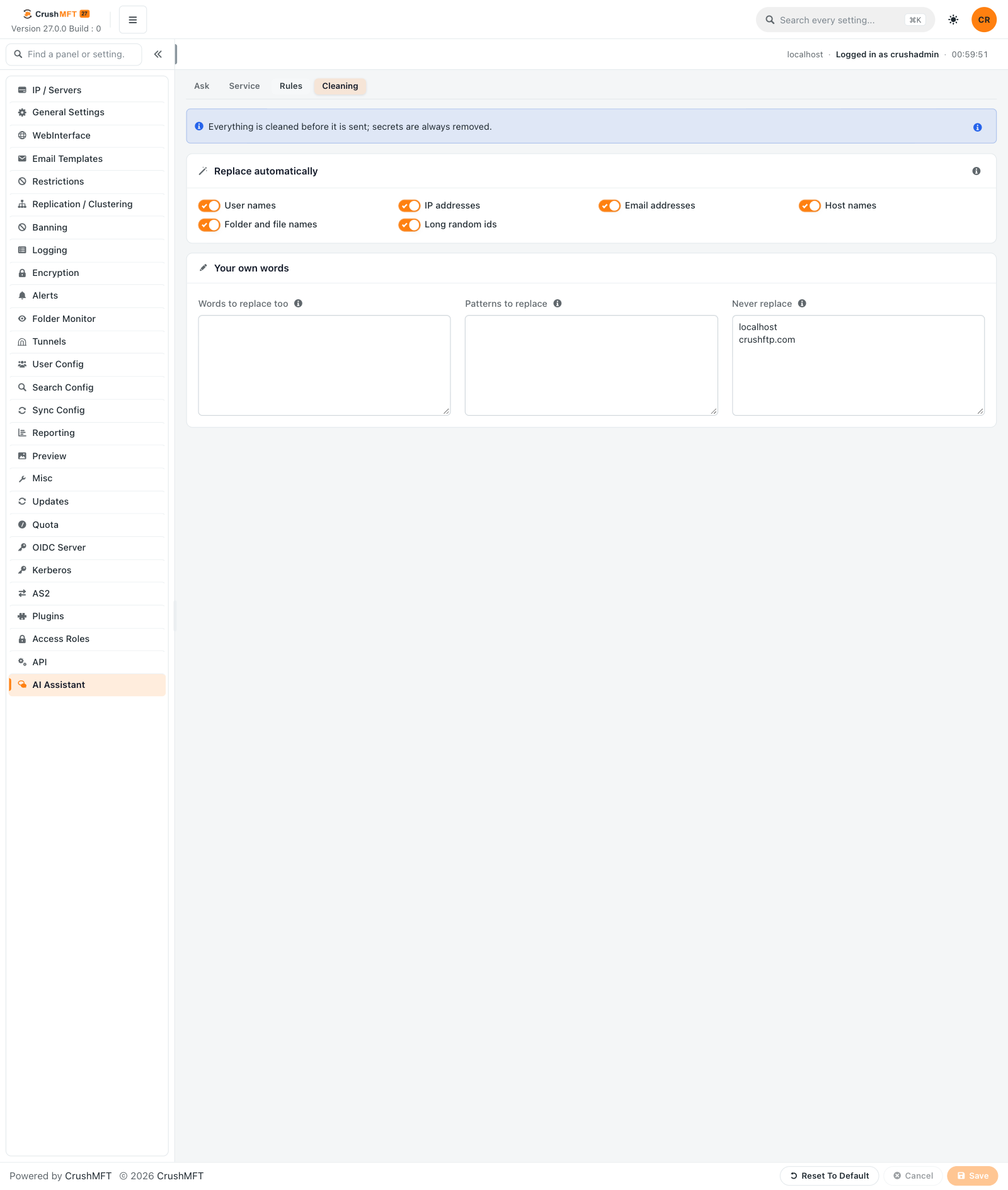
Everything the assistant sends passes through the cleaning first: the question, the log, the thread dump, and every answer of the server that it reads.
- Always removed: passwords, keys, tokens, cookies, Authorization headers, private keys, and the passwords in URLs. No setting turns this off.
- Replaced with placeholders: the names below become placeholders such as
[user_1]and[ip_2]. The server keeps the real values to itself and puts them back into the answer, so you read real names and the service never saw them.
| Setting | Key | Replaces | Default |
|---|---|---|---|
| User names | ai_clean_users |
user names, where the server can tell that a word is one: in its own log prefix and after user=, username=, owner= and USER |
on |
| IP addresses | ai_clean_ips |
addresses | on |
| Email addresses | ai_clean_emails |
email addresses | on |
| Host names | ai_clean_hosts |
host names | on |
| Folder and file names | ai_clean_paths |
paths | on |
| Long random ids | ai_clean_random |
long random strings, such as session ids | on |
| Words to replace too | ai_clean_words |
words of your own, one per line, in any case: customer and company names, project code names | empty |
| Patterns to replace | ai_clean_patterns |
one Java regular expression per line, such as INV-\d{6} for invoice numbers. A pattern that takes longer than two seconds is stopped. |
empty |
| Never replace | ai_keep_words |
one per line: names that help the AI and say nothing about anyone, such as a vendor's domain or a service account. A domain keeps its subdomains. | localhost |
A user name inside free text, which the server cannot recognise as one, is not replaced by itself: put such words into Words to replace too.
Ask#
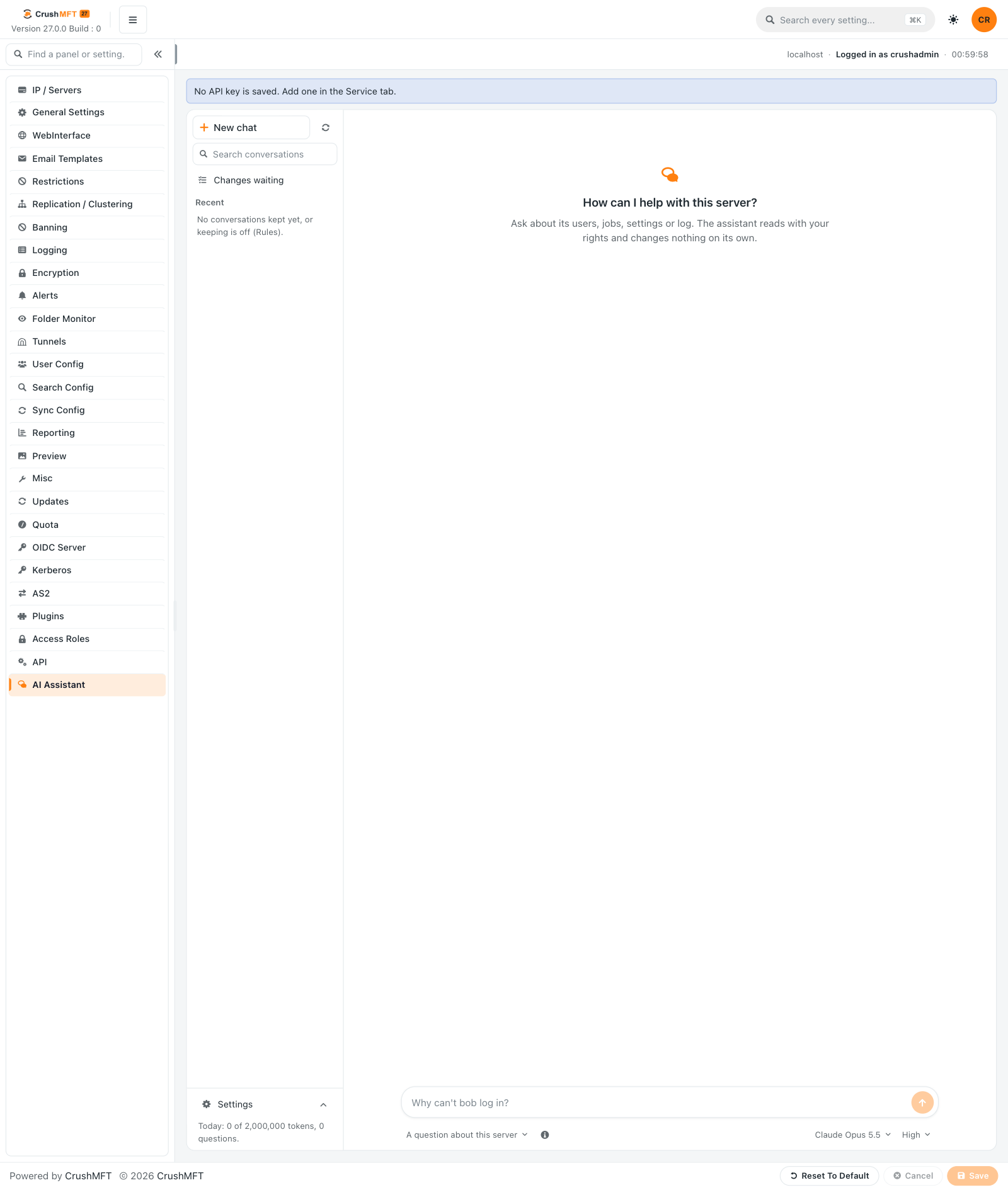
The left side has New chat, a search through earlier conversations, Changes waiting, the recent conversations, and Settings, which leads to the three other tabs.
Under the question field you choose:
| Choice | Options |
|---|---|
| What for | A question about this server, Build a job from a sentence, Explain the server log, Explain a thread dump, Explain text I paste |
| Model and Effort | for this question; they start with the values of the Service tab |
Enter sends, Shift+Enter starts a new line.
- For the log, the newest lines and the server's live values go along, up to the limit of the Rules tab.
- For a thread dump, the server takes one of itself now, or you paste one that was taken earlier or on another server.
- For pasted text, you paste what you want explained.
With Show the cleaned ... before it is sent on, Prepare and preview shows what will be sent, with the placeholders in it, and only a second click sends it.
Under an answer, Details shows what the assistant did: what it looked up on the server to answer.
A conversation stays open for two hours after its last question. After that a new question starts a new conversation.
Changes waiting#
When the assistant may suggest changes, a change it suggests waits under Changes waiting until you approve or reject it. Approving runs it with your rights as they are at that moment. A suggestion that nobody answers expires after 7 days.