The data: what is recorded and for how long#
Every report reads from one record of what happened on the server. This page says what is in it, how long it is kept, and what the Data section of the Reports app shows about it.
What is recorded#
| Kind | Holds | From |
|---|---|---|
| auth | every login and logout, failed logins, password changes: who, from where, with which protocol, program, encryption and sign-in method; for a logout, how long the session was and what it moved | the first start |
| file | every upload, download, delete, rename, move and new folder, failed ones too: who, which file, where, how large, how fast. Also what jobs did to files. | |
| form | forms that users filled in at an upload, a share or the welcome page | |
| job, jobstep | each job run with what started it and how it ended; each task with its duration, its items and the remote host it reached | |
| share | shares made, opened, changed, expired and deleted, with their recipients | |
| admin | what administrators did, with the value before and after. Secrets are masked. | |
| security | bans, kicked sessions, actions refused by the access rules | |
| server | starts, stops, version changes, listeners going up and down | |
| sample | one line a minute: sessions, transfers, speed, memory, threads, processor, free disk | |
| as2, sla | AS2 messages and receipts; the daily marks of expected files | |
| the snapshots | once a week: every account with its state, who can reach which folder, the sizes of the folders you named, the open shares |
Two things are recorded on purpose in a certain way:
- A failed login for a name that is no account is kept apart from the logins of real accounts. Most such names are attackers' guesses, and some are passwords typed into the wrong box. Whether those names are kept at all is a switch, Names typed at failed logins.
- Addresses of files are kept without the passwords that may be in them.
What is recorded can be narrowed in Preferences, Reporting: failed logins, the typed names, job activity, admin changes with before and after, and the health samples each have a switch. Record activity switches the whole record off; reports then show what is already there.
How long it is kept#
| Kept for, unless you change it | |
|---|---|
| every single event | 1,095 days: three years |
| the hourly and daily totals | 3,650 days: ten years |
After three years a report still has its numbers, counts and sums per hour and day, without the single lines. Each kind of data can have its own number of days: logins for one year and admin changes for seven, for example. See Preferences, Reporting.
The Data section#
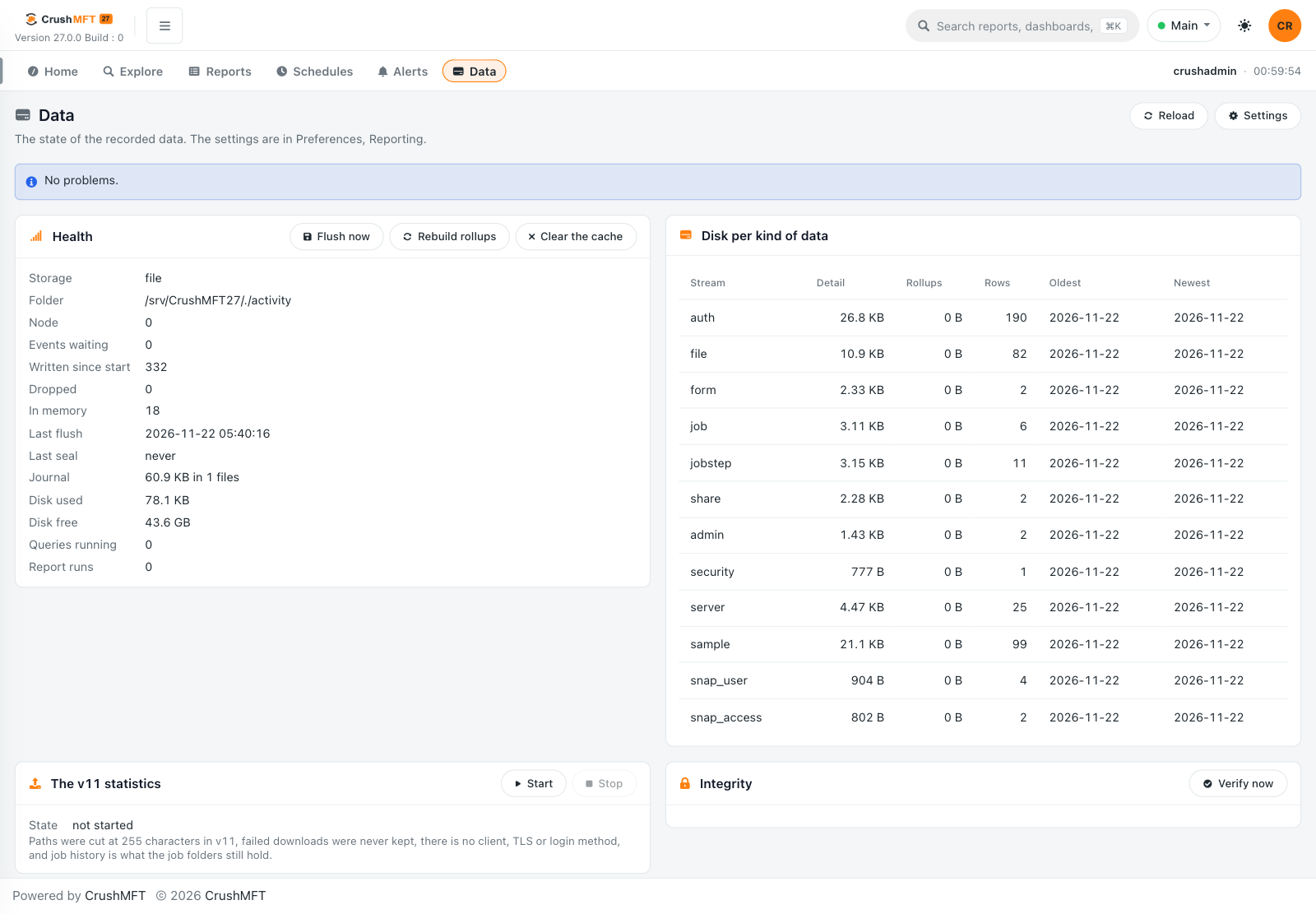
"The state of the recorded data. The settings are in Preferences, Reporting." Settings leads there.
The line at the top says "No problems.", or what is wrong: recording is off, the store is not running, the last error.
Health#
| Line | Is |
|---|---|
| Storage | file, or the database |
| Folder | where the record is kept |
| Node | this server's number in a cluster |
| Events waiting | events not written yet. It should be near 0. |
| Written since start | |
| Dropped | events that were thrown away because too many were waiting. It must be 0; anything else means the disk could not keep up, and the record has a hole. |
| In memory, Last flush | the newest events, not yet in their files, and when the last ones went there |
| Last seal | when a finished day was last closed and added to the integrity chain |
| Journal | the safety copy of the events not yet in their files |
| Disk used, Disk free | |
| Queries running, Report runs | work in progress |
| Button | What it does |
|---|---|
| Flush now | writes what is waiting, at once |
| Rebuild rollups | works out the hourly and daily totals again from the single events. For after a fault, or after bringing in old data. |
| Clear the cache | forgets kept answers |
| Reload | reads the page again |
Disk per kind of data#
One line per kind: the room its events take (Detail), the room of its totals (Rollups), the number of rows, and the oldest and newest day. On the test server, after a day: 331 logins in 95.6 KB, 26 file events in 12.2 KB, 560 health samples in 110 KB.
This table is where to look before changing the retention: it shows what three years of each kind will cost on your server.
Nodes#
In a cluster, one line per server with its newest event. A server whose newest event is old is not recording.
Integrity#
Each kind of data keeps a chain: every day that is closed is fingerprinted, and each fingerprint includes the one before. Changing or removing anything in an old day would break every link after it.
- Verify now checks every stored day against the chain: "Verified 412 days in 3,871 files, 14 s: no problems."
- The card lists "The last link of each day chain. Kept elsewhere, it proves later that nothing was changed." Copy those lines into your own records, or let the server do it: the last link is also written to the log once a day, and from there to a SIEM.
Erase a person#
For a request to be forgotten:
Replaces this name with an "erased-" mark wherever the recorded data holds it as a person: the user, a name typed at a failed login, who started a job, who shared or received a share. Every stored day, the database and saved runs are rewritten. Counts, sizes, addresses and file names stay.
User name, then Erase: "Erase "…" from the recorded data? This cannot be undone: no report will show who it was again."
Afterwards the card says what the name was replaced with and how much was rewritten. The numbers of the reports do not change; they just no longer say who. The erasure itself is recorded as an admin change, without the name.
Erasing rewrites old days, so their fingerprints change: the chain shows that the day was written again, and when.
The v11 statistics#
Brings the history of a CrushFTP 11 server into the record: see Bringing the history of CrushFTP 11.
Who may do what here#
Looking at the Data section needs the right to see dashboards. Verify, Erase, Rebuild rollups, the import and the retention need a full administrator.
Things to know#
- The record is not the log. The log files say what the server did, line by line, for finding faults; the record says what happened, in a form that can be counted. They are kept, and thrown away, separately: see Logging.
- The record watches itself. When events are dropped, the disk fails, or a database it writes to falls more than 15 minutes behind, the server writes a line
ACTIVITY: …to its log, at most every 15 minutes. An alert of the type Report Store Problem in Preferences, Alerts tells someone; the line at the top of this section, Dropped, and the metrics show it too. - Transfer limits use the record's counters, and keep working when recording is switched off.
- How it is stored: The store on disk, or in your database.