User Manager#
The User Manager is the app where accounts are made and looked after: who may log in, with what password or key, which folders they see and what they may do there, and every limit and option that can be set per person.
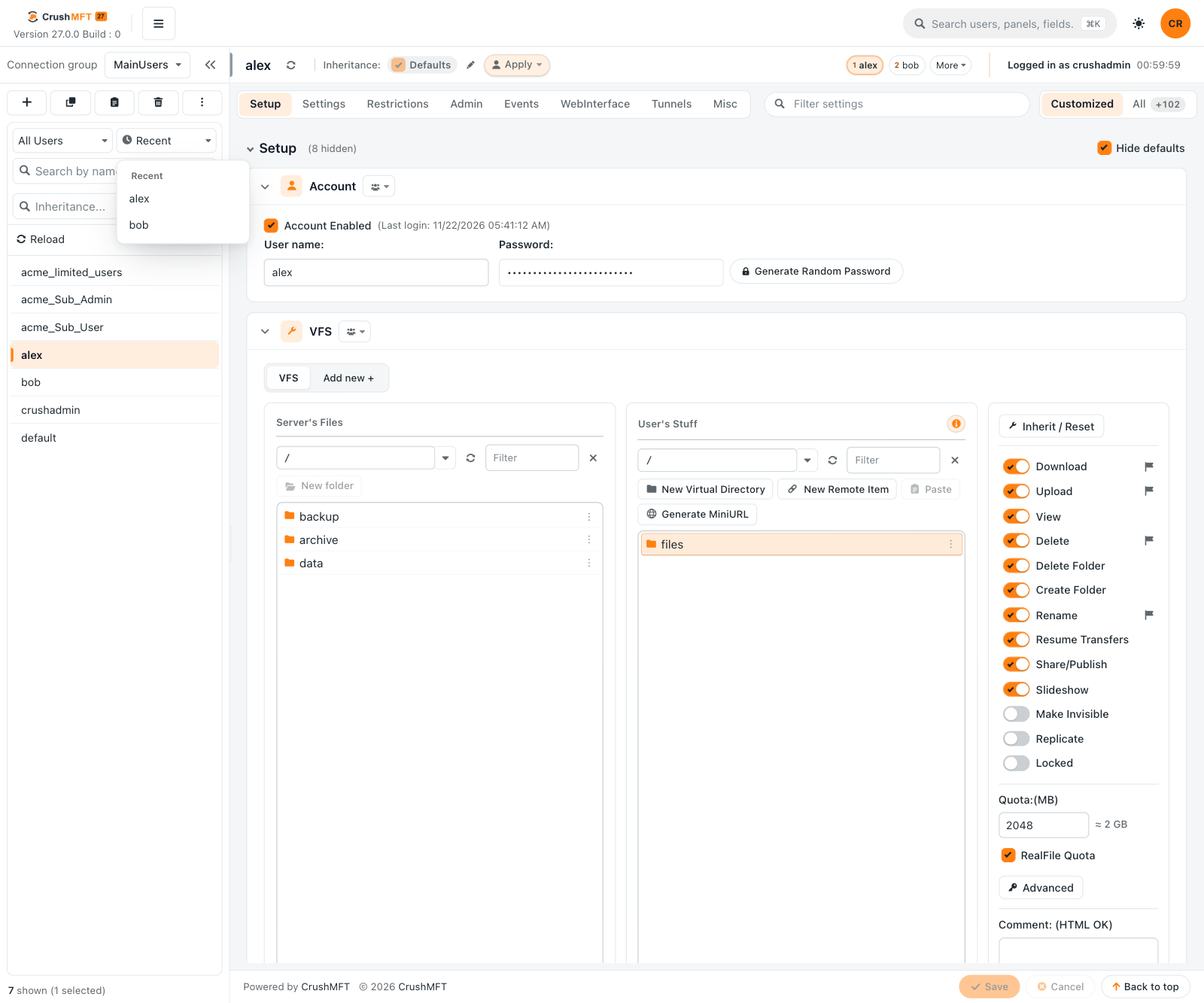
The window#
| Part | What it is |
|---|---|
| Connection group, top left | the set of users you are looking at. A server has one, MainUsers, unless listeners were given groups of their own in IP / Servers. |
| the list of users, on the left | every user of the group. Click one to open it. See The user list and its menu. |
| the line above the settings | the user's name, a button to read the user again from the server, the users this one inherits from with a pencil to change them (Inheritance), and Apply |
| the tabs | Setup, Settings, Restrictions, Admin, Events, WebInterface, Tunnels and Misc. They are one long page: a tab jumps to its part. |
| Filter panels and settings | narrows the page to the settings whose name has what you type |
| Hide defaults | on: only what is set for this user is shown. Off: every setting, also those that come from the default user. |
| Save, Cancel, at the bottom | nothing is stored until Save. Cancel puts the page back as it was loaded. |
Hide defaults#
A new user has almost nothing of their own: nearly every setting comes from the user named default. With Hide defaults on, the page shows only what is different for this user, and says how much it hides: "Total 103 sections are not being shown." That is the view to see at a glance what is special about somebody.
Untick it to see and change everything. Each tab has a Hide defaults of its own as well.
A setting that is inherited#
Every group of settings is a card. A card that comes from another user says Inherited from default and its fields are locked.
| Button on the card | What it does |
|---|---|
| Override | gives this user a value of their own for this card, starting from the inherited one. The card then says Overridden for this user. |
| Revert | takes the user's own value away again, so that the card follows the inheritance |
| Make sticky | keeps the card in view while Hide defaults is on |
This is the heart of the User Manager: set a thing once on default, or on a user that others inherit from, and override it only where one person must differ. See Inheritance.
Saving for several users#
Apply, beside the inheritance, decides who a save is for:
| Choice | Saves the changes you made |
|---|---|
| This User | to the user that is open |
| All Selected users in the List | to every user that is selected on the left |
| All Users in the List | to every user the list shows at that moment, which is all of them, or the ones a filter or a group leaves |
Only what you changed is written to the others, not the whole user.
Where the users are kept#
In files in the server's users folder, or in a database: see User Config. A user's file holds only what is the user's own, so it is short. Each save also keeps the version before it, which is what Rollback goes back to.