Dropbox#
An item of a VFS of the type Dropbox points at a Dropbox account, or at a folder of it. The server signs in once, with OAuth, through an app you make at Dropbox.
At Dropbox: an app#
-
Open the Dropbox App Console and press Create app.
-
Choose the access: App folder gives the server one folder of its own in the Dropbox; Full Dropbox gives it everything. Choose the app folder unless users must reach existing files.
-
Name the app and create it.
-
On the app's Settings tab, under Redirect URIs, add the address of your server's web interface followed by
?command=register_dropbox_api:https://files.example.com/?command=register_dropbox_api -
On the Permissions tab, tick what the server needs: reading and writing of files and folders, at least
files.metadata.read,files.content.readandfiles.content.write. Press Submit. -
Copy the App key and the App secret from the Settings tab.
Set the permissions before you sign in from the item. A token keeps the permissions it was made with.
In the item#
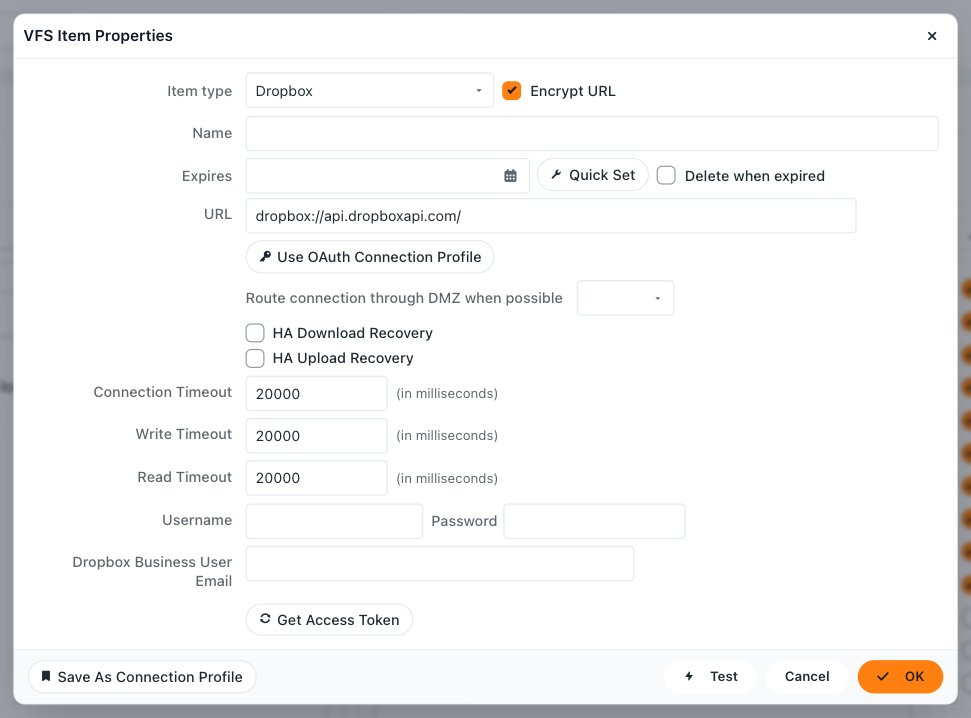
- Choose the item type Dropbox. The address is
dropbox://api.dropboxapi.com/; add a folder to give the user only that. - Press Get Access Token and enter the App Key and the App Secret.
- A Dropbox window opens. Sign in with the account, and allow the access.
- The item is filled in: Username and Password hold the app and the token.
- Press Test.
Or use a sign-in kept in a connection profile, with Use OAuth Connection Profile: see Special types.
Dropbox Business#
For a team, the app can act as one member of the team and so reach the team's folders:
- A team admin gives the app the permissions for team data on the Permissions tab;
members.readis needed. - In the item, enter that member's mail address under Dropbox Business User Email.
What to expect#
- An upload that breaks off starts again from the beginning.
- Files get the date of the upload: a client cannot set the original's date.
- Dropbox does not tell upper and lower case apart in names:
Report.pdfandreport.pdfare the same file there.
A server that reaches the internet through a proxy or a strict firewall must be let out to api.dropboxapi.com and content.dropboxapi.com.
The options every type has are on Advanced options of a VFS item.
When it does not work#
| What you see | Usually |
|---|---|
| "invalid redirect_uri" in the Dropbox window | the redirect URI of the app is not exactly your browser's address plus ?command=register_dropbox_api |
| listing works, uploads are refused | the app lacks files.content.write: add it, then get a new token |
| the team folders are missing | Dropbox Business User Email, and the team permissions of the app |
| it stopped working | the access was removed in the Dropbox account, or the app was deleted |