Radius#
The Radius plugin checks logins against a RADIUS server. The server becomes one more "network access server" of your RADIUS installation, beside the VPN and the Wi-Fi: a user signs in to the server by SFTP or in the browser, and the RADIUS server says yes or no, and can ask for a one-time code.
It needs an Enterprise licence: "Enterprise only feature".
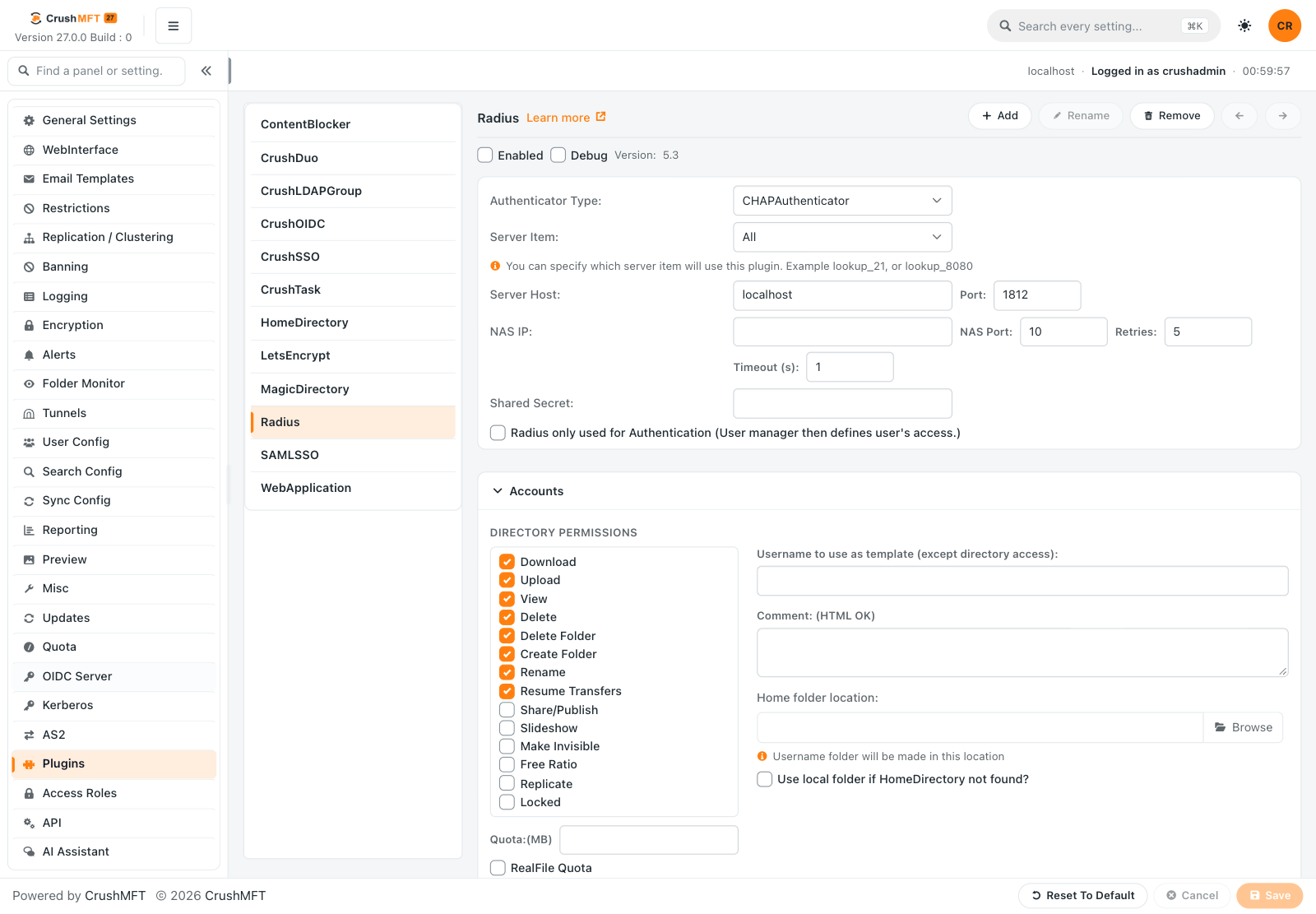
The plugin is set up in Preferences › Plugins › Radius. It comes with the server.
Note
RADIUS protects passwords with MD5. In FIPS mode the plugin is off, and its screen says so.
Connection#
| Setting | Is | On a new server |
|---|---|---|
| Enabled, Debug | as for every plugin. With Debug, the exchange with the RADIUS server is written to the log. | off |
| Authenticator Type | how the password is proven to the RADIUS server: PAPAuthenticator, CHAPAuthenticator, MSCHAPv1Authenticator, MSCHAPv2Authenticator, EAPMD5Authenticator, EAPMSCHAPv2Authenticator. It must be one the RADIUS server allows for this client. | CHAP |
| Server Item | the listeners it works for: "You can specify which server item will use this plugin. Example lookup_21, or lookup_8080". See what login plugins share. | All |
| Server Host, Port | the RADIUS server | localhost, 1812 |
| NAS IP | the address the server names itself by. Empty: its own address. | empty |
| NAS Port | the port number it names | 10 |
| Retries | how often a request is sent again when no answer comes | 5 |
| Timeout (s) | how long each try waits | 1 |
| Shared Secret | the secret this client and the RADIUS server share | empty |
The server names its kind of port as Ethernet; a policy on the RADIUS server that asks for another kind does not match.
What an accepted user gets#
RADIUS says who somebody is, not what their folders are. There are two ways to settle that.
The User Manager decides#
Radius only used for Authentication (User manager then defines user's access.)
Each RADIUS user also exists in the User Manager, under the same name, with folders and settings as for any user. Their password there does not matter: RADIUS checks it. Somebody RADIUS accepts who is not in the User Manager is refused.
The plugin makes a home folder#
With that box off, the plugin builds the user at each login:
| Setting | Is | On a new server |
|---|---|---|
| Username to use as template (except directory access) | a user of the User Manager whose settings every RADIUS user gets | empty |
| Home folder location | the folder in which home folders are. "Username folder will be made in this location". Without it: "No home folder specified. Stopping...set a Home folder location, or enable 'Radius only used for Authentication'." | empty |
| Directory Permissions | the rights in the home folder: see the permissions block | download, upload, view, delete, resume, rename, create and delete folders |
| Append username to path? | each user gets their own folder, named after them. Off: all share the one folder. | on |
| Create folder with username | the folder is made at the first login. Off: it must exist, or the login is refused. | on |
| Create additional subfolders in home directory | folders made inside each home, with rights of their own | none |
Roles from Filter-Id#
A RADIUS server can send an attribute Filter-Id with an accepted login, usually the name of a group. Radius "Filter-Id" role mapping turns that into settings:
| Button | Does |
|---|---|
| Add Role, Edit Selected, Remove Selected | an entry is the text of a Filter-Id, and a user of the User Manager to take settings from |
| Move Up, Move Down | the order. For a user with several matching roles, the last one in the list counts most. |
"Leave blank for all users."
Whose settings count, from weakest to strongest: the plugin's template user, then the user of a matching role, then, with Radius only used for Authentication, the user's own entry in the User Manager.
A role does not refuse anybody: a login with no matching role is still accepted. The exception is a role whose user is DISABLED: "User is being blocked due to a negative role that disabled their access."
One-time codes#
When the RADIUS server answers a correct password with a challenge, the server passes the question on: in the browser, the user gets a second field ("Provide OTP."). Programs that cannot ask a second question send the code with the password, in the form described in Two-factor sign-in: on other protocols.
Things to know#
- The RADIUS server must know this server as a client, by its address and the shared secret. Nothing works until it does.
- One second is short. With a RADIUS server that pushes to a phone and waits for the tap, raise Timeout (s) and lower Retries: each retry is a new request, and a new push.
- An empty secret, or one with a space at an end, is the usual mistake; the log names both.
- Only passwords. A login by SSH key or certificate is not a RADIUS login.
- Several RADIUS servers: a configuration each. They are asked in order.
Step by step with Microsoft's server: Radius with Microsoft NPS.
Not tried for this page#
Nothing was run against a RADIUS server. The page is written from the plugin's screen and from what the plugin's file says it does.