Port forwarding#
A listener of the protocol PortForward IP (PortForward://) accepts a connection and passes it on, byte for byte, to another machine and port. Nobody logs in to CrushMFT, and CrushMFT does not look at what is said.
PortForward IP SSL (PortForwardS://) does the same and adds TLS on the outside: clients speak TLS to the listener, and the listener speaks plain to the destination.
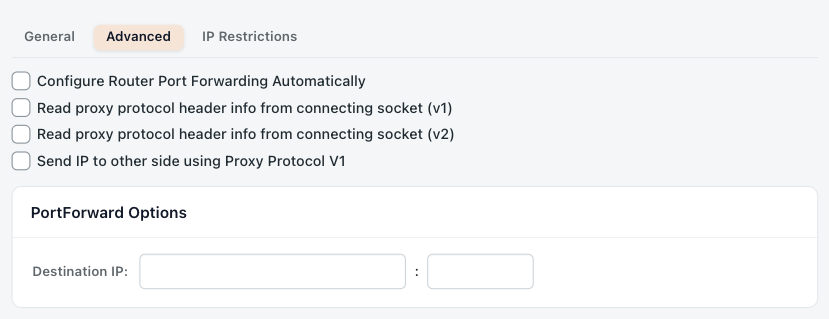
| Setting | What it is |
|---|---|
| Destination IP and port | where connections are passed on to |
| Send IP to other side using Proxy Protocol V1 | the listener first tells the destination the real address of the client, as a PROXY protocol header. The destination must expect it: see The PROXY protocol on a port. |
| SSL Options, PortForwardS only | the certificate clients are shown: see SSL on a port, SNI |
Both are made in IP / Servers.
What it is for#
| Use | How |
|---|---|
| a service behind the server that should be reachable on the server's address | a PortForward listener to that service |
| a plain web application that needs HTTPS | a PortForwardS listener in front of it. The server holds the certificate and does the encryption. |
| a service in the internal network, reachable through a DMZ | a PortForward listener on the DMZ server, see below |
| one partner who must still reach an old server on the same port as everybody else | a hand-off by address, see below |
Through a DMZ#
On a DMZ server, a forwarded connection travels through the DMZ's link to the internal server and leaves from there. The destination is therefore given as the internal server sees it: 127.0.0.1 is the internal server itself, and an internal host name is one the internal server can resolve. Nothing has to be opened from the DMZ into the internal network for it.
Handing single clients off#
A connection to another listener can be handed to a port forward, by the client's address. Example: everybody uses CrushMFT for SFTP on port 22, and one partner must still reach an old SSH server.
- Make a PortForward listener whose destination is the old server, and give it a name, such as
RedirectOpenSSH. Its own port does not matter and need not be reachable. - On the SFTP listener, open IP Restrictions. Make sure there is a rule that allows everybody, from
0.0.0.0to255.255.255.255. - Add a rule of the kind Deny for the partner's address, as both the starting and the stopping IP, and write into its Notes:
FORWARD:RedirectOpenSSH, the wordFORWARD:and the name of the port forward. See IP restrictions of a port.
A connection from that address is then not refused: the server looks for the listener of that name and hands the connection to it. Everybody else gets CrushMFT.
Things to know#
- A forwarded connection is a pipe. No user, no rights, no file log: the server's log shows that a connection was passed on, from where, and for how long.
- The destination sees every connection as coming from the server, unless the PROXY protocol header is sent and understood.
- Restrict a forwarding listener by address wherever you can. It opens whatever is behind it to whoever may connect.
- For web requests that should go to another web server by host name or path, the reverse proxy is the better tool: it understands HTTP.