Running, watching and stopping#
This page is about runs: starting a job, watching it work, reading its log, and pausing, stopping or repeating it.
Starting a run#
| Where | How |
|---|---|
| the job list | Run Job, or Run & Monitor Job to watch it at once |
| the designer | Test & Run Job |
| by itself | a schedule, an event, a watched folder: see What starts a job |
A run does not wait for you: closing the page does not stop it.
Active Jobs#
Active Jobs, on the left, lists runs: the ones under way and the ones that ended.
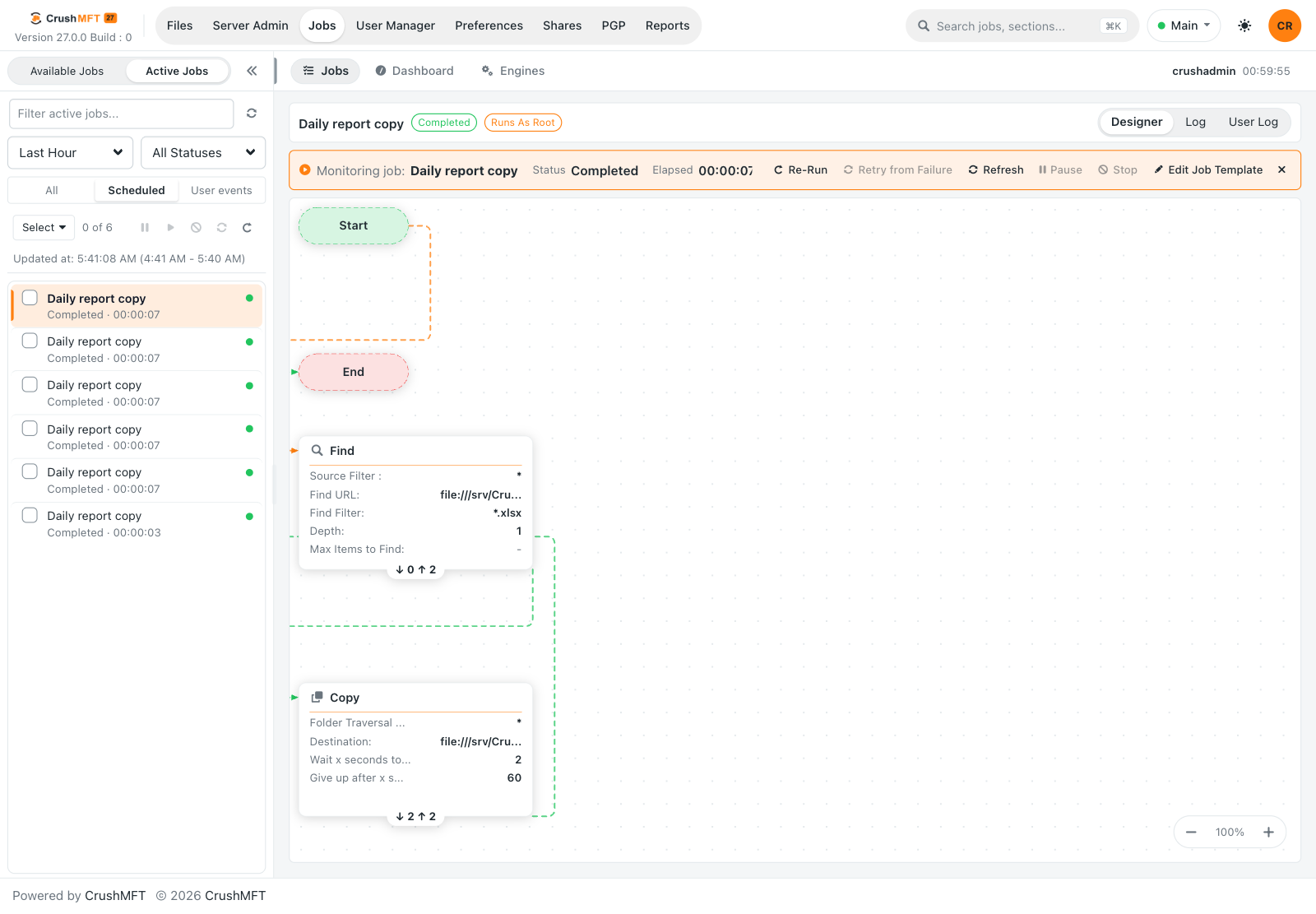
| Control | What it does |
|---|---|
| Filter active jobs… | by the job's name |
| the range | Last 10 Minutes … Last 30 Days, Custom, All. The line under it says what is shown: "Updated at: 10:30:36 PM (9:31 PM - 10:30 PM)". |
| the status | All Statuses, Running, Paused, Completed, With Error, Cancelled |
| All, Scheduled, User events | runs of jobs, runs that events of users started, or both |
| Select and the tick boxes | to act on several runs at once, with the buttons beside the count |
Each run shows its job, how it ended and how long it took, with a dot: green for completed, red for errors.
| A run is | Meaning |
|---|---|
| Running | |
| Paused | somebody paused it, or it stopped at a breakpoint |
| Completed | every task did its work |
| Completed-Errors | it ran to an end, and at least one task failed |
| Cancelled | it was stopped |
| waiting | it has not started yet, with the reason: "the job is already running", "no room on the engine", "needs an engine with label …" |
Watching a run#
Click a run. The job is drawn as the run saw it, with a bar above:
Monitoring job: Daily report copy · Status Completed · Elapsed 00:00:07
On the canvas, the line the run took is drawn in colour, and each task shows two counts under its card: ↓ the items it was given and ↑ the items it handed on. In the picture the Find was given 0 and found 2, and the Copy was given 2 and handed on 2. A task that is working shows its progress. Click a task for its items, with all their values.
This is the fastest way to find where a job loses its files: follow the counts until one is not what you expect.
| Button | What it does |
|---|---|
| Re-Run | starts the job again from the beginning |
| Retry from Failure | starts again at the task that failed, with the items it had. For a run that ended with errors. |
| Refresh | reads the run again. A run under way refreshes by itself. |
| Pause, Resume | holds a run after the task it is in, and lets it go on |
| Stop | ends the run. The task it is in is told to stop; a transfer under way is broken off. |
| Edit Job Template | leaves the run and opens the job for editing |
| × | closes the monitor |
A run that does not end after Stop within its grace time gets Stop now, which ends it by force.
The same actions are in a run's own menu in the list, and for several ticked runs at once: Pause Selected, Resume Selected, Stop Selected, Re-Run Selected.
The log of a run#
The Log tab shows the log of the selected run. Without a run it says "Select a run under Active Jobs to view its log."
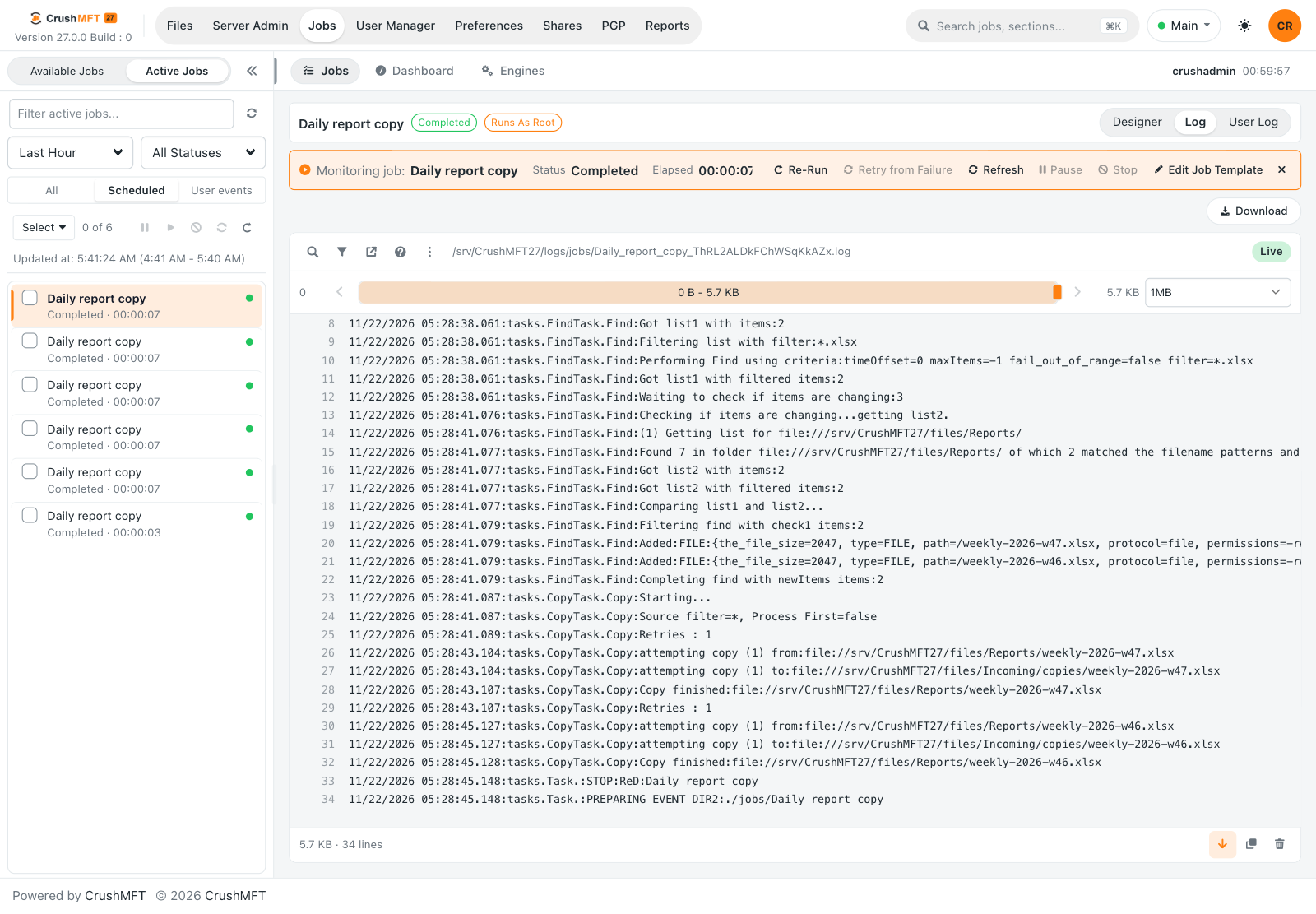
| Part | What it does |
|---|---|
| the magnifier, the funnel | finds text in the log, and shows only the lines that hold it |
| the arrow in a box | opens the log in a window of its own |
| the path | where the log's file is on the server |
| Live | the log is followed while the run goes on |
| the bar and the size beside it | which part of a long log is shown, and how much at a time |
| Download | saves the log as a file |
| the footer | size and number of lines, and buttons to jump to the end and to copy |
A line of the log:
11/20/2026 22:28:48.439:tasks.FindTask.Find:Found 7 in folder file:///srv/CrushMFT27/files/Reports/ of which 2 matched …
is the time, the kind of task, the task's name, and what it did. Tasks with names of their own make a log readable: "Fetch invoices" says more than "Find".
The User Log tab holds what tasks wrote for the user of an event, where there was one.
Whether a job writes a log at all is Enable logging in its Setup, and the name of the file is Log file name there. Logs are in logs/jobs in the server's folder.
What is kept, and how long#
A run is kept after it ended when Save history is ticked in the job's Setup. The items of each task are kept with the run, the first thousand of each list, unless Store job items is off in the Jobs settings.
Runs after a restart#
With Save state ticked in a job's Setup, a run notes where it is after each task. When the server or the engine is stopped while a run is under way, the run goes on from that task afterwards, on the same engine or on another. A task that was interrupted in the middle of a long list goes on where it was.
Elsewhere#
| all jobs at a glance | the Dashboard: Overview |
| runs from the admin pages | Running jobs |
| runs by program | GET /job-runs, POST /job-runs/{id}/pause and so on: Jobs in the API |
| what to do about a failed run | When a job fails |