ContentBlocker#
ContentBlocker lets a folder take only files of the kinds you name. An upload of any other kind is refused, and so is renaming a file into another kind afterwards.
It is for folders with a purpose: only PDFs into Invoices, only pictures into Photos, no programs anywhere.
The plugin is set up in Preferences › Plugins › ContentBlocker. It comes with the server.
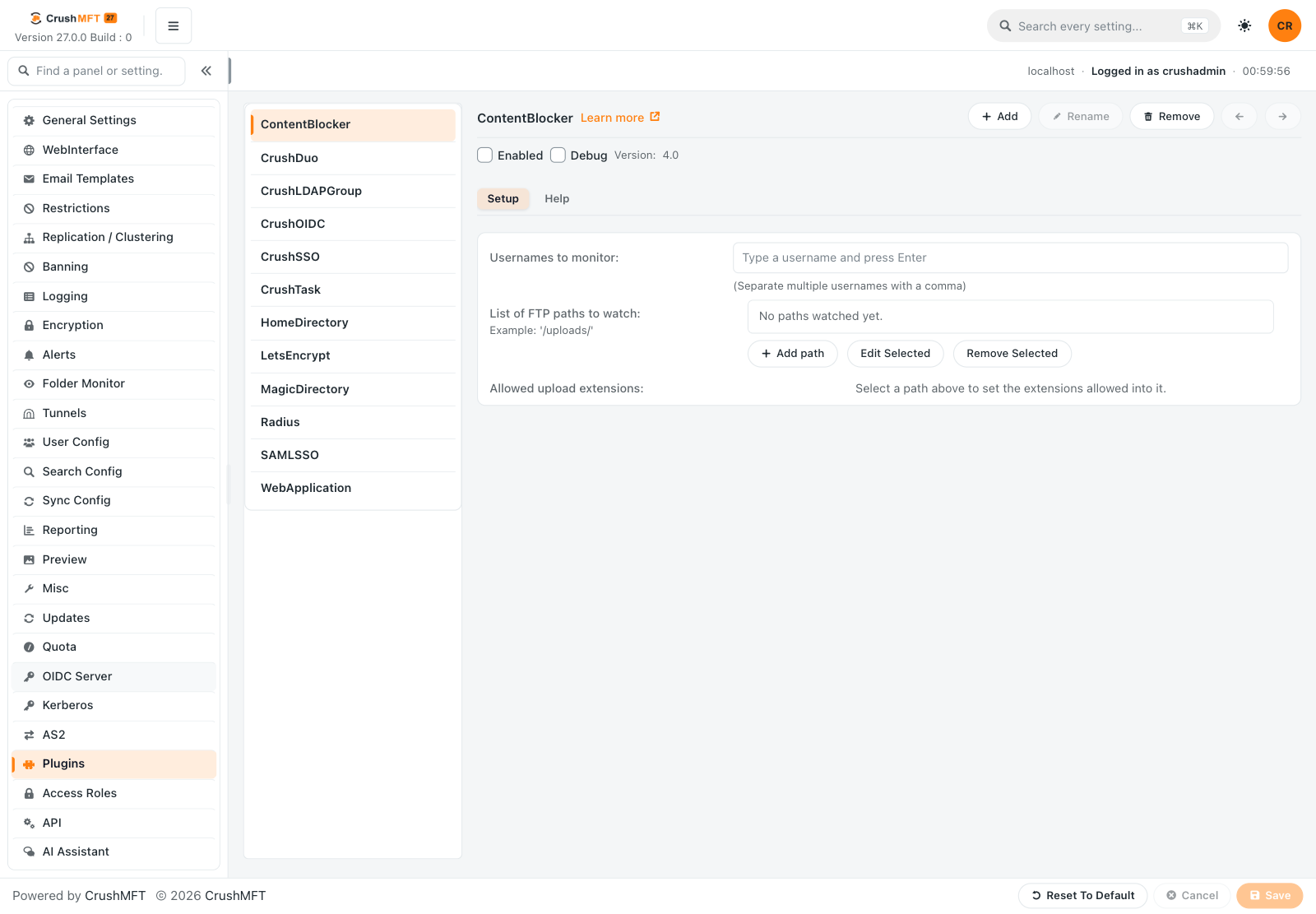
Settings#
| Setting | Is |
|---|---|
| Enabled | the plugin works |
| Debug | it writes each check to the log: "checking", "blocking file::" |
| Usernames to monitor | the users it applies to, separated by commas. * stands for any text: * alone is everybody, acme_* every user whose name starts so. |
| List of FTP paths to watch | the folders it watches, as the user sees them, ending in /: /uploads/. Add Path, Edit Selected, Remove Selected. Folders below a watched folder are watched too. |
| List of allowed extensions for uploads from above directory selection | click a path, then give the endings that folder accepts: PDF, JPG. Add, Edit, Remove. Upper and lower case do not matter. |
A path is "as the user sees it": the path in their own list of folders, not the place on the server's disk. A user whose top folder holds files writes /files/.
Several configurations can exist side by side, for example one for staff and one for partners: see several configurations.
What a user gets#
A file that does not end in one of the allowed endings is refused before any data is taken:
550 This type of file is not allowed.
Attempt, in a folder that allows PDF and TXT |
Result |
|---|---|
upload report.pdf or REPORT.PDF |
accepted |
upload setup.exe |
refused |
upload README, a name with no ending |
refused |
rename report.pdf to report.exe |
refused |
Example#
Partners may put only documents into their upload folder:
| Setting | Value |
|---|---|
| Usernames to monitor | partner_* |
| path | /upload/ |
| allowed extensions of that path | PDF, DOCX, XLSX, CSV, ZIP |
Things to know#
- It looks at the name, not at the content. A program renamed to
invoice.pdfpasses. To look inside files, scan them: an upload event can hand each file to a virus scanner through an Execute task. - Files without an ending cannot be allowed. The list holds endings; a name without one never matches.
- It applies to every way in: the browser, FTP, SFTP, WebDAV. It acts on the upload and the rename, not on files a job or an administrator puts there.
- A zip is one file.
ZIPon the list lets anything in, inside a zip. - Only the listed users. Somebody not named under Usernames to monitor is not checked at all.
Tried for this page#
On a test server, with one user and the folder /files/ allowing PDF and TXT: uploads by FTP of .exe (refused with 550), .pdf and .PDF (accepted), a name without an ending (refused), and a rename from .pdf to .exe (refused). Not tried: the browser, SFTP, and name patterns with *.