The VFS editor#
A user never sees the server's disk. They see a virtual file system, a VFS: a set of items that you put together, each pointing at a real folder or at storage somewhere else, each with its own permissions. The VFS editor is the VFS card on the Setup tab of a user.
The two sides#
| Side | What it is |
|---|---|
| Server's Files, left | the server machine: its disks and folders, to pick from. The path field goes to a folder, the arrows reload, Filter narrows the list, New folder makes a folder on the server. |
| User's Stuff, right | what the user sees after login. / is the top; items can be put into folders of their own making. |
Both sides have Show meta info (size and date), Directory on top, and a Sort order.
Giving a user a folder#
Drag a folder from Server's Files to User's Stuff. It becomes an item with the folder's name, which the user sees as a folder at that place. The user can go down into it and never above it.
| Button | What it does |
|---|---|
| New Virtual Directory | makes a folder that exists only in this VFS, to group items under: "This is a virtual directory, you cannot upload to it." |
| New Remote Item | makes an item that points at storage elsewhere, see below |
| Paste | puts in an item that was copied from another user |
| Generate MiniURL | makes a short link to the selected item, see Send email, run a job, MiniURL |
The three dots of an item open its menu: its properties, a copy, a rename, its removal. Removing an item from User's Stuff takes it out of the user's view; the files on the server are not touched.
What the user may do#
Select an item on the right. The switches beside it are that item's permissions:
| Permission | The user may |
|---|---|
| Download, Upload | get files from it, put files into it |
| View | see what is in it. Without it the folder looks empty, and files can still be fetched by somebody who knows their names. |
| Delete, Delete Folder | remove files, remove folders |
| Create Folder | make folders |
| Rename | rename and move |
| Resume Transfers | continue a broken transfer |
| Share/Publish | share files and folders from it with others |
| Slideshow | view its pictures as a slide show in the web interface |
| Make Invisible | the item is not listed, and still works for somebody who knows its path |
| Replicate | changes are passed on to the secondary server of VFS replication |
| Locked | the item is held as it is |
| Below the switches | What it does |
|---|---|
| Quota: (MB) | how much may be kept in the item |
| RealFile Quota | the quota counts what is really in the folder. Without it, it is counted down with every upload. See Quota. |
| Comment: (HTML OK) | a text shown to the user for this folder |
| Inherit / Reset | takes the item's permissions from the folder above again |
| Advanced | encryption, sync, POSIX and further permissions, below |
Permissions hold for the item and for everything below it, until an item or folder further down has permissions of its own. A little flag beside a switch marks a permission that is set on this very item.
A remote item#
New Remote Item opens VFS Item Properties.
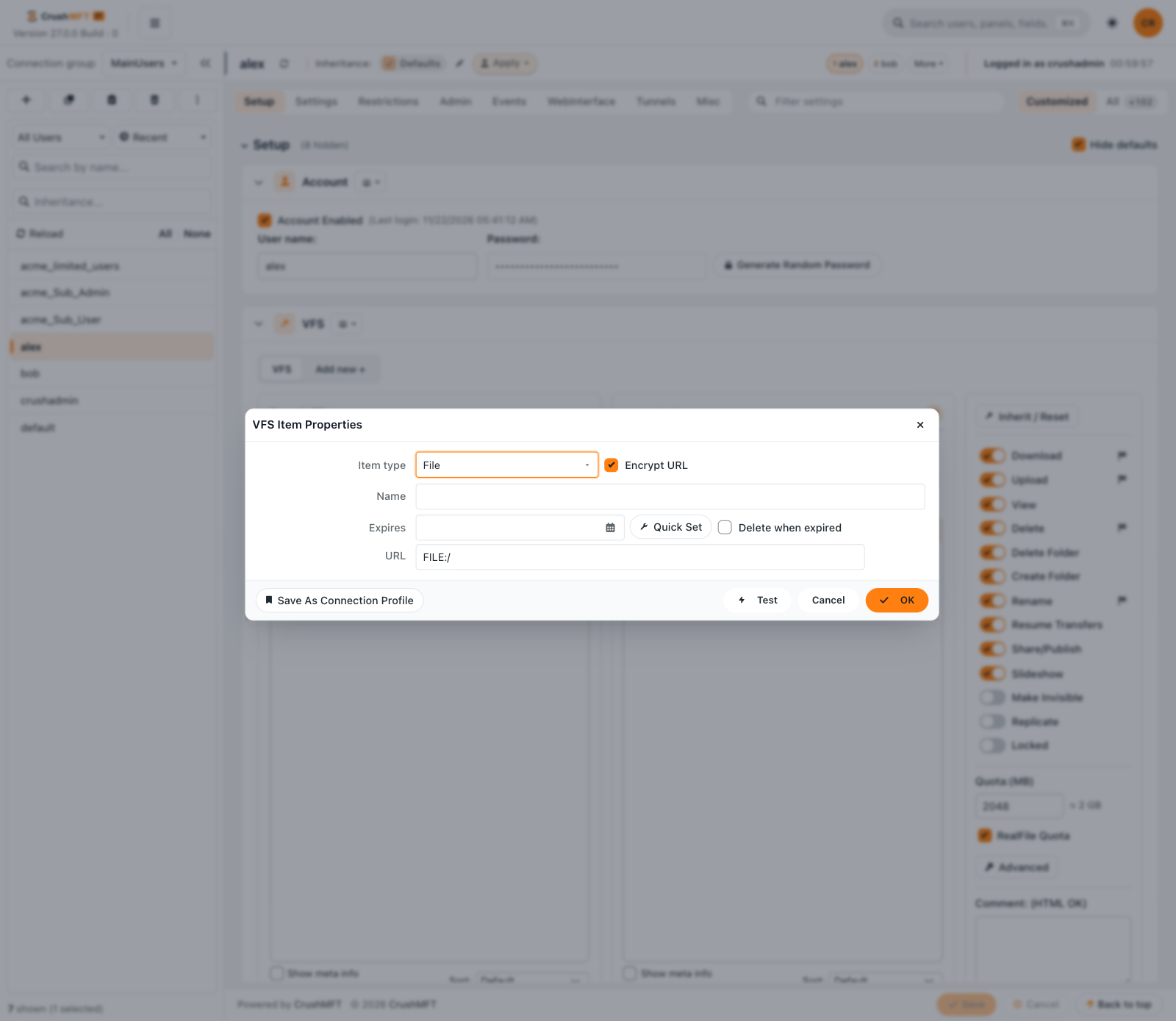
| Field | What it is |
|---|---|
| Item type | what the item points at: File (a local folder), SMB, NFS, FTP, FTPS, FTPES, SFTP, HTTP, HTTPS, WebDAV, S3, S3Crush, Google Drive, Google Storage, Memory, Hadoop, Azure, Citrix, Glacier, Dropbox, Backblaze B2, OAuth, Key Vault, OneDrive, SharePoint, Box, or a Connection Profile |
| Name | the name the user sees |
| URL, and the fields of the type | where it is and how to log in there |
| Encrypt URL | stores the address, with its password, encrypted |
| Expires, Delete when expired | a date after which the item stops working, and whether it is then removed |
| Save As Connection Profile | keeps the connection under a name, to use it for other users too |
| Test | tries the connection, see Testing a VFS item |
In a remote item's address, {username} and {password} stand for what the user logged in with: one item then leads each user to their own account on the other system.
Advanced#
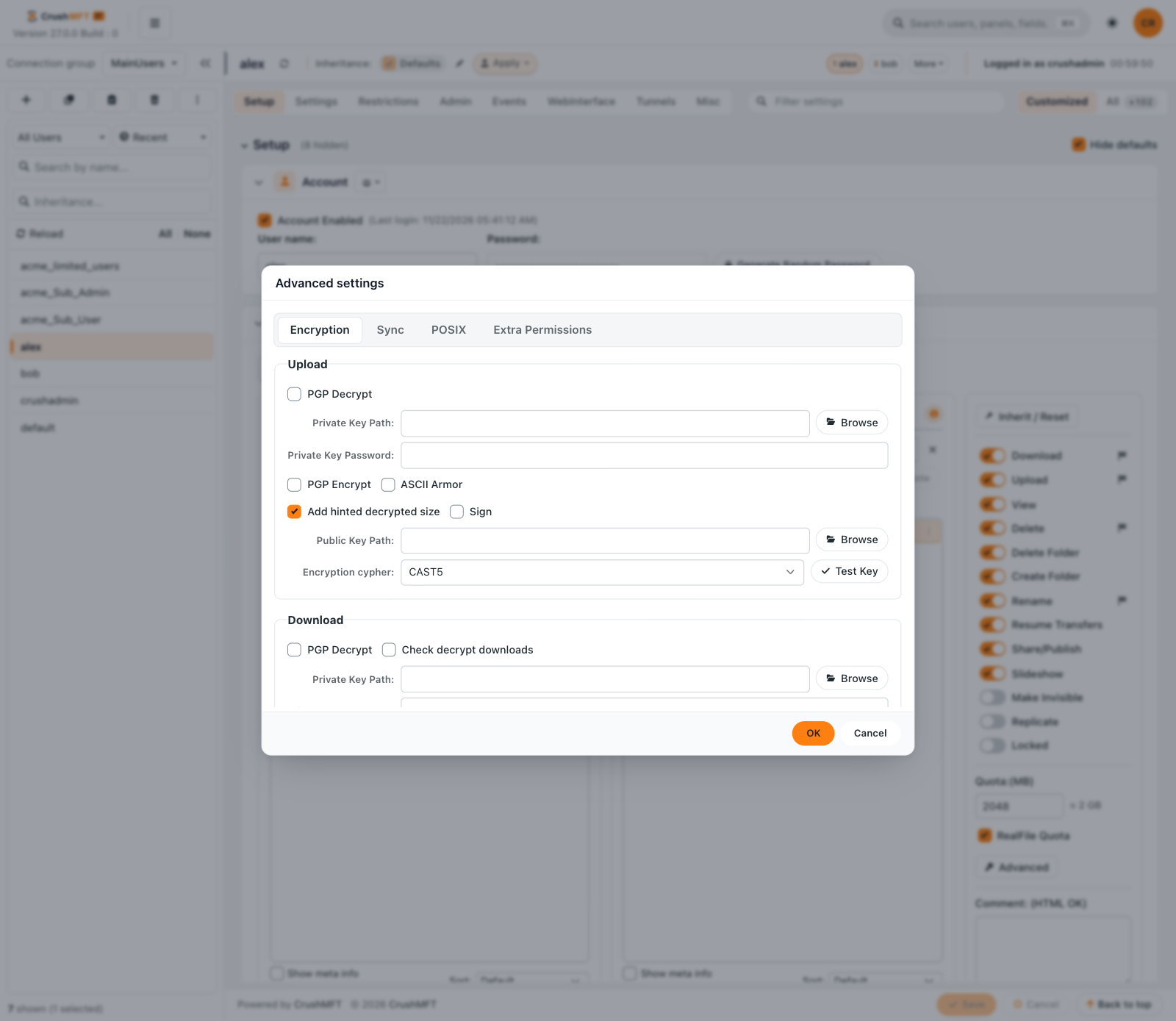
| Tab | Holds |
|---|---|
| Encryption | PGP for this item: files are encrypted as they are uploaded and decrypted as they are downloaded, or the other way round, with the keys you name. Test Key checks a key. |
| Sync | settings for folders that are kept in step with CrushSync |
| POSIX | the owner, group and permissions that uploaded files get on a Unix system |
| Extra Permissions | further switches for this item |
Several file systems#
Add new + beside the VFS tab makes a second file system for the user, with a name of its own ("Extra VFS name"). Which one a login gets can then depend on how the user connects.
Save at the bottom stores the VFS with the rest of the user.