Access Roles#
A role is a named set of permissions that you give to an account, so that somebody can do one part of the administration without being a full administrator: look after the users of one group, run jobs, read logs. The Access Roles section of Preferences is where the roles themselves are kept. Which account holds which role is set on the account, in the User Manager.
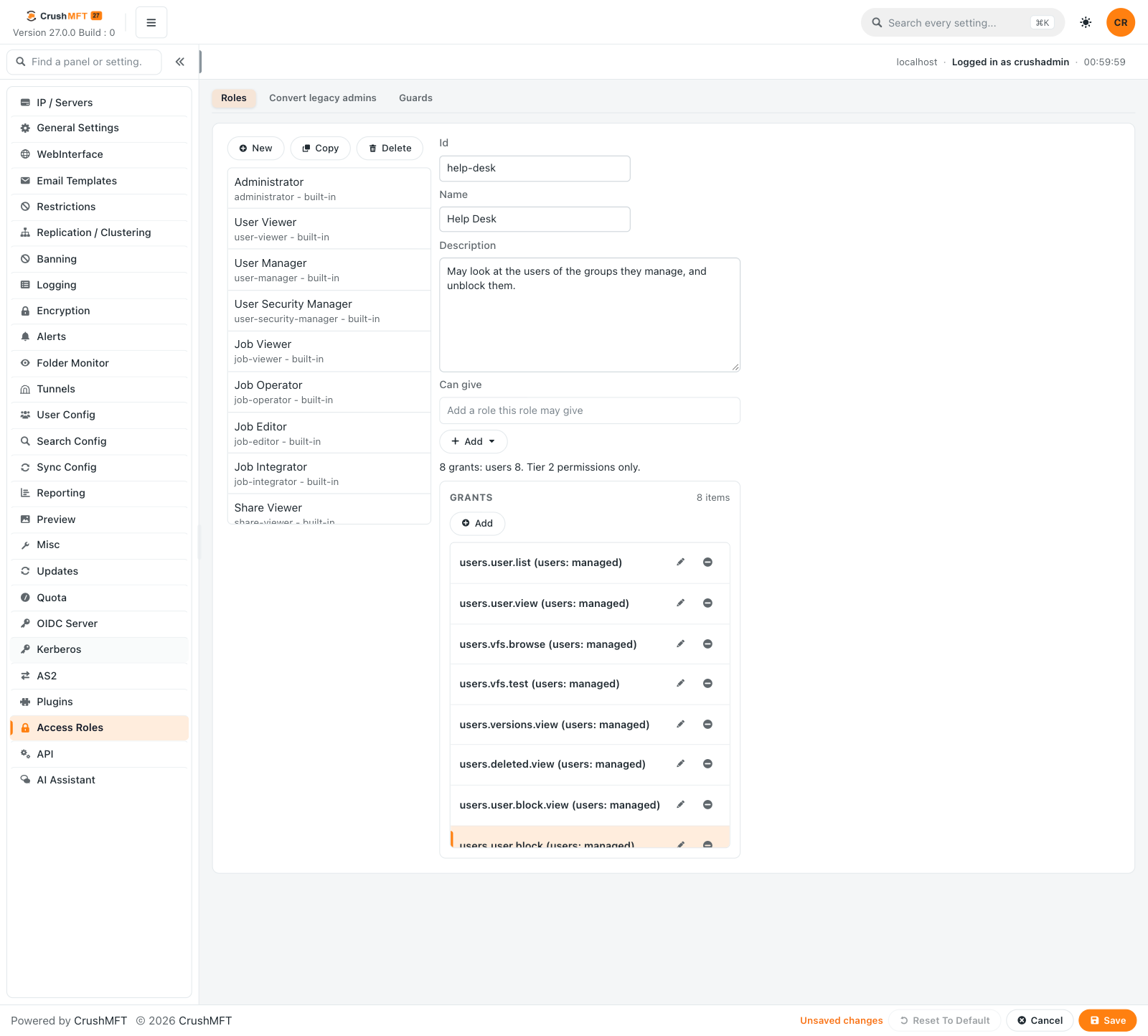
The section has two parts: Roles, and Convert legacy admins for accounts that still carry the admin flags of earlier versions.
How it fits together#
| Word | Means |
|---|---|
| Permission | one thing that can be done, named area.object.action: users.user.create, jobs.job.run, logs.server.read. The server has a fixed list of about 250. |
| Grant | one permission together with what it applies to: which users, which jobs, which storage |
| Role | a list of grants with a name |
| Tier | how far a permission reaches, see below |
Nothing is allowed unless a grant allows it.
| Tier | Means | Who can hold it |
|---|---|---|
| 0 | equal to full control of the server: running programs, plugin settings, login providers, the roles themselves | only the Administrator role |
| 1 | sensitive: reaches passwords, keys, other people's identity, logs | any role you put it in |
| 2 | everything else | any role |
Under a role's fields, one line sums it up, such as "8 grants: users 8. Tier 2 permissions only." or "Holds tier 1 permissions (sensitive)."
The built-in roles#
The server comes with 21 roles. They cannot be changed or deleted.
| Role | Id | What it gives |
|---|---|---|
| Administrator | administrator |
Everything, including every tier 0 permission. The only role that carries tier 0. |
| User Viewer | user-viewer |
Read users, their settings and their VFS. |
| User Manager | user-manager |
Create and maintain accounts inside a users scope and a storage scope. No credentials, no roles. |
| User Security Manager | user-security-manager |
The fields of accounts that carry identity: passwords, 2FA, keys, email, phone. |
| Job Viewer | job-viewer |
See jobs and their history. Secrets masked. |
| Job Operator | job-operator |
Run, pause and cancel jobs, and read their logs. |
| Job Editor | job-editor |
Build jobs from the file-handling and flow tasks, inside a job scope and a storage scope. |
| Job Integrator | job-integrator |
The tasks that talk to other systems (mail, HTTP, AS2, PGP, tunnels) and the connection profiles they use. Given together with Job Editor. |
| Share Viewer | share-viewer |
See everyone's shares in scope. |
| Share Manager | share-manager |
Create, change and remove shares for users in scope. |
| Report Viewer | report-viewer |
Run reports, explore the data, export it, and see dashboards. |
| Report Manager | report-manager |
Schedule reports, keep the shared reports and dashboards, set alerts and expected files. |
| Server Monitor | server-monitor |
Watch the server's status, and the cluster's. |
| Server Operator | server-operator |
Day-to-day operation: sessions, bans, ports, restart, on this server and on the other nodes of the cluster. |
| Update Runner | update-runner |
Check for and install updates. |
| Diagnostics | diagnostics |
Thread dumps, debug upload to the vendor, the telnet test tool, JVM memory size. |
| Log Reader | log-reader |
Read the server logs. |
| AS2 Operator | as2-operator |
Watch AS2 version 2 and look after its messages: its settings, stations and partners to read, its health, the message records, redeliver, release and discard, and lifting blocks. Not the stations and partners themselves. |
| Key Manager | key-manager |
Certificates, keystores and PGP keys. Not the export of private keys. |
| Preferences Viewer | preferences-viewer |
Read every preference section. Secrets masked. |
| Preferences Editor | preferences-editor |
Change the preference sections that are not tier 0. |
| Auditor | auditor |
Read the access audit log, the roles and the token list. |
Click a role to see its grants. An account can hold several roles: give a job builder Job Editor and Job Integrator, a help desk User Manager and User Security Manager.
A role of your own#
| Button | What it does |
|---|---|
| New | starts an empty role |
| Copy | makes a copy of the selected role that you can change. This is the way to start from a built-in role. |
| Delete | deletes the selected role of your own, after a question. Accounts that hold it lose what it gives. If accounts hold it, the server says so first and asks again. |
| Field | What it is |
|---|---|
| Id | the short name the server stores: lower case letters, digits and -, at most 64 characters. A copy gets the id of the original with -copy. |
| Name | the name people see |
| Description | what the role is for |
| Can give | the roles a holder of this role may give to other accounts. Add picks from the list of roles. The Administrator role is not in it. |
| Grants | the permissions, see below |
In the list, a role that is not saved yet is marked changed. Save at the bottom saves all roles (saving); a role without a name, or with an id that does not fit, is refused with the reason.
The roles are kept in the file rbac.XML in the server's folder.
Grants#
Add above the list of grants opens a grant; the pencil of a line changes it, the minus removes it.
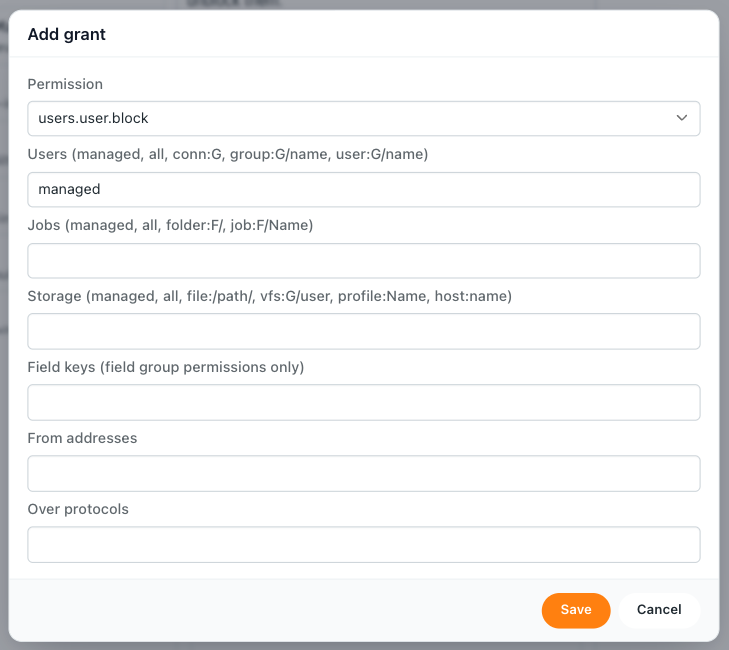
| Field | What it is |
|---|---|
| Permission | one permission from the server's list |
| Users | the users it applies to: managed for the users the holder manages, all, conn:G for a user connection group, group:G/name for the members of a group, user:G/name for one user |
| Jobs | the jobs it applies to: managed, all, folder:F/ for a job folder, job:F/Name for one job |
| Storage | where the holder may point things at: managed, all, file:/path/ for a folder on the server, vfs:G/user for a user's virtual file system, profile:Name for a connection profile, host:name for a host |
| Field keys | for the permissions about groups of user fields: which fields |
| From addresses | the grant only counts for requests from these addresses |
| Over protocols | the grant only counts over these protocols |
Leave a field empty when the permission has nothing to do with it. managed is what makes one role fit many people: each holder gets it for their own group.
A role names each permission. There are no wildcards, so a permission that a later version adds is never part of your role until you put it in.
Convert legacy admins#
In earlier versions an account became an administrator, or a limited one, through admin flags such as CONNECT, USER_EDIT or JOB_EDIT. Those accounts go on working as they did: nothing is rewritten by an upgrade. This part lists them and offers to turn each into roles.
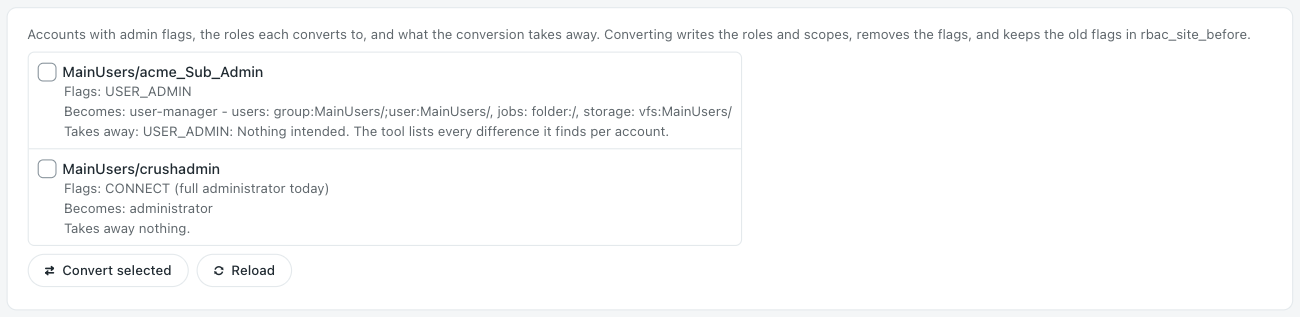
Each account is shown with:
| Line | Says |
|---|---|
| Flags | the admin flags it has now, and whether they add up to a full administrator today |
| Becomes | the roles it would get |
| Takes away | what the account could do with its flags and cannot do with those roles. "Takes away nothing." when the roles cover everything. |
Tick the accounts and press Convert selected. The server asks once, then writes the roles and scopes to the accounts and removes the flags. The old flags are kept on the account as rbac_site_before, so that there is a way back by hand. Reload reads the list again.
Read Takes away before you convert. A full administrator (CONNECT) becomes Administrator and loses nothing. The flags that edit users, jobs or preferences reach further than the roles they become, on purpose: after the conversion such an account can no longer do the tier 0 things, such as giving admin rights or building a job that runs a program.
"No account has admin flags." means there is nothing left to convert.
Guards#
The third tab of the section. It holds what the server refuses whatever a role allows, and how the old admin flags count.
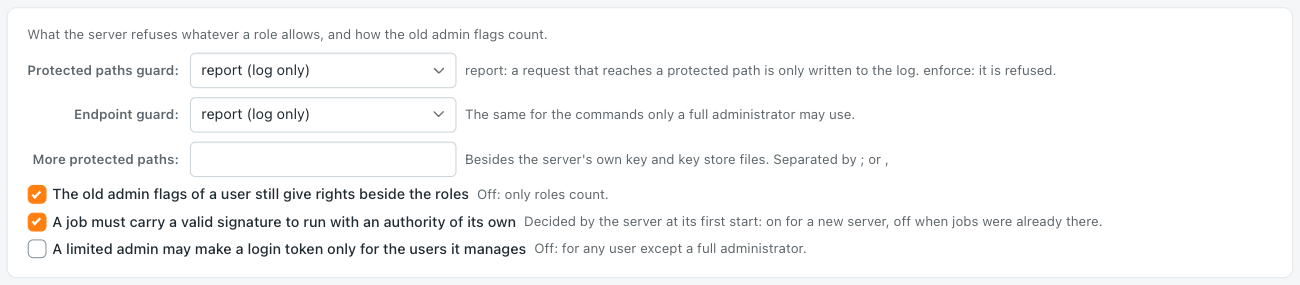
| Field | What it does |
|---|---|
| Protected paths guard | report (log only): a request that reaches a protected path is only written to the log. enforce: it is refused. |
| Endpoint guard | the same choice for the commands only a full administrator may use |
| More protected paths | paths of your own beside the server's own key and key store files, separated by ; or , |
| The old admin flags of a user still give rights beside the roles | off: only roles count |
| A job must carry a valid signature to run with an authority of its own | decided by the server at its first start: on for a new server, off when jobs were already there |
| A limited admin may make a login token only for the users it manages | off: for any user except a full administrator |
The keys, in the order of the table: rbac_path_guard, rbac_endpoint_guard, rbac_protected_paths, rbac_legacy_flags, rbac_jobs_require_signature, generatetoken_limited_admin_group_only. The panel stores only the fields you touched.