Ciphers#
A cipher suite is one way of encrypting a TLS connection. Client and server each have a list, and the connection uses one that both have. The Ciphers card, on the SSL tab of the Encryption section of Preferences, says which ones this server offers for HTTPS and FTP over TLS, and in which order it prefers them.
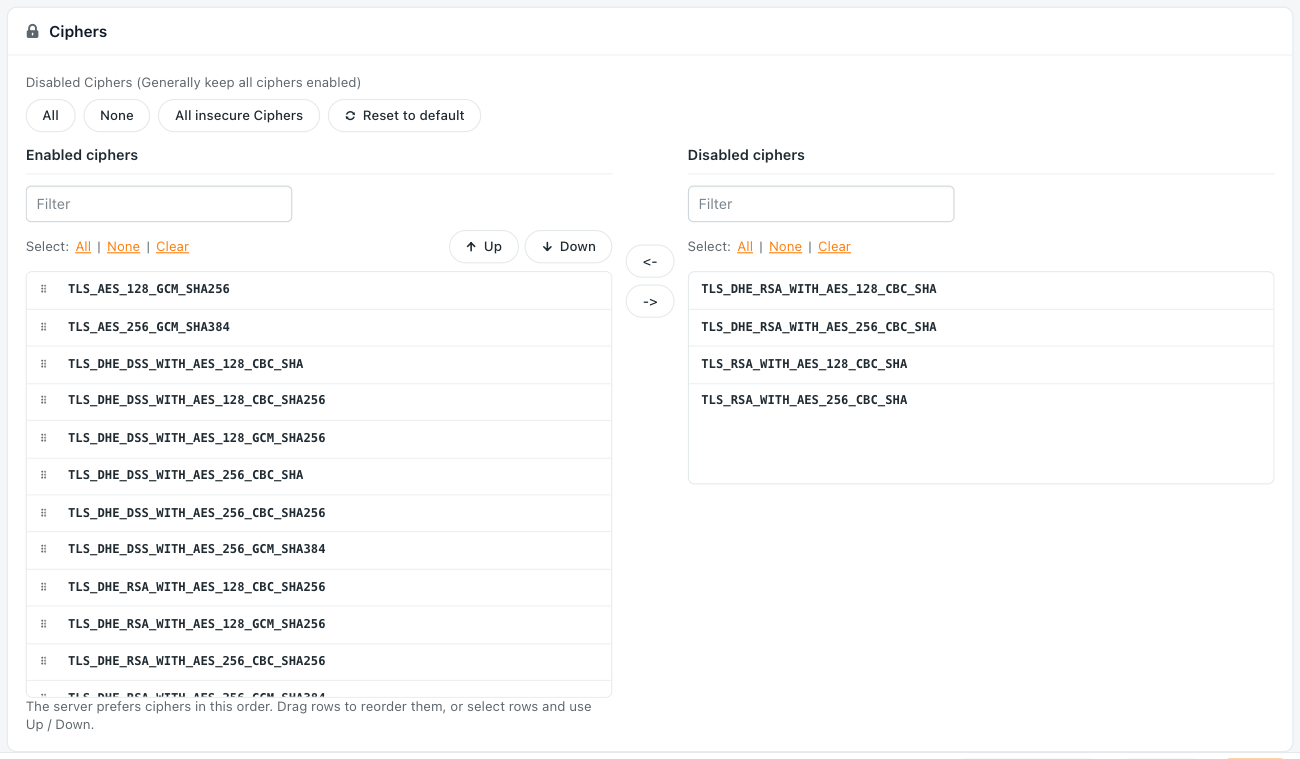
Generally, keep the ciphers as they are. A new server has the weak ones turned off already. Come here when a security scan asks you to turn a cipher off, or when an old client cannot connect and needs one turned back on.
The ciphers for SFTP are not here: SSH has its own, set on each SFTP listener.
The two lists#
| List | Holds |
|---|---|
| Enabled ciphers | what the server offers, in the order it prefers them: the first one in the list that the client also has is used |
| Disabled ciphers | what the server could offer and does not |
The names are those of the Java the server runs on, and the choice follows it: a newer Java may bring new ciphers and drop old ones. The lists are filled once a TLS listener has started; on a server without an HTTPS or FTPS listener there is nothing to show.
| To | Do this |
|---|---|
| turn a cipher off | select it under Enabled ciphers and click -> |
| turn a cipher on | select it under Disabled ciphers and click <- |
| change the order | drag an enabled cipher by its handle, or select it and use Up and Down |
| find a cipher | type part of its name in Filter above a list. Clear empties the filter. |
| select many | All and None beside Select |
The four buttons#
| Button | What it does |
|---|---|
| All | turns every cipher off. The card then warns: "This configuration has all ciphers disabled, your SSL ports will not function at all." Nobody could reach the server over HTTPS, you included. |
| None | turns every cipher on |
| All insecure Ciphers | turns off the ciphers known to be weak, see below |
| Reset to default | after asking, puts the lists back to those of a new server |
All insecure Ciphers turns off every cipher whose name has one of these in it:
| In the name | Why it is weak |
|---|---|
NULL, EMPTY, ANON |
no encryption, or no check of who the server is |
EXPORT, RC4, and the old DES and 3DES ciphers |
old ciphers that can be broken |
_DHE_ |
key exchange that is slow and, with short keys, weak |
TLS_RSA_WITH_… |
key exchange without forward secrecy: someone who later gets the server's key can read recorded traffic |
What stays on are the TLS 1.3 ciphers (TLS_AES_…, TLS_CHACHA20_…) and the ECDHE ciphers of TLS 1.2. Every current browser and client has those.
Whatever the lists say, the server never offers EXPORT, ANON and NULL ciphers: it turns them off itself when it starts.
Saving, and checking#
The lists are part of Save at the bottom of the page. When they have changed, the TLS listeners are started anew so that the change counts at once.
To see what a client is offered, from another machine:
nmap --script ssl-enum-ciphers -p 443 files.example.com
or try one cipher with openssl s_client -connect files.example.com:443 -cipher ECDHE-RSA-AES256-GCM-SHA384.
Which TLS versions are spoken at all is set above the ciphers, see Advanced Options.