Amazon S3#
An item of a VFS can point at a bucket of Amazon S3, or at a folder in one. Users then work with the bucket as with any folder, over every protocol the server offers: an SFTP user uploads, and the file is an object in S3.
The file does not rest on the server on its way: it is passed through, piece by piece.
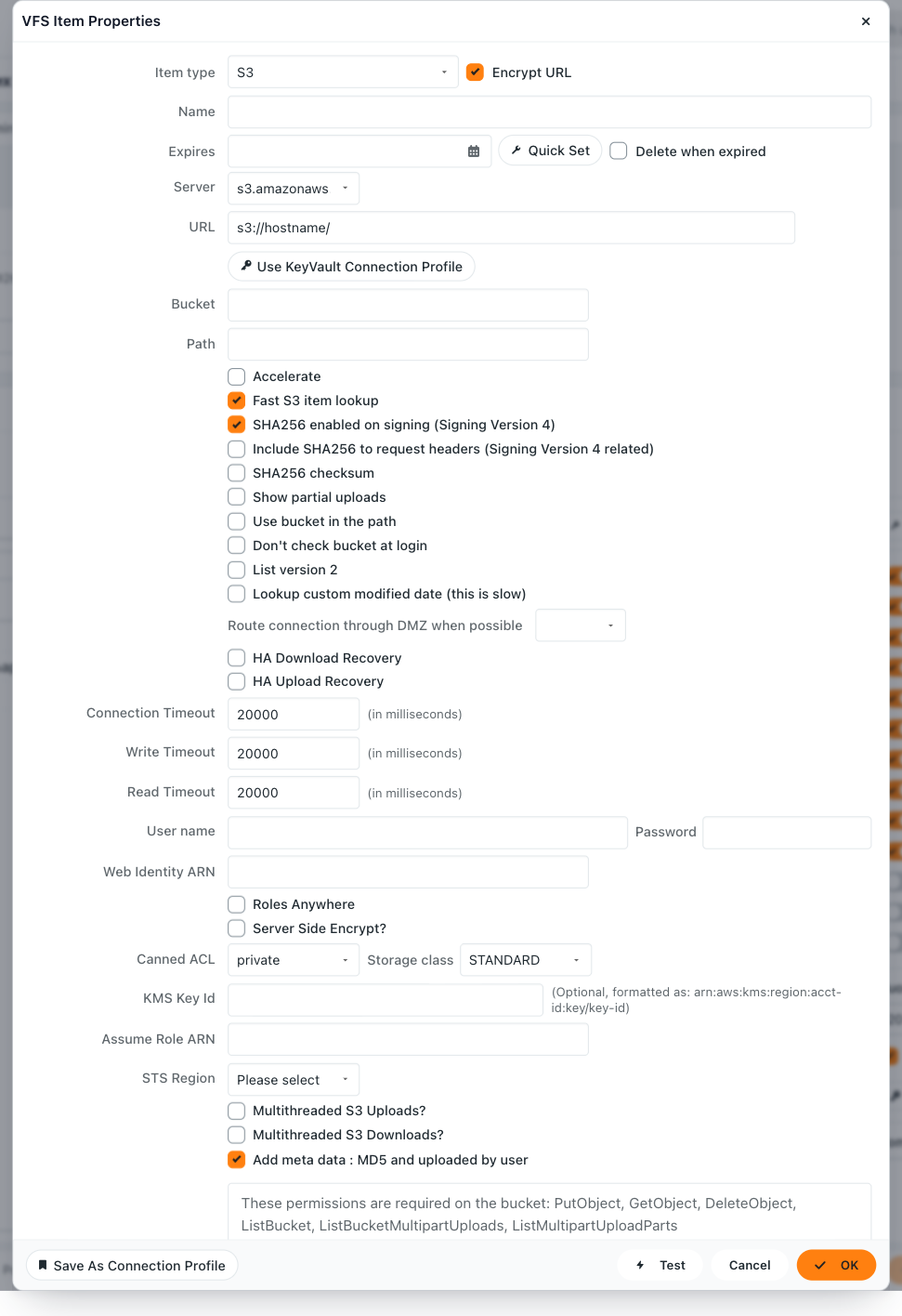
Where#
| Field | What it is |
|---|---|
| Server | the S3 endpoint of the bucket's region, such as s3.eu-central-1.amazonaws.com. s3.amazonaws.com is the first region, us-east-1. The list also has the access point endpoints. |
| Bucket | the name of the bucket |
| Path | a folder in the bucket, to give the user only that. Empty: the whole bucket. |
| URL | the address the three make together. You can type it instead: s3://KEY:SECRET@s3.eu-central-1.amazonaws.com/bucket/folder/ |
Who#
| Way | Fill in |
|---|---|
| an access key | User name: the access key ID. Password: the secret access key. |
| the role of the machine | User name: iam_lookup. On a server that runs in AWS (EC2), the keys of the instance's role are fetched from the machine itself and renewed by themselves. Nothing secret is stored. |
| another role, through STS | Assume Role ARN and STS Region, on top of one of the two above: the server becomes that role for its work. The usual way into a bucket of another account. |
| a web identity | Web Identity ARN: the role to take with a token of an OAuth profile, with no stored key at all |
| a certificate | Roles Anywhere, for a server outside AWS that proves itself with a certificate of your own authority. Ticking it shows the fields for the region, the trust anchor, the profile, the role and the certificate. |
| a key from a vault | Use KeyVault Connection Profile: see Special types |
The dialog says what the key or role must be allowed on the bucket: "PutObject, GetObject, DeleteObject, ListBucket, ListBucketMultipartUploads, ListMultipartUploadParts". Give it these on this bucket and nothing more.
Prefer a role over a stored key wherever the server runs in AWS.
Options#
| Option | What it does | New item |
|---|---|---|
| Fast S3 item lookup | asks about a single object directly instead of listing its folder | on |
| List version 2 | uses the newer listing call of S3. Needed by some access policies. | off |
| Use bucket in the path | writes requests as host/bucket/key instead of bucket.host/key. For bucket names with dots, and for S3-compatible storage. |
off |
| Don't check bucket at login | does not look at the bucket when connecting. For keys that may not list buckets. | off |
| Accelerate | uses S3 Transfer Acceleration, when the bucket has it turned on | off |
| SHA256 enabled on signing (Signing Version 4) | signs requests the current way, Signature Version 4. Without the tick they are signed the older way, Version 2, which only Amazon's oldest regions still accept. A new item has it ticked; an item saved before without the setting keeps Version 2 until it is ticked. Leave it ticked for any region that opened after 2013, such as eu-central-1, and for most other storage. | on |
| Include SHA256 to request headers | with Version 4: sets the content hash header before the request is signed. For storage that refuses the signature otherwise. | off |
| SHA256 checksum | sends a checksum with uploads, which S3 verifies | off |
| Show partial uploads | lists uploads that were begun and never completed, so that they can be removed | off |
| Lookup custom modified date (this is slow) | reads each file's original date from its metadata, at one more request per file | off |
| Add meta data : MD5 and uploaded by user | stores the file's MD5 and the name of the CrushMFT user with each upload | on |
| Server Side Encrypt?, KMS Key Id | asks S3 to encrypt what is stored; with a KMS key of your own, "formatted as: arn:aws:kms:region:acct-id:key/key-id" | off |
| Canned ACL | the access list new objects get: private, bucket-owner-full-control and the others of S3 |
private |
| Storage class | where new objects are stored: STANDARD, STANDARD_IA, INTELLIGENT_TIERING, GLACIER and the others | STANDARD |
| Multithreaded S3 Uploads? | sends the parts of a large upload at the same time. Ticking it shows Upload Buffer (MB per part) and Upload Threads. | off |
| Multithreaded S3 Downloads? | the same for downloads, with Download Buffer, Download Threads and Max Download Buffer | off |
The options every type has are on Advanced options of a VFS item.
Good to know about S3#
S3 is not a file system, and the server makes it look like one.
- There are no folders. A folder is a key that ends in
/, or just a common beginning of keys. An empty folder exists only when such a key was made. - Rename is copy and delete. Renaming a folder with a thousand files is two thousand requests, and takes that long. Tools that upload under a temporary name and rename at the end pay for it on every file.
- No appending. An upload that broke off is resumed by S3's own parts; a file cannot be extended later.
- Listings cost time and money. Keep folders small; avoid users who list the whole bucket again and again.
- Memory. Each multithreaded transfer holds its buffers in memory: threads times buffer, per transfer. Size the server's memory for the transfers that run at once.
If you need fast listings and renames more than objects under their real names, see S3 in the CrushMFT layout.
When it does not work#
| What you see | Usually |
|---|---|
| "SignatureDoesNotMatch" | the secret key, or the machine's clock |
| the request is refused because of its signature version, or "InvalidRequest … AWS4-HMAC-SHA256" | SHA256 enabled on signing (Signing Version 4) is not ticked |
| "AccessDenied" on login | the key may not list buckets: Don't check bucket at login |
| "AccessDenied" on some actions | a missing permission of the list above |
| a redirect or "wrong region" | Server is not the bucket's region |
| the bucket name has dots and TLS fails | Use bucket in the path |
| uploads work and are unreadable for the bucket's owner | Canned ACL bucket-owner-full-control |
A login to S3 that stops working can raise an alert: see When a storage login stops working.