Kerberos#
In a Windows domain, and in other Kerberos realms, a user who is logged in to their own machine can reach a file server without typing a password again: the machine shows the server a ticket. For that the server needs a key of its own, which the domain's administrator gives it as a keytab file. The Kerberos section of Preferences is the list of the keytabs this server has.
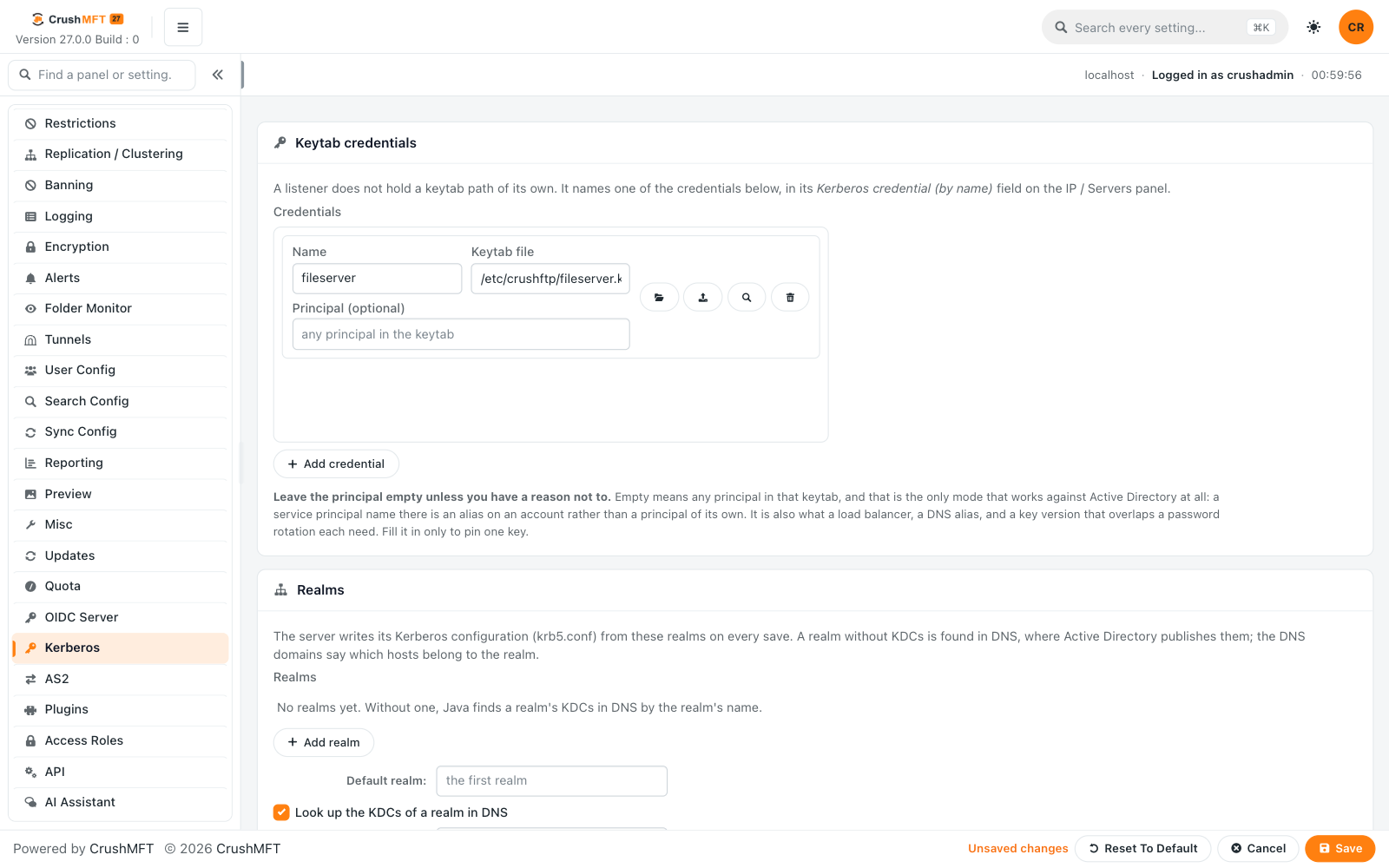
A listener does not hold the path of a keytab itself. It names one of the credentials of this list, in its Kerberos credential (by name) field in IP / Servers. SMB and NFS listeners use them. One credential can serve several listeners, and a changed keytab is changed in one place.
Credentials#
Add credential adds a line. Each line has:
| Field | What it is |
|---|---|
| Name | the name a listener refers to this credential by, such as fileserver |
| Keytab file | the path of the keytab file on the server machine, such as /etc/crushftp/fileserver.keytab. The server reads it when a listener starts. |
| Principal (optional) | leave it empty, see below |
and three buttons:
| Button | What it does |
|---|---|
| the folder | picks the keytab file on the server machine |
| the magnifier, Show what is inside this keytab | has the server read the file and say what is in it: the principals, their key versions and their encryption types. The keys themselves are never sent to the browser. It answers "is this the right file" without a shell on the server. |
| the bin | removes the credential |
Save at the bottom saves the list (saving).
Leave the principal empty#
Empty means "any principal in that keytab". That is the right setting in nearly every case:
- It is the only one that works against Active Directory at all. A service principal name there is an alias on an account, not a principal of its own.
- A load balancer and a DNS alias need it: clients ask for the name they typed, which is not the server's own.
- A password rotation needs it: for a while the keytab holds the old and the new key version, and both must be accepted.
Fill a principal in only to pin the server to one key of a keytab that holds several.
The keytab file#
- The domain's administrator makes it, for the name clients use for this server:
cifs/files.example.comfor SMB,nfs/files.example.comfor NFS. - It is a secret: whoever has it can pose as the server. Keep it readable for the user the server runs as and for nobody else.
- When the account's password is changed in the domain, the file must be made again and put in the same place. Restart the listener afterwards.
- In FIPS mode, keys of the types RC4, DES and 3DES in a keytab are not used; the list of what is inside marks them.
If the file is not there, the check says so: "No keytab at" and the path.
Realms#
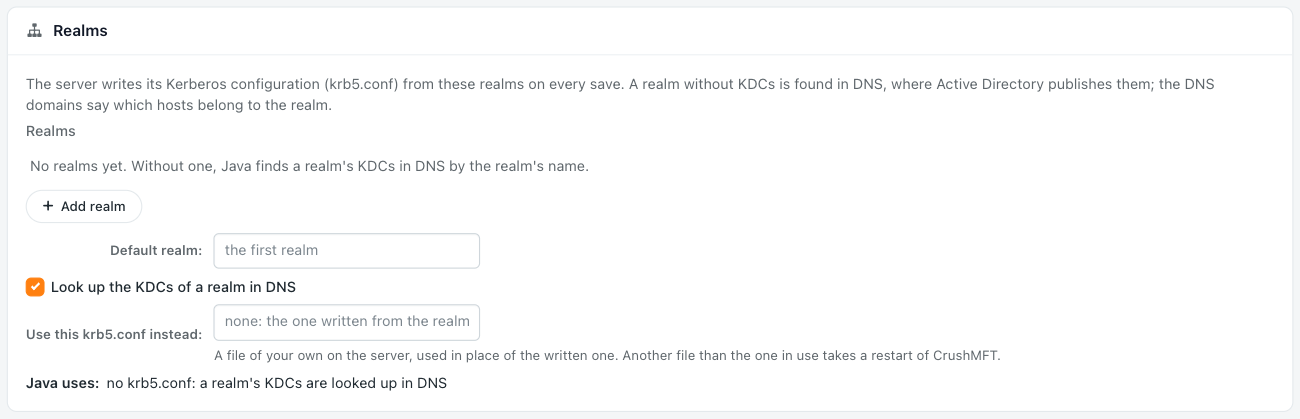
The server writes its Kerberos configuration, the file krb5.conf, from the realms listed here, every time you save. A realm without KDCs of its own is looked up in DNS, where Active Directory publishes them; a realm's DNS domains say which hosts belong to it.
| Field | What it does |
|---|---|
| Add realm | a realm, with its KDCs and its DNS domains |
| Default realm | the realm of a name that names none. Empty: the first realm of the list. |
| Look up the KDCs of a realm in DNS | on: a realm with no KDCs written here is found in DNS |
| Use this krb5.conf instead | a file of your own on the server, used in place of the written one. Another file than the one in use takes a restart of CrushMFT. |
The line Java uses under the fields says what is in force now. The keys are kerberos_default_realm, kerberos_dns_lookup_kdc and kerberos_krb5_conf.