Sending mail (SMTP)#
The server sends mail for many things: password resets, one-time codes, alerts, shares, events, scheduled reports, jobs. All of it goes through the mail server set in the SMTP Settings panel of General Settings. Until a mail server is set here, none of these mails are sent.
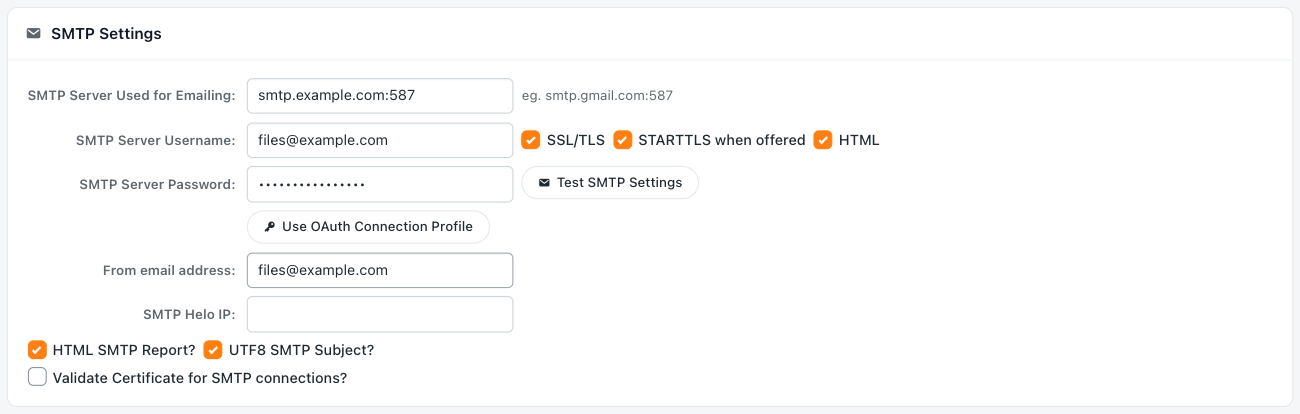
The settings#
| Setting | What it is | Default |
|---|---|---|
| SMTP Server Used for Emailing | the mail server, as host or host:port, for example mail.example.com:587. Without a port, 25 is used. Several servers separated by commas are tried in this order until one accepts the mail. |
empty |
| SMTP Server Username | the name to log in to the mail server with. Empty: no login. | empty |
| SSL/TLS | the mail must go over an encrypted connection: if the mail server does not offer one, nothing is sent. See Encryption. | off |
| HTML | mails are sent as HTML. Line breaks in a plain text are kept. | on |
| SMTP Server Password | the password for the user name. It is stored encrypted. | empty |
| Test SMTP Settings | sends a test mail with what is on the screen, see Testing settings | |
| Use OAuth Connection Profile | logs in with a token instead of a password, see Signing in with OAuth | |
| From email address | the sender of every mail that does not name one of its own. Most mail servers only accept an address that belongs to the account you log in with. | empty |
| SMTP Helo IP | the name the server gives when it greets the mail server. Empty: the machine's own name. Set it when the mail server refuses the greeting, for example because it wants a name that exists in DNS. | empty |
| HTML SMTP Report? | scheduled reports are mailed as HTML | on |
| UTF8 SMTP Subject? | subjects are sent as UTF-8, so that letters outside plain English arrive right | on |
| Validate Certificate for SMTP connections? | how the mail server's certificate is checked, see The mail server's certificate | off |
Press Save at the bottom when the test works.
Encryption#
Which encryption is used depends on the port:
| Port | What happens |
|---|---|
| 465 | the connection is encrypted from the first byte |
| any other, such as 587 or 25 | the connection starts in the clear and switches to TLS (STARTTLS) when the mail server offers it |
With SSL/TLS ticked the switch to TLS is required: a mail server that does not offer it gets no mail, and no password. Tick it for every mail server that is not on the same machine.
The mail server's certificate#
| Validate Certificate for SMTP connections? | The certificate is accepted when |
|---|---|
| off | a certificate authority the server trusts issued it. Any other certificate, such as a self-signed one, is accepted the first time and remembered; if the mail server later shows a different one, the connection is refused. |
| on | a certificate authority the server trusts issued it and it names the mail server's host name. Nothing else is accepted. |
Signing in with OAuth#
Some mail services no longer take a password. There are three ways to log in with a token instead:
| For | How |
|---|---|
| Gmail and Google Workspace | type a server name with gmail.com in it: Get GMail oauth token appears. See Mail through Google. |
| Microsoft 365 | type a server name with office365 or outlook in it: Get Refresh Token appears. See Mail through Microsoft 365. |
| any service you made an OAuth connection profile for | Use OAuth Connection Profile |
Use OAuth Connection Profile lists the connection profiles of the kind OAuth and takes the one you choose; with only one it is taken at once, and with none it says "No OAuth connection profiles available." The panel then shows OAuth Profile: with the profile's name, the user name becomes oauth, and the two buttons for Google and Microsoft are hidden. The server logs in to the mail server as the From email address, with a token from the profile. Clear goes back to a name and a password. Changing the user name to anything other than oauth drops the profile too.
Generic OAuth settings#
A server whose configuration already holds them also shows SMTP OAuth 2 authentication with OAuth Client Id, OAuth Client Secret, OAuth Scope, OAuth Action, OAuth URL params, OAuth Client URL and Get mail oauth token. They are kept so that such a configuration goes on working. On a new server they are not shown: use a connection profile.
How a mail is sent#
- A mail that fails is tried up to five times before the server gives up.
- What the mail server answered is in the server log, on lines marked
SMTP. {high_priority}anywhere in a subject is taken out and the mail is marked as important.- In FIPS mode a note under the server field says which ways of logging in are allowed. See FIPS mode.
Common mail servers#
| Service | Server | Log in with |
|---|---|---|
| your own mail server | its name and port, usually 587 | a name and a password, or nothing when it accepts mail from the server's address |
| Gmail, Google Workspace | smtp.gmail.com:587 |
an app password, or OAuth: Mail through Google |
| Microsoft 365 | smtp.office365.com:587 |
OAuth: Mail through Microsoft 365 |