Citrix ShareFile#
An item of a VFS of the type Citrix points at the folders of a Citrix ShareFile account. The server signs in once, with OAuth, through an API key you get from ShareFile.
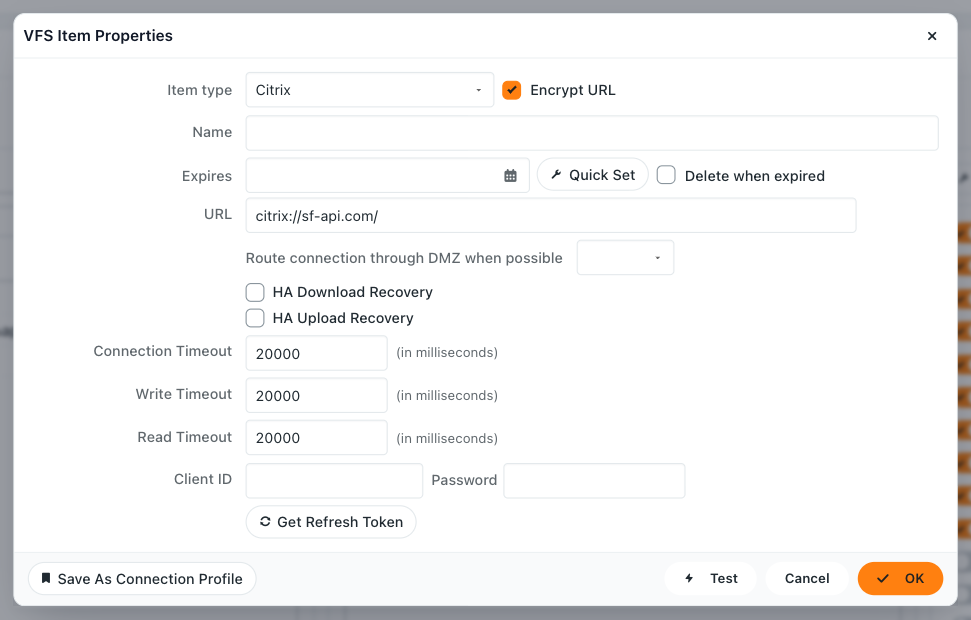
At ShareFile: an API key#
-
Open ShareFile's page for API keys (
api.sharefile.com, "Get an API key") and sign in. -
Make a key for your application. As Redirect URI, enter the address of your server's web interface followed by
?command=register_citrix_api:https://files.example.com/?command=register_citrix_apiShareFile accepts only addresses with https. You must therefore be logged in to the CrushMFT admin pages over HTTPS while you make the item.
-
Note the Client ID and the Client Secret.
In the item#
-
Choose the item type Citrix. The address is
citrix://sf-api.com/. -
Join the client ID and the secret with a tilde, and paste the whole text into the field Client ID:
CLIENTID~CLIENTSECRET -
Press Get Refresh Token. A window "Citrix Oauth" shows a code for this sign-in; press OK.
-
A ShareFile window opens. Sign in with the ShareFile account whose folders the item shall show, and allow the access.
-
The Password of the item is filled in with the token.
-
Press Test.
What to expect#
- The item shows what the signed-in account sees in ShareFile: its personal folders and the shared folders it may use. Sign in with an account made for this purpose, with rights on just those folders.
- The token belongs to that account. It stops when the account is disabled, when its password is reset by an administrator, or when the API key is deleted.
- ShareFile has rules for names; files with characters it does not allow are refused.
A server behind a proxy or a strict firewall must be let out to secure.sharefile.com, to sf-api.com and to your account's own address, yourcompany.sharefile.com and yourcompany.sf-api.com.
The options every type has are on Advanced options of a VFS item.
When it does not work#
| What you see | Usually |
|---|---|
| ShareFile refuses the redirect | the redirect URI of the key is not exactly your browser's address plus ?command=register_citrix_api; or you are on http |
| nothing happens after the sign-in | the field Client ID holds only the ID, without ~ and the secret |
| the token is refused later | the account, or the key, was removed |