Settings#
Settings is the second tab of a user in the User Manager: how long the user may stay, how fast and how much they may transfer, and a number of switches about how files are handled for them.
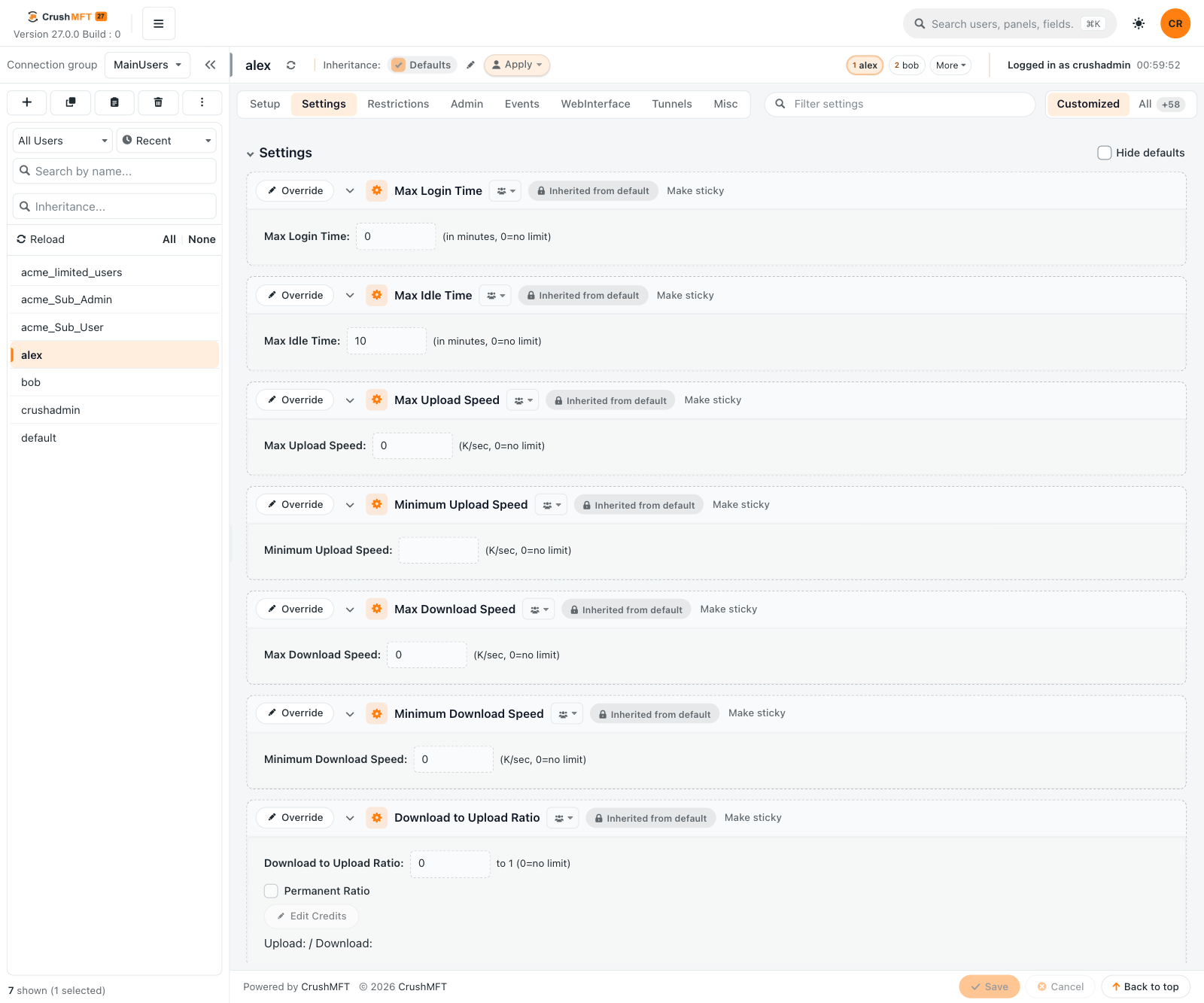
Like everything on a user these are inherited: on a new user every card says Inherited from default. Change them on default for everybody, and use Override on one user for an exception.
Time#
| Setting | Unit | What it does | New server |
|---|---|---|---|
| Max Login Time | minutes, 0 = no limit | the longest a session may last, however busy it is | 0 |
| Max Idle Time | minutes, 0 = no limit | a session that does nothing for this long is ended | 10 |
Speed#
| Setting | Unit | What it does | New server |
|---|---|---|---|
| Max Upload Speed, Max Download Speed | K per second, 0 = no limit | the fastest this user's transfers may go | 0 |
| Minimum Upload Speed, Minimum Download Speed | K per second, 0 = no limit | a transfer that stays slower than this is ended. Against connections that hold a slot and send almost nothing. | not set, 0 |
Ratio#
| Setting | What it does |
|---|---|
| Download to Upload Ratio | "to 1", 0 = no limit. With 3, a user may download three times what they uploaded. |
| Permanent Ratio | the credit is kept from one session to the next. Without it every session starts at zero. |
| Edit Credits | shows the bytes uploaded and downloaded so far and lets you change them |
How much#
Each limit is in K (amounts) or files (counts); 0 or empty means no limit.
| Setting | Limits |
|---|---|
| Max Upload Individual File Size | the size of one uploaded file |
| Max Upload Amount Per Session, Per Day, Per Month | what the user may upload in all |
| Max Download Amount Per Session, Per Day, Per Month | what the user may download in all |
| Max Upload Count Per Session, Per Day, Per Month | how many files they may upload |
| Max Download Count Per Session, Per Day, Per Month | how many files they may download |
The day and month cards have a Clear ... Transfer Amount or Clear ... Transfer Count button, which sets what was counted so far back to zero: use it to let somebody go on who has hit their limit.
How much a user may keep is a quota, not one of these: see the VFS editor and the two quota settings below.
Quota#
| Setting | What it does |
|---|---|
| User level quota MB | one quota for the user as a whole. Empty: none. A quota that is set on an item of the VFS wins over this. |
| Dir to use for Quota | the folder whose content is counted, when it is not the item itself. Leave it empty; ../ counts the folder above. The page itself warns to be careful with it. |
How the used amount is counted is set for the server in Quota.
Listings and transfers#
| Setting | What it does | New server |
|---|---|---|
| Disable Partial Download | a download must start at the beginning of the file: no resuming, no fetching of pieces | off |
| Enable Directory Size Calculation, Depth | listings show the size of what is in each folder, counted down to that depth. Slow on large trees. | off, 1 |
| Enable Directory Count Calculation | listings show how many items each folder holds | off |
| Use 'ls-la' for directory listings | on macOS, Linux and Unix, listings are taken from the system's ls -la, which shows the real owners and permissions |
off |
| Rename overwrite | a rename onto a name that exists replaces that file. Off: it is refused. | off |
| Track deleted sub items | when a folder is deleted, each item in it is recorded as deleted too, for events and reports | off |
| Allow '.zipstream' Expansion | an upload whose name ends in .zipstream is unpacked as it arrives: one stream brings many files |
off |
| Allow '.zipstream' Expansion on DMZ | the unpacking is done on the DMZ server | off |
| Enable CrushClient Agent Mode | the account is for a CrushClient that runs as an agent | off |
AS2#
| Card | What it is |
|---|---|
| AS2/3 Decryption Key, AS2/3 Signature Verification Key | the keys used for AS2 messages of this user: see A user's keys and certificates |
| Unique AS2 filenames | a unique id is added to the name of each file that comes in by AS2, so that two messages with the same file name do not overwrite each other |
| Process AS3 Files | files that come in by FTP are treated as AS3 messages |
Reverse notifications#
Enable subscribe reverse notification event lets the user subscribe to changes in folders. It needs an event to act as the template: see Reverse events. Without one the card says so and points to the Events tab.