Status#
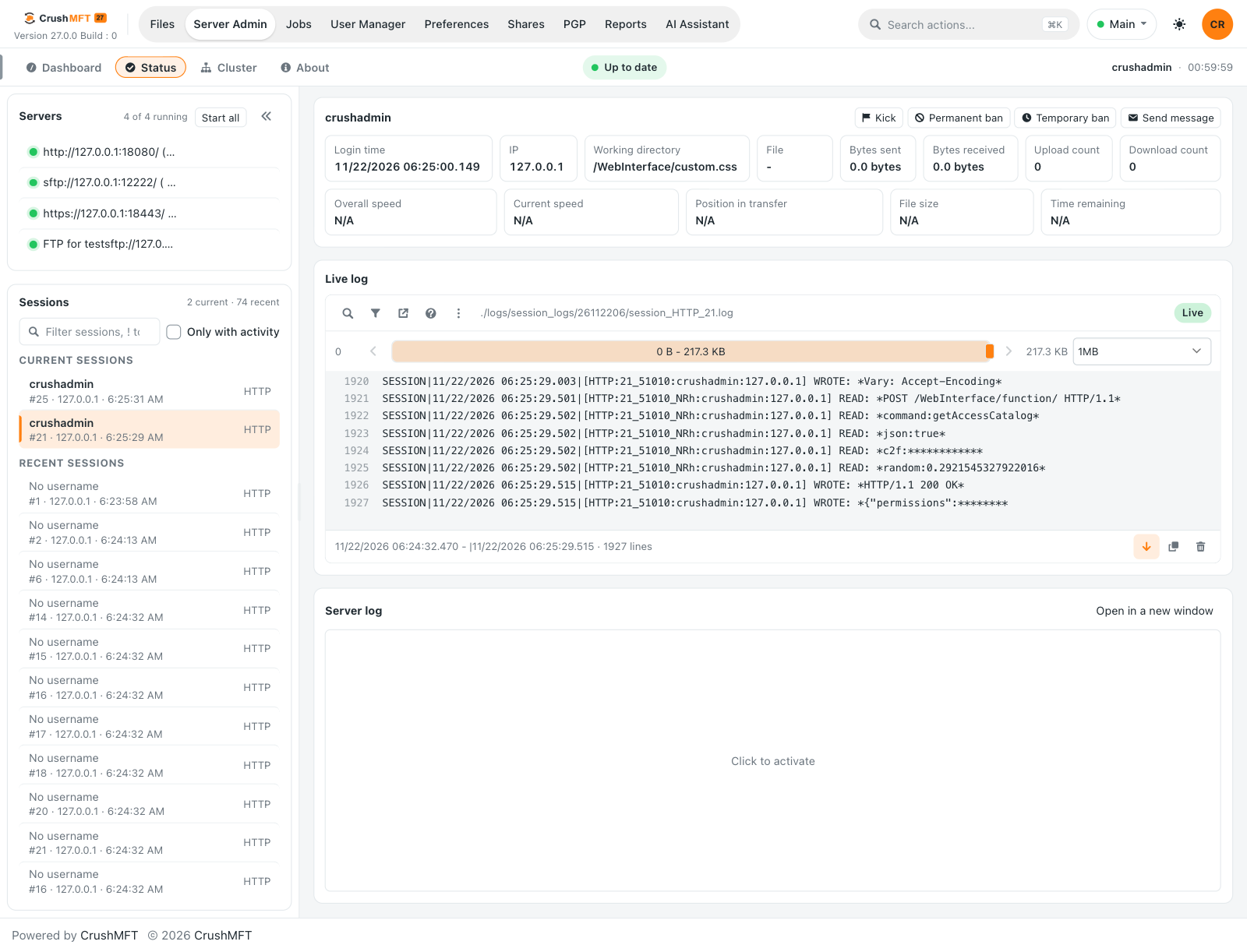
The Status section of Server Admin is the working view of a running server: its listeners with a start and a stop for each, everybody who is connected, what one session is doing, and the log as it is written.
Servers#
The list at the top left has one line per listener, as they are set up in IP / Servers: its address, its kind, whether it is running, how many users are connected to it, and how many connections it has handled since the server started. A green dot means running. The heading counts them: "3 of 3 running".
Move the mouse over a line for its three buttons:
| Button | What it does |
|---|---|
| Start | starts a listener that is stopped |
| Stop | stops the listener, after a question: "Stopping ... disconnects every session on it. No one can connect to it until it is started again." |
| Restart | stops and starts it, after a question: "Restarting ... disconnects every session on it. Users can reconnect once it is back up." |
Start all starts every listener that is stopped. The double arrow folds the left column away to give the right side the whole width.
A stopped listener stays in the list as "is stopped", and the heading counts one less.
Warning
Do not stop the listener you are connected through yourself: your own browser session goes with it, and you need another way in to start it again.
Sessions#
Below the servers is everybody who is or was connected.
| Part | Shows |
|---|---|
| Current sessions | the sessions that are connected now: the user name, the session's number, the address it comes from, when it began, and the protocol |
| Recent sessions | up to a hundred that ended lately. A connection that never logged in is listed as "No username". |
| Filter sessions | narrows both lists as you type |
| Only with activity | shows only the sessions that did something |
Click a session to open it on the right.
One session#
| Field | Shows |
|---|---|
| Login time, IP | when the session began and where it comes from |
| Working directory | the folder, or for a web session the address, it asked for last |
| File | the file that is being transferred, if any |
| Bytes sent, Bytes received, Upload count, Download count | what the session has moved so far |
| Overall speed, Current speed | of the transfer that is running |
| Position in transfer, File size, Time remaining | how far that transfer is |
The four buttons act on the session's user:
| Button | What it does |
|---|---|
| Kick | ends the session. The user can log in again. |
| Temporary ban | ends it and bans the address for a time |
| Permanent ban | ends it and bans the address for good. Bans are kept and lifted in Banning. |
| Send message | sends a text to the session |
Live log#
Under the fields is the log of that one session, which the server keeps in a file of its own, followed live. The toolbar searches, filters, opens the log in a window of its own and explains the search; the bar below it moves through the file; the buttons at the bottom right follow the newest line, copy, and clear.
Server log#
The lower right panel is the server's main log, live. It starts when you click into it ("Click to activate"), so that it costs nothing while you do not look at it. Open in a new window gives it a window of its own.
What is written to the log, and how detailed, is set in Logging.