Find task#
A Find lists a folder and puts what it finds on the job's list of items. It is the first task of most jobs that are not started by an upload: nothing else in a job looks for files by itself.
The folder can be anywhere the server can reach: its own disk, or another server by SFTP, FTP, S3, SMB, WebDAV and the rest. See VFS for the kinds of address.
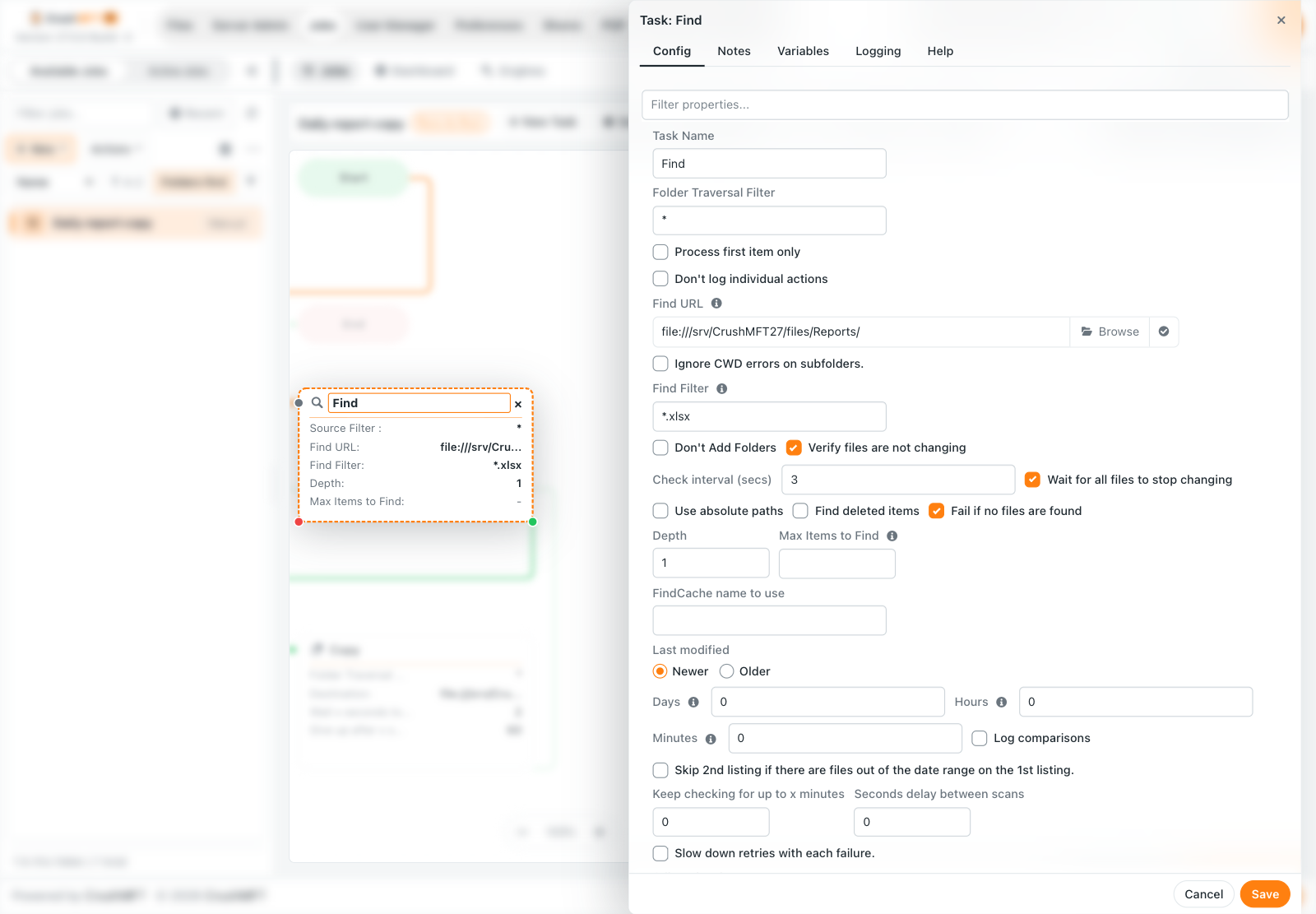
Fields#
| Field | What it does | On a new task |
|---|---|---|
| Find URL | the folder to list, as an address: file:///data/in/, sftp://user@host/out/. Browse picks it; Test tries the connection. The fields for that kind of address appear below: see Conditions on a task. |
|
| Find Filter | which of the listed items are kept. A pattern with * and ?, compared with the item's whole address, not only its name. |
* |
| Depth | how many levels of folders to list. 1 is the folder itself, without what is in its subfolders. | 1 |
| Max Items to Find | stops after so many. Empty or 0: no limit. | empty |
| Don't Add Folders | folders are looked into but not put on the list | off |
| Use absolute paths | {path} of each item is its full path on that server. Unticked, it is the path below the Find URL: 2026/a.csv for a file two levels down, which is what a Copy needs to rebuild the folders elsewhere. |
off |
| Ignore CWD errors on subfolders. | a subfolder that cannot be opened is skipped; without it the Find fails | off |
| Route connection through DMZ when possible | the connection is made from a DMZ server |
The filter#
The filter sees addresses like file:///data/in/abc_folder/abc.txt. So:
| Filter | Finds |
|---|---|
*.csv |
every item whose address ends in .csv |
*/abc* |
everything in a folder whose name begins with abc, and every file that does |
*/abc_folder/abc* |
only the files beginning with abc in that folder |
REGEX:.*/INV_[0-9]{6}\.pdf |
with REGEX: in front, the rest is a regular expression |
Variables work in the filter and in the URL: file:///data/in/{yyyy}{MM}{dd}/.
Files that are still being written#
| Field | What it does | On a new task |
|---|---|---|
| Verify files are not changing | the Find lists the folder twice and keeps only the items whose size and date were the same both times | on |
| Check interval (secs) | the wait between the two listings | 3 |
| Wait for all files to stop changing | if anything differed, nothing is handed on from this listing: the batch is taken whole or not at all | on |
This is why even a small Find takes three seconds. Raise the interval for slow senders. A file that an upload to this server is still writing is left out as well.
By date#
| Field | What it does |
|---|---|
| Last modified: Newer / Older, Days, Hours, Minutes | only items changed within that time, or longer ago than that. All three at 0: any age. |
| Adjust time by … hours | for a server whose clock, or time zone, is off against this one |
| Log comparisons | writes each date comparison to the log, to see why a file was or was not taken |
| Skip 2nd listing if there are files out of the date range on the 1st listing. | saves the second listing when the first already shows the batch is not ready |
Waiting for files#
| Field | What it does | On a new task |
|---|---|---|
| Fail if no files are found | an empty result is a failure: the task's red line is taken | on |
| Keep checking for up to x minutes | when nothing was found, look again until this time is over | 0: once |
| Seconds delay between scans | the pause between the looks | |
| Slow down retries with each failure. | each pause is twice the one before | off |
The errors are "No items were found." and "No stable items were found.".
Untick Fail if no files are found for a job in which an empty folder is normal: otherwise every such run ends "completed with errors".
Only new files#
| Field | What it does |
|---|---|
| FindCache name to use | items a FindCache of that name remembers are left out. For fetching each file once from a folder you may not delete from. |
| Find deleted items | with a cache: also hands on what the cache remembers and the folder no longer has, each marked {find_deleted} true |
What it hands on#
The items it was given, and behind them the items it found. A second Find in a job adds to the list; it does not replace it. To start afresh, put an Exclude with the filter * before it.
Each found item has {url}, {name}, {path}, {size}, {type} (FILE or DIR) and its date, for the tasks that follow.
The Source Filter#
The Source Filter at the top is not the Find Filter. It decides for which of the items the Find was given it looks at all, when the Find URL holds a variable of the item: a Find with the URL {url} lists each folder on the list. Leave it at *.
Things to know#
- Depth costs. Each level is a listing of every folder on it. On another server, a depth of 20 over a large tree takes minutes. See Jobs with a million items.
- A Find does not lock anything. Between the Find and the Copy behind it a file can change or go. The check for changing files makes that rare, not impossible.
- In the log: "Found 7 in folder … of which 2 matched the filename patterns" tells you at once whether the filter is the problem.