API settings#
The API section of Preferences turns the server's API on and off and decides who may call it, with what kind of login, and how much. What the API is and how to use it is in the API pages; this page is about the switches.
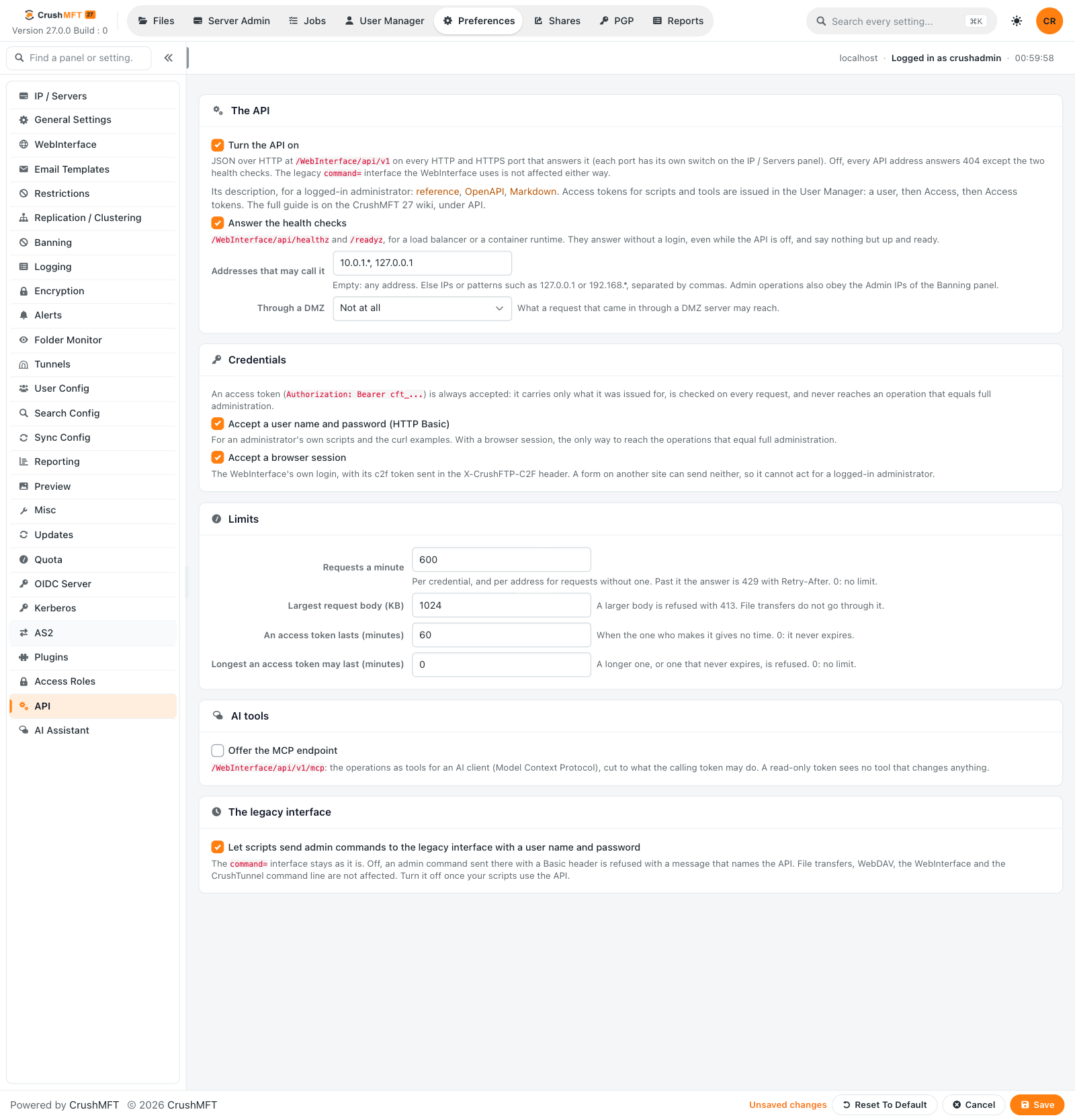
Every setting is part of Save at the bottom (saving) and counts within seconds, without a restart.
The API#
| Setting | Key | What it does | Default |
|---|---|---|---|
| Turn the API on | api_enabled |
the server answers at /WebInterface/api/v1, on every HTTP and HTTPS port that has the API switched on in IP / Servers. Off: every API address answers 404, except the two health checks. |
off |
| Answer the health checks | api_health |
/WebInterface/api/healthz and /WebInterface/api/readyz answer without a login, also while the API is off. They say {"status":"ok"} and {"status":"ready"} and nothing else. Off: they answer 404 too. |
on |
| Addresses that may call it | api_allowed_ips |
the addresses the API answers, separated by commas, with * for any part: 10.0.1.*, 127.0.0.1. Empty: any address. Operations of an administrator obey the Admin IPs of Banning as well. |
empty |
| Through a DMZ | api_from_dmz |
what a request that came in through a DMZ server may reach: Not at all, Only a user's own files and account, or Everything | Not at all |
The web interface does not use this API: it works the same whether the API is on or off.
The page links to the API's own description on this server, for an administrator who is logged in: the reference, the OpenAPI file and the same as Markdown. See Description and health.
A call from an address that is not on the list is answered with 403 (shortened here):
{"status":403,"code":"forbidden","detail":"The API is not open to this address (api_allowed_ips)."}
Credentials#
An access token is always accepted. The two switches decide about the other two ways to log in. See Authentication and Access tokens with a time limit.
| Setting | Key | What it does | Default |
|---|---|---|---|
| Accept a user name and password (HTTP Basic) | api_basic_auth |
a call may log in with a user name and password. This is how an administrator's own scripts and the curl examples work, and besides a browser session it is the only way to the operations that equal full administration. |
on |
| Accept a browser session | api_cookie_sessions |
a call may use the login of the web interface, with its c2f token in the header X-CrushMFT-C2F. A form on another web site can send neither, so it cannot act for an administrator who is logged in. |
on |
With the first one off, a call with a user name and password gets (shortened):
{"status":401,"code":"unauthenticated","detail":"Basic credentials are turned off for the API (api_basic_auth). Use an access token."}
A token carries only what it was issued for and never reaches an operation that equals full administration. If you turn both switches off, nobody can do those operations through the API.
Limits#
| Setting | Key | What it does | Default |
|---|---|---|---|
| Requests a minute | api_rate_per_minute |
how many calls one credential may make in a minute; calls without a credential are counted by address. Past it the answer is 429 with a Retry-After header that says how many seconds to wait. 0: no limit. |
600 |
| Largest request body (KB) | api_max_body_kb |
a call with a larger body is refused with 413: "The body is larger than 1024 KB." File transfers do not go through it. | 1024 |
AI tools#
| Setting | Key | What it does | Default |
|---|---|---|---|
| Offer the MCP endpoint | api_mcp |
/WebInterface/api/v1/mcp offers the operations as tools to an AI client that speaks the Model Context Protocol. A client sees only the tools its credential may use: a read-only token sees none that changes anything. |
off |
It needs the API turned on, and a login like any other call. See AI agents.
The legacy interface#
Older scripts talk to the server with command= requests, the interface the web interface itself uses. It stays as it is. This switch is about one use of it only.
| Setting | Key | What it does | Default |
|---|---|---|---|
| Let scripts send admin commands to the legacy interface with a user name and password | legacy_admin_basic_auth |
off: an admin command sent there with a Basic header is refused. File transfers, WebDAV, the web interface and the CrushTunnel command line are not affected. | on |
The refusal names the way to go:
FAILURE:Access Denied. Admin commands by a Basic header login are switched off on this server (legacy_admin_basic_auth): use the API at /WebInterface/api/v1, with Basic or an access token.
Turn it off once your scripts use the API. See The legacy interface.
Checking from a command line#
With the API on, this shows that it answers and who you are to it:
curl -u admin https://files.example.com/WebInterface/api/v1/whoami
Without a login the answer is 401, "Send an access token: Authorization: Bearer cft_...". An answer of 404 with "There is nothing here." means the API is off, or off for the port you called.