Banning#
Banning, a section of Preferences, decides which addresses may connect at all, and when the server shuts an address or a user name out by itself. A banned address is refused on every listener and every protocol, before any login.
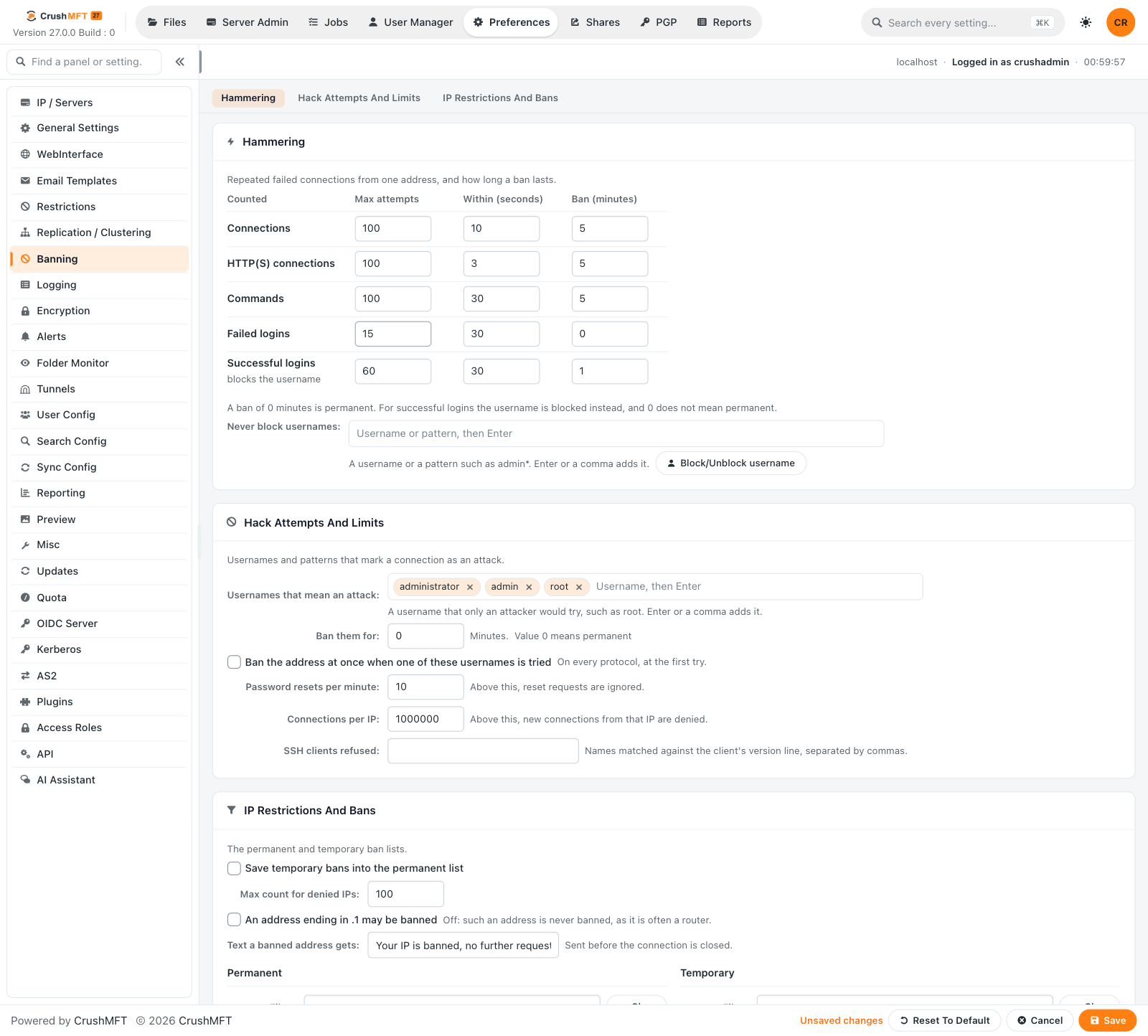
| Panel | Holds |
|---|---|
| Hammering | five limits on how often an address or a user name may try |
| Hack Attempts And Limits | user names that only an attacker tries, and two more limits |
| IP Restrictions And Bans | the lists of allowed and denied addresses, the addresses that are never banned, who may administer, and countries |
How a connection is checked#
For every new connection the server looks at the address it comes from, in this order:
- The Temporary list, then the Permanent list. In each, the first entry the address falls into decides: allow or deny.
- The IP restrictions of the listener it came in on (IP / Servers).
- For a public address, its country (Banning by country).
- An address in Never ban these IPs is let in, whatever steps 1 to 3 said.
A connection that is let in is then counted for the hammering limits.
Hammering#
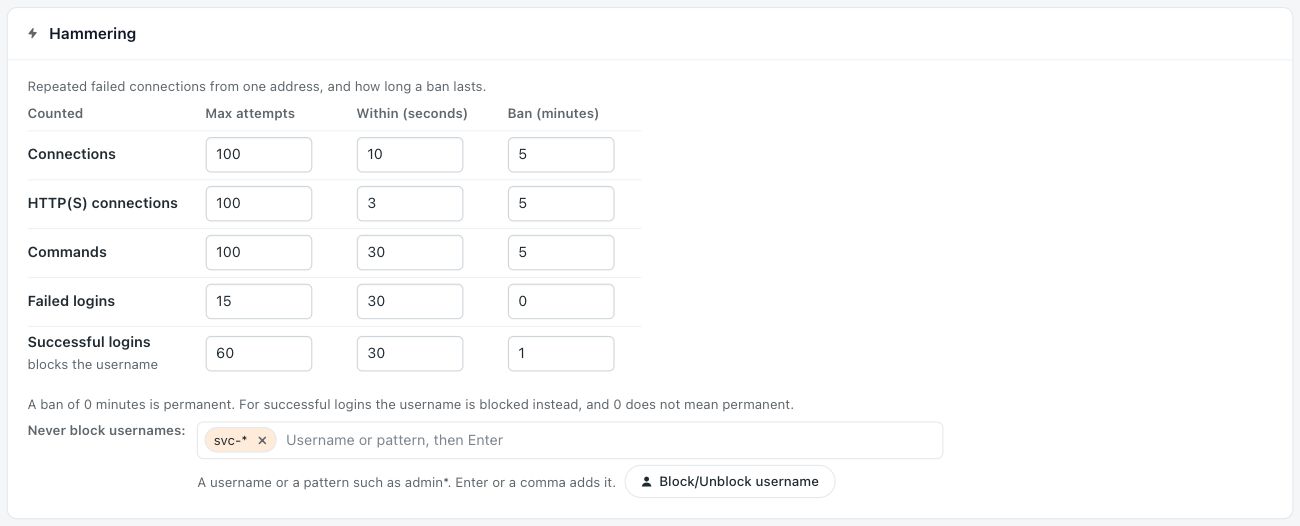
Each row is a limit: at most so many attempts within so many seconds. Who goes over it is banned for the minutes in the last column.
| Counted | What is counted | Default | Over the limit |
|---|---|---|---|
| Connections | connections from one address to listeners that are not web listeners: FTP, SFTP and so on | 100 in 10 seconds | the address is banned for 5 minutes |
| HTTP(S) connections | connections from one address to web listeners | 100 in 3 seconds | the address is banned for 5 minutes |
| Commands | commands that failed in one session: refused, not found, not allowed | 100 in 30 seconds | the address is banned for 5 minutes |
| Failed logins | logins with a wrong name or password, counted per address and per user name | 15 in 30 seconds | the address is banned for good (0 minutes), and the user name is blocked for a minute |
| Successful logins | logins of one user name, from anywhere | 60 in 30 seconds | the user name is blocked for 1 minute |
- A ban of 0 minutes is permanent. The address is written into the Permanent list as a Deny entry, with the date and the reason.
- A ban of more than 0 minutes is temporary. It is lifted by itself when the time is over.
- Within (seconds) set to 0 turns the two connection rows off.
- Failed logins is two limits in one row. The address that fails too often is banned. A user name that is failed too often, from however many addresses, is blocked: nobody can log in under it until the time is over, not even with the right password. For the name, 0 minutes counts as one minute. Each of the three fields may hold two numbers separated by a comma, such as
15,40: the first is for the user name, the second for the address. - Successful logins never bans an address. It blocks the user name, to stop a script that logs in over and over. With 0 minutes only the login that went over the limit is refused.
- In the first minute after the server starts, a temporary ban lasts only five seconds.
Every automatic ban is written to the log ("---IP Banned---") and can raise an alert.
| Setting | What it is |
|---|---|
| Never block usernames | user names the Successful logins row never blocks: type a name or a pattern such as svc-* and press Enter. For accounts of programs that log in very often. |
| Block/Unblock username | blocks a user name by hand, or lifts a block, see below |
Blocking a user name by hand#
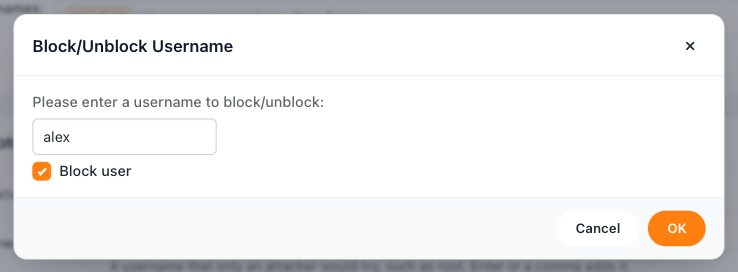
Block/Unblock username asks for a user name. With Block user ticked, the name is blocked for 24 hours on this server and on its DMZ servers: nobody can log in under it. Without the tick, a block on that name is lifted, whether you set it or the server did. It happens at once, when you press OK; there is nothing to save. A block is not a setting: it is gone when the server restarts. To shut an account out for good, disable it in the User Manager.
Hack Attempts And Limits#
| Setting | What it does | Default |
|---|---|---|
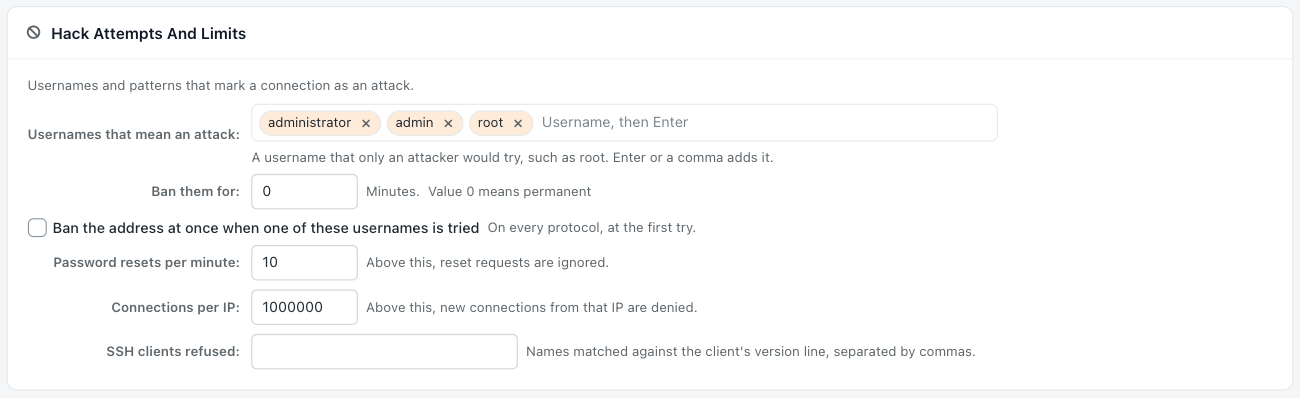
| Usernames that mean an attack | a login attempt under one of these names bans the address, whatever the password. Type a name and press Enter. | administrator, admin, root |
| Ban them for | the minutes of that ban. 0 is permanent. | 0 |
| Password resets per minute | how many password resets the server accepts in a minute, from everyone together. Above this, reset requests are ignored. | 10 |
| Connections per IP | how many connections one address may have open at the same time. Above this, new connections from that address are refused; the address is not banned. | 100 |
Warning
Before you give a real account one of these names, take the name off the list. Otherwise that user is banned the moment they log in.
An entry of the list can be more than a plain name:
| Entry | Means |
|---|---|
backup*, test? |
a pattern: * stands for any text, ? for one character. Upper and lower case are the same. |
URL: and a pattern, such as URL:*/wp-login.php* |
a web request for a matching path, or to a matching host name, bans the address. For the addresses that scanners ask for and your server never has. |
the address of a file, such as file://{working_dir}hack_usernames.txt |
the names are read from that file, one per line. Lines that start with # are skipped. |
anonymous cannot be put on the list: "The Anonymous user cannot be added to the hack attempt list."
IP Restrictions And Bans#
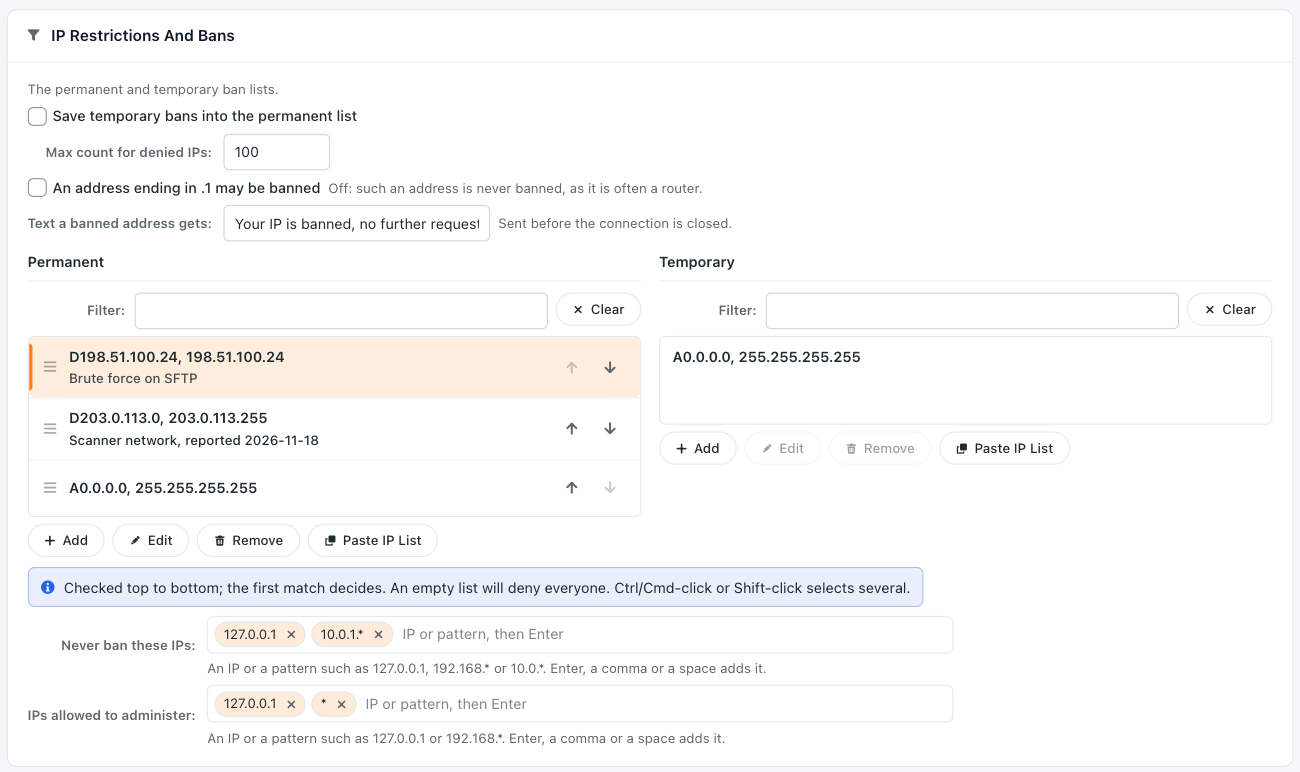
| Setting | What it does | Default |
|---|---|---|
| Save temporary bans into the permanent list | where the server keeps the temporary bans it sets. Off: in memory, shown in the Temporary list, forgotten when the server restarts. On: in the Permanent list, saved with the settings, so they hold over a restart until their time is over; the Temporary list is not shown. | off |
| Max count for denied IPs | the most Deny entries a list keeps. When there are more, the oldest at the bottom are removed. Raise it before you keep a long list of your own. | 100 |
| Permanent | the list of addresses that are allowed and denied, see below | one entry that allows everyone |
| Temporary | the temporary bans in force right now | |
| Never ban these IPs | addresses that are never banned and always let in, see below | 127.0.0.1 |
| IPs allowed to administer | the addresses from which the server may be administered. 127.0.0.1, the server machine itself, is always allowed. To limit administration to your own network, remove * and add your addresses or patterns such as 10.0.1.*. |
127.0.0.1, * (everywhere) |
| GeoIP Country Restrictions | see Banning by country | none |
The Permanent list#
Each entry is Allow or Deny, a first and a last address, and a reason. An entry for one address has the same address twice.
The list is read from the top, and the first entry an address falls into decides. A new server has one entry, A 0.0.0.0, 255.255.255.255: everyone is allowed, IPv6 addresses too. Put your Deny entries above it. To let in only some networks, put Allow entries for them first and remove the entry that allows everyone: an address that falls into no entry is refused.
An empty list would refuse everyone. The panel does not let that happen: when the last entry is removed, it puts the entry that allows everyone back and says so.
| Control | What it does |
|---|---|
| Filter, Clear | shows only the entries that contain what you type |
| the handle, ↑, ↓ | drag an entry, or move it up or down. The order matters. |
| Add | adds an entry, see below |
| Edit | changes the selected entry |
| Remove | removes the selected entries, after asking. Ctrl-click, Cmd-click or Shift-click selects several. |
| Paste IP List | adds many entries at once, see below |
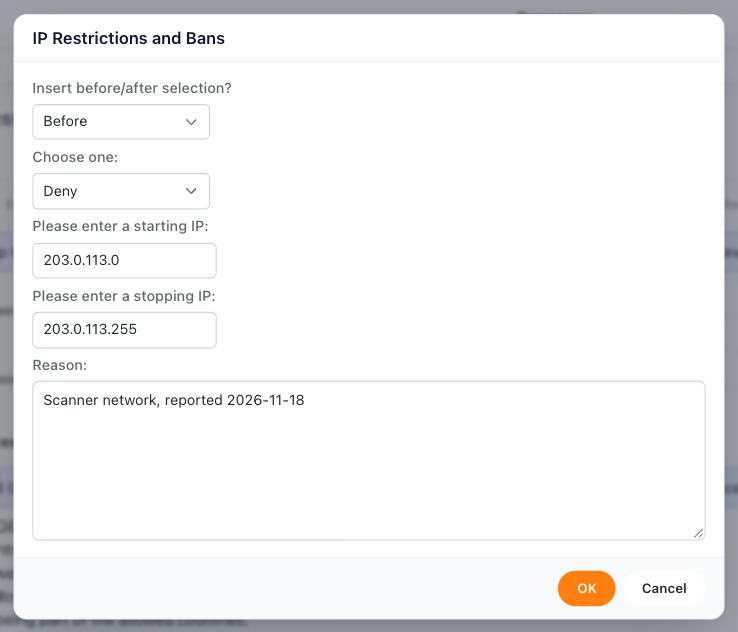
| Field | What it is |
|---|---|
| Insert before/after selection? | where the new entry goes, seen from the selected one |
| Choose one | Allow or Deny. Ban is the same as Deny. |
| Please enter a starting IP, Please enter a stopping IP | the first and the last address of the range. The same address twice for one address. |
| Reason | a note for yourself. It is also what the log says when the entry refuses a connection. |
An address inside an Allow entry of your own, other than the one that allows everyone, is never banned automatically.
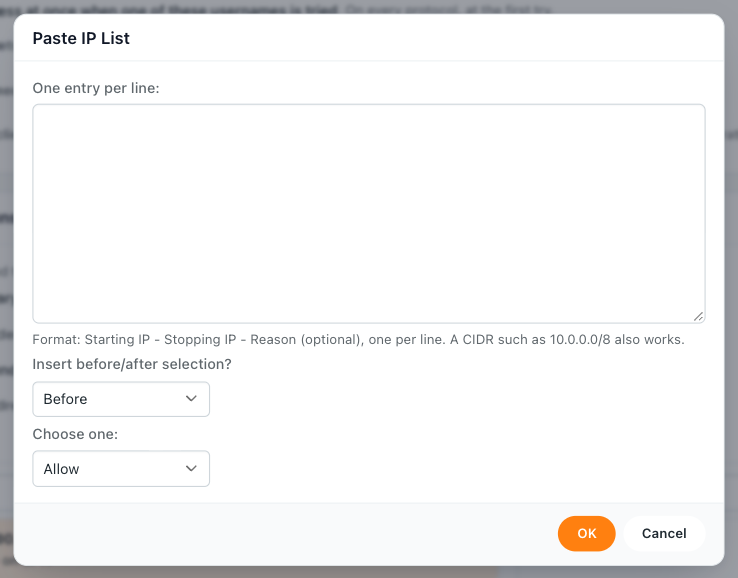
Paste IP List takes one entry per line, as first address - last address - reason; the reason may be left out. A network in CIDR form such as 10.0.0.0/8 works too. Lines that are neither are skipped, and the panel says how many.
The Temporary list#
The Temporary list shows what the server has banned for a time: the address, and the date and the reason as its note. It changes while you look at it. To lift a ban before its time, remove the entry and press Save.
Never ban these IPs#
Addresses and patterns, such as 127.0.0.1, 192.168.* or 10.0.*. An address on this list:
- is never banned by the server, whatever it does;
- is let in even when the lists or the country rules say no.
Put the addresses of your own monitoring and of your load balancer here: many users behind one address look like hammering.
Two more things are never banned by the server itself:
- an address that ends in
.1. That is usually a router, and banning it would shut out everyone behind it. - everything, when the list is
*or the single worddisabled: the server then sets no bans at all.
Spaces and slashes are not accepted here ("The value entered is invalid, please use a pattern as suggested."), so write 10.0.*, not 10.0.0.0/16. While the list is invalid, Save refuses: "Please fix the never ban list first."
Lifting a ban#
| What is banned | How to lift it |
|---|---|
| an address, for a time | remove it from the Temporary list and Save, or wait |
| an address, for good | remove its Deny entry from the Permanent list and Save |
| a user name | Block/Unblock username, without the tick |