File revisions#
When a file is replaced, the old content is gone. With revisions turned on for a folder, the server keeps it: each time a file there is replaced or deleted, the version that was there is put aside, and the last few versions can be looked at and fetched again.
Turning it on#
Revisions are a setting of a folder of a user's VFS.
-
In the VFS editor, select the item and press Advanced.
-
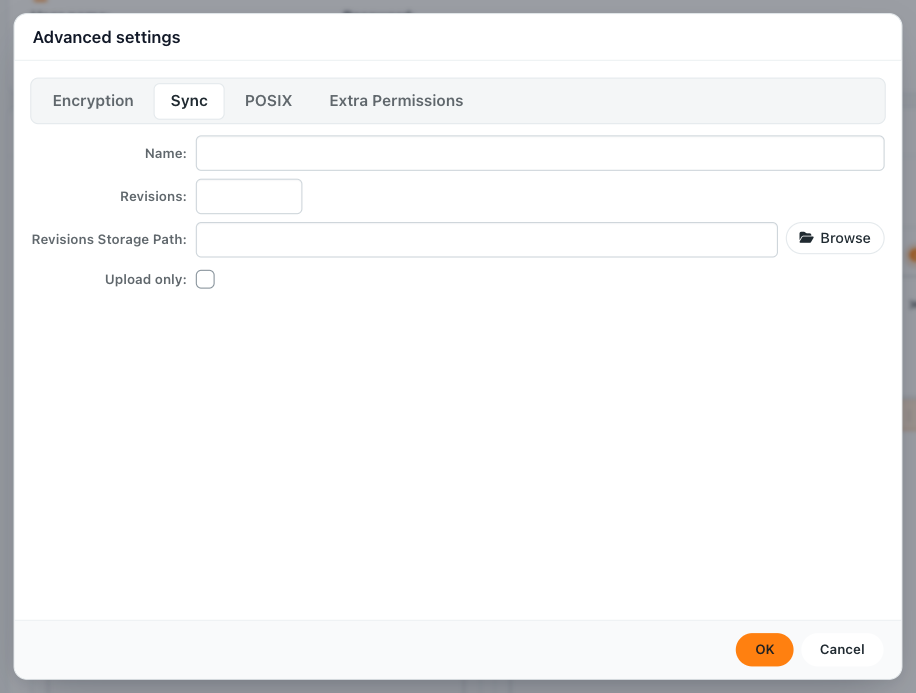
Open the tab Sync.
-
Fill in:
Field What to enter Revisions how many earlier versions to keep of each file. 3 is a sensible start. 0 keeps none. Revisions Storage Path a folder on the server's own disk in which the versions are kept. It must not be inside a folder that users reach. Name only for folders that are also kept in step with CrushSync: the name under which the folder is offered -
Give the users the button Show History: see Buttons.
-
Save the user.
Set it on a template to give the same to a group of users. Users who share one real folder should also share the storage path, so that there is one history of a file, not one per user.
What is kept#
Under the storage path, the server makes a folder for every file that was ever replaced, named like the file's path, with numbered folders in it:
| Folder | Holds |
|---|---|
0 |
the version before the present one, and a small file info.XML that says who replaced it and when |
1 |
the one before that |
| … | up to the number in Revisions |
When a file is replaced, the numbers move up by one, the version that was in the folder becomes 0, and the oldest falls out. The same happens when a file is deleted or renamed away: its last content is kept as a revision.
On a local folder, the old version is moved, which takes no time. On other storage it is copied to the server's disk first.
Getting a version back#
In the web interface, the user selects the file and presses Show History. The page lists the versions with their dates and who made the change; each can be downloaded. To put an old version back, the user downloads it and uploads it again, which in turn makes the present version a revision.
An administrator can also fetch a version straight from the storage path.
Things to know#
- Revisions take space: up to the number of revisions times the size of every file that changes. A folder with large files that are replaced daily needs a storage path with room. This space is outside the user's quota.
- Only changes that go through the server make revisions. A file that is changed on the disk by another program is not noticed.
- Revisions are not a backup. They live on the same server, and they keep a few versions, not a history without end.
- A server in DMZ mode keeps none: the internal server does.
- To see who did what in a folder without keeping the content, see Folder and file history in WebInterface.