Content Security Policy#
With every web page and every answer, the server sends headers that tell the browser what the page may do: which other sites it may load scripts from, whether it may be shown inside another site, whether it must always be reached over HTTPS. They are set on the CSP tab of the WebInterface section of Preferences.
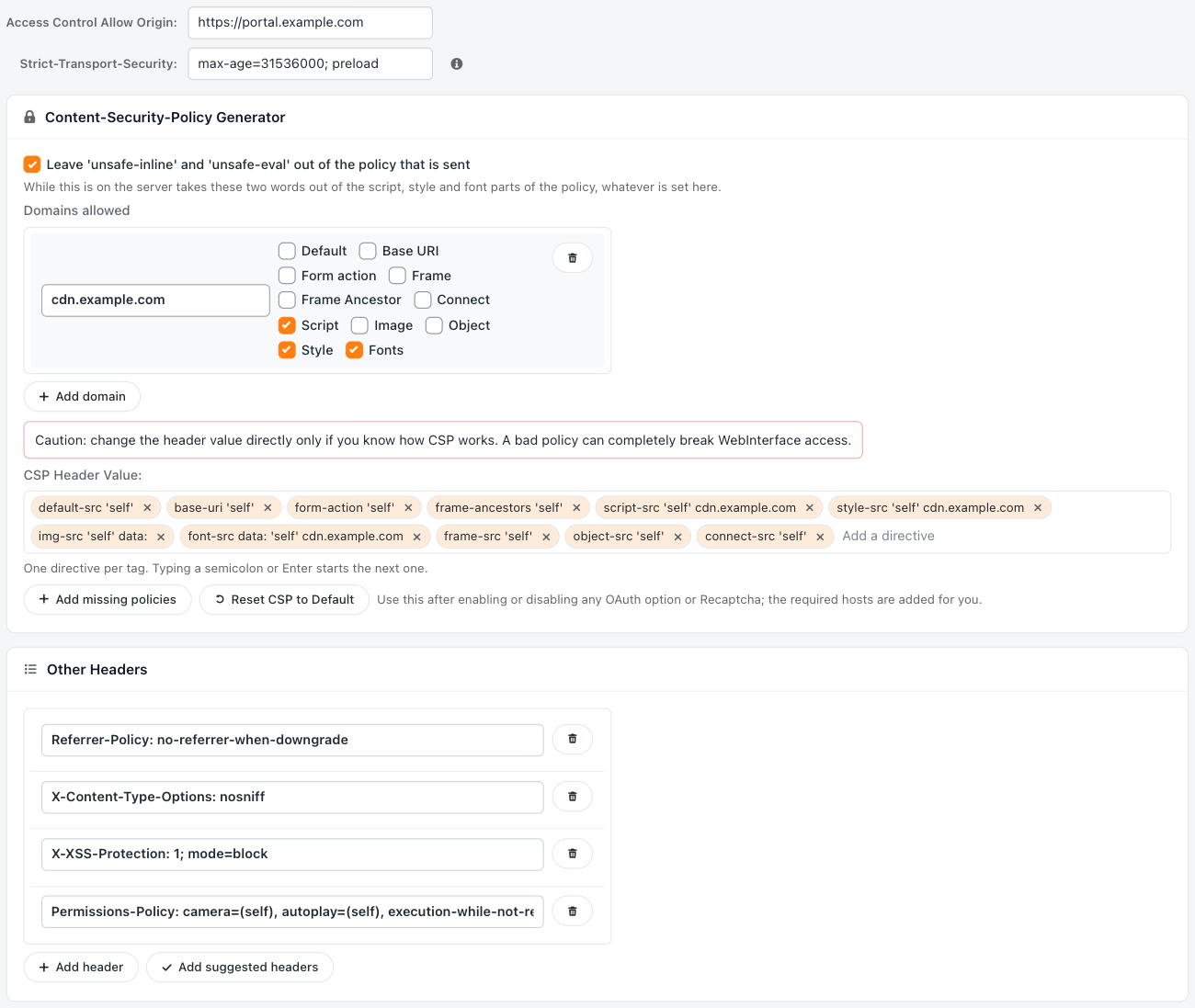
A new server is set up to allow nothing from outside itself. You come here when you add something that needs another site, such as a sign-in with Google or Microsoft, a script of your own from another server, or a web application on another address that talks to this server.
Warning
A wrong policy can lock everyone out of the WebInterface, administrators too: the browser then refuses to run the pages. Change one thing at a time, and keep a second browser window logged in while you try it.
The tab at a glance#
| Part | What it sets |
|---|---|
| Access Control Allow Origin | which other web sites may call this server from their pages |
| Strict-Transport-Security | tells browsers to use HTTPS only |
| Content-Security-Policy Generator | what the server's own pages may load, and from where |
| Other Headers | any further headers to send |
Access Control Allow Origin#
Browsers do not let a page of one site read answers from another site, unless that other site says it may. This field lists the sites that may: their addresses, separated by commas, as https://portal.example.com.
| Value | Means |
|---|---|
| empty | no other site may. This is the default. |
| one or more addresses | pages of these sites may call the server, with the login of the user who is looking at them |
a pattern with *, such as https://*.example.com |
every site that fits |
* alone |
any site may read what needs no login. Browsers never hand a logged-in answer to a page under *. |
A site that is not listed gets no permission, and the browser blocks its page from reading the answer.
Strict-Transport-Security#
What the server sends as the Strict-Transport-Security header (HSTS). A browser that has seen it uses HTTPS for this host for as long as max-age says, in seconds, even when the user types http://.
A new server sends max-age=31536000; preload, one year, from its first start. The field shows what the server sends: it is empty when the server sends none, as on a server that came from CrushFTP 11 without one. Empty the field and press Save to send no such header; Reset CSP to Default puts the one-year value back.
A browser ignores the header when the connection shows a certificate warning, so a server that still uses its own self-signed certificate does not lock browsers in. Once the server has a certificate browsers accept, every name it is reached under needs one: after a browser has seen the header over a trusted connection, it will not open the server without one for that year.
The Content-Security-Policy#
The policy is a list of directives. Each names a kind of thing a page may load and the places it may come from. 'self' stands for the server itself. A new server has:
default-src 'self'; base-uri 'self'; form-action 'self'; frame-ancestors 'self';
script-src 'self'; style-src 'self'; img-src 'self' data:; font-src data: 'self';
frame-src 'self'; object-src 'self'; connect-src 'self'
There are two ways to change it, and they show the same policy.
Domains allowed#
The easy way. Add domain adds a line: type the name of the other site, such as cdn.example.com, and tick what the pages may use from it.
| Tick | Directive | Lets the pages |
|---|---|---|
| Default | default-src |
use the site for everything that has no directive of its own |
| Base URI | base-uri |
use it as the base address of a page |
| Form action | form-action |
send forms to it |
| Frame | frame-src |
show its pages inside a frame |
| Frame Ancestor | frame-ancestors |
be shown inside a frame on that site |
| Connect | connect-src |
send requests to it from scripts |
| Script | script-src |
load scripts from it |
| Image | img-src |
load pictures from it |
| Object | object-src |
load plug-in content from it |
| Style | style-src |
load style sheets from it |
| Fonts | font-src |
load fonts from it |
In the picture, scripts, style sheets and fonts may come from cdn.example.com. The policy under it follows as you tick.
To let your own site show the WebInterface inside a frame, add that site and tick Frame Ancestor.
CSP Header Value#
The policy itself, one directive per tag. Type a directive and press Enter or a semicolon to add it; the × on a tag removes it. Change it here only when you know how a Content-Security-Policy works. What you type is kept as you typed it: a 'sha256-…' hash or a 'nonce-…' value only works with its capitals.
| Button | What it does |
|---|---|
| Add missing policies | puts back any directive of a new server's policy that is missing, and adds the sites that the sign-in methods you have turned on need: Google, Microsoft, reCAPTCHA. Use it after turning such a method on or off. What you added yourself stays. |
| Reset CSP to Default | after asking "Reset to defaults? This resets Strict-Transport-Security, the Content-Security-Policy and the other headers.", puts all three back to those of a new server |
Both only change the tab. Nothing is sent differently until you press Save.
What the server adds by itself#
When it sends the policy, the server adds to connect-src:
www.recaptcha.netandwww.gstatic.com, for reCAPTCHA on the login page;- the support server, while support sessions are turned on (WebInterface settings).
You do not see these in the tab, but a browser does.
Other Headers#
Further headers, each written as the browser gets it, Name: value. Add header adds an empty line, the bin beside a line removes it. At most 15 can be stored.
A new server sends:
| Header | Tells the browser |
|---|---|
Referrer-Policy: no-referrer-when-downgrade |
not to tell a plain HTTP site which page a link came from |
X-Content-Type-Options: nosniff |
to take the server's word for the type of a file |
X-XSS-Protection: 1; mode=block |
to stop a page when it detects a script injected through the address |
Permissions-Policy: camera=(self), autoplay=(self), … |
which device features the pages may use |
Add suggested headers adds those of the four that are missing. It does not change one that is there.
Note
Earlier servers got the Permissions-Policy in an older form, camera=self; autoplay=self; …, which browsers do not read. A server that still has that line as it came gets the form above at its next start. A line you changed is left as it is.
Checking what is sent#
Look at the headers of the login page with the developer tools of your browser, under Network, or with:
curl -s -D - -o /dev/null https://files.example.com/WebInterface/login.html