Importing users from CSV#
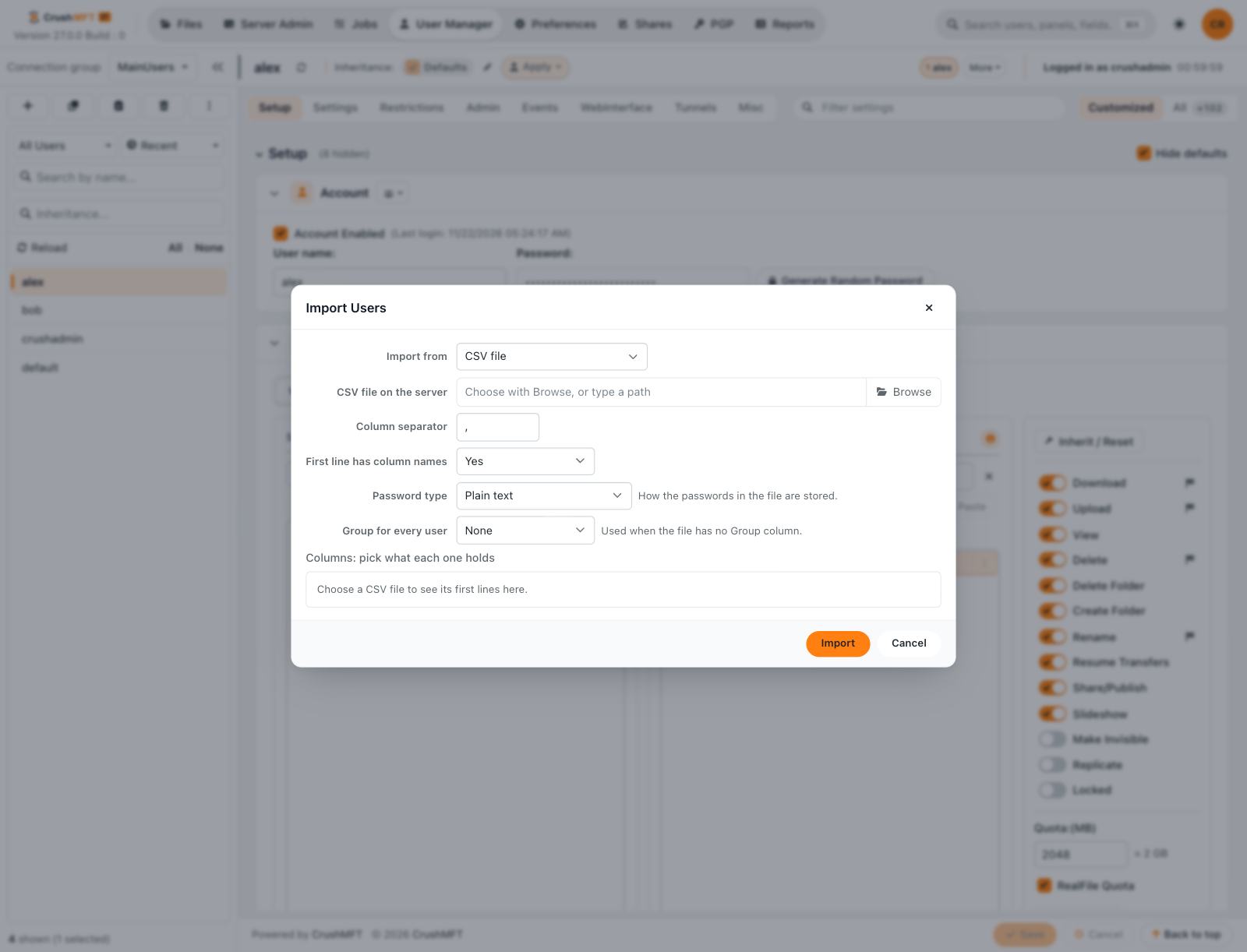
Many users at once come in from a CSV file: one line per user, with the columns you have. Import users is in the menu of the user list in the User Manager.
The file#
A plain text file on the server machine, such as:
username,password,email,first_name,last_name
carol,a-long-password,carol@example.com,Carol,Reed
dave,another-password,dave@example.com,Dave,Okoro
Put the file where the server can read it. It holds passwords: delete it when the import is done.
The dialog#
| Field | What it is |
|---|---|
| Import from | CSV file. The other entries are for other products: see Importing users from other servers. |
| CSV file on the server | the path of the file. Browse picks it. |
| Column separator | the character between the columns, a comma unless your file has another |
| First line has column names | Yes when the first line is a heading, as above |
| Password type | how the passwords in the file are stored: Plain text, or a hash that came out of another system: MD5 hash, SHA256, SHA512, SHA512CRYPT, SHA512CRYPT salted hash, MD5 salted hash, MD5 Crypt, PBKDF2-SHA256, BCrypt |
| Group for every user | a group that all imported users are put into. It is used when the file has no Group column. |
The columns#
When the file is chosen, its first lines are shown, with a list above every column. Choose what each column holds:
| Choice | The column holds |
|---|---|
| Username, Password | the login |
| Group | the group the user is put into |
| Email, First Name, Last Name | the user's details |
| Permissions | what the user may do in their home folder |
| Notes | a note about the user |
| Salt | the salt of a salted password hash |
| Home Folder | the folder the user gets |
| Custom Name Home Folder | a home folder with a name of its own for the user |
| Custom value... | any other setting of a user: you name it |
| Skip this column | nothing: the column is left out |
With a heading line whose names are the usual ones, the columns are recognised by themselves.
Importing#
Import creates the users and answers "SUCCESS: Users imported." They appear in the list at once and can log in right away.
- A user that is already there is changed to what the file says.
- The users inherit from
defaultlike any new user. To give them all the same template, select them afterwards (Paste users takes the list of names) and set it in Manage Inheritance. - With hashed passwords the users log in with the password they had in the other system; the server checks it against the hash and nobody has to be given a new one.
If the path is wrong, the import fails with an error of the server instead of a plain message. Check the path first.