IP restrictions of a port#
Each listener can have a list of rules that say from which addresses a connection is accepted. A connection that is not allowed is closed before anything is said: no login prompt, no banner. The rules are on the tab IP Restrictions of the listener in IP / Servers.
With no rules, the listener accepts everybody.
A rule#
Add opens IP Restriction:
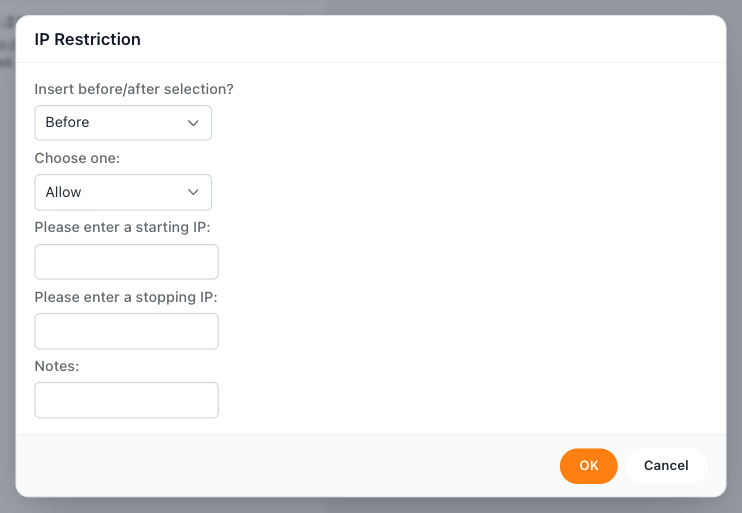
| Field | What it is |
|---|---|
| Insert before/after selection? | where the new rule goes, relative to the selected one. The order matters. |
| Choose one | Allow or Deny |
| Please enter a starting IP, a stopping IP | the range of addresses, both ends included. For one address, enter it twice. IPv4 and IPv6 both work. A host name can be given in place of the starting IP; it is looked up, and the rule is for that one address. |
| Notes | a reason, for yourself. For a Deny rule it is also what the log says when the rule refuses somebody. |
Edit changes the selected rule, Remove deletes it. Nothing holds until you Save the listeners.
How the rules are read#
For each new connection the server goes down the list from the top. The first rule whose range holds the address decides: Allow lets it in, Deny refuses it. The rest of the list is not looked at.
An address that fits no rule is refused.
So a list has one of two shapes:
Everybody but some. Deny rules first, then one rule that allows everybody:
| Rule | Range |
|---|---|
| Deny | 203.0.113.0 – 203.0.113.255 |
| Allow | 0.0.0.0 – 255.255.255.255 |
Nobody but some. Only Allow rules:
| Rule | Range |
|---|---|
| Allow | 10.0.1.0 – 10.0.1.255 |
| Allow | 198.51.100.17 – 198.51.100.17 |
Warning
Removing the rule that allows everybody from a list that has other rules turns "everybody but some" into "nobody but those allowed". The page asks before it does that. If you lock yourself out of the only web port, edit the listener in the server's prefs.XML, or use the server's control panel on the machine.
The rule 0.0.0.0 – 255.255.255.255 as an Allow covers IPv6 addresses too.
Three layers#
An address must pass three checks, in this order:
| Layer | Set in | Holds for |
|---|---|---|
| bans | Banning: temporary bans the server sets by itself, and the permanent list | every listener |
| the listener's rules | here | this listener |
| the user's rules | IP restrictions of a user | that user, after the name is known |
Use the listener's rules for "this port is only for these networks". Use the user's rules for "this account may only come from that partner".
Typical uses#
| Goal | Rules |
|---|---|
| an admin port for the office only | Allow the office networks, nothing else |
| SFTP for a fixed set of partners | one Allow per partner address |
| a port with weaker settings for one old client | Allow that client's address only: see One old partner |
| keeping a noisy network out | a Deny for it, above the rule that allows everybody |
Whole countries are kept out in Countries, not here.
Handing a connection to another listener#
A Deny rule whose Notes are FORWARD: and the name of a port forwarding listener does not refuse: the connection is handed to that listener and passed on to its destination. See Handing single clients off.
Behind a load balancer#
Without anything further, every connection comes from the balancer's address, and rules by address are useless. With the PROXY protocol read on the listener, the rules are checked against the users' real addresses, as told by the balancer.