FTP, FTPS and FTPES servers#
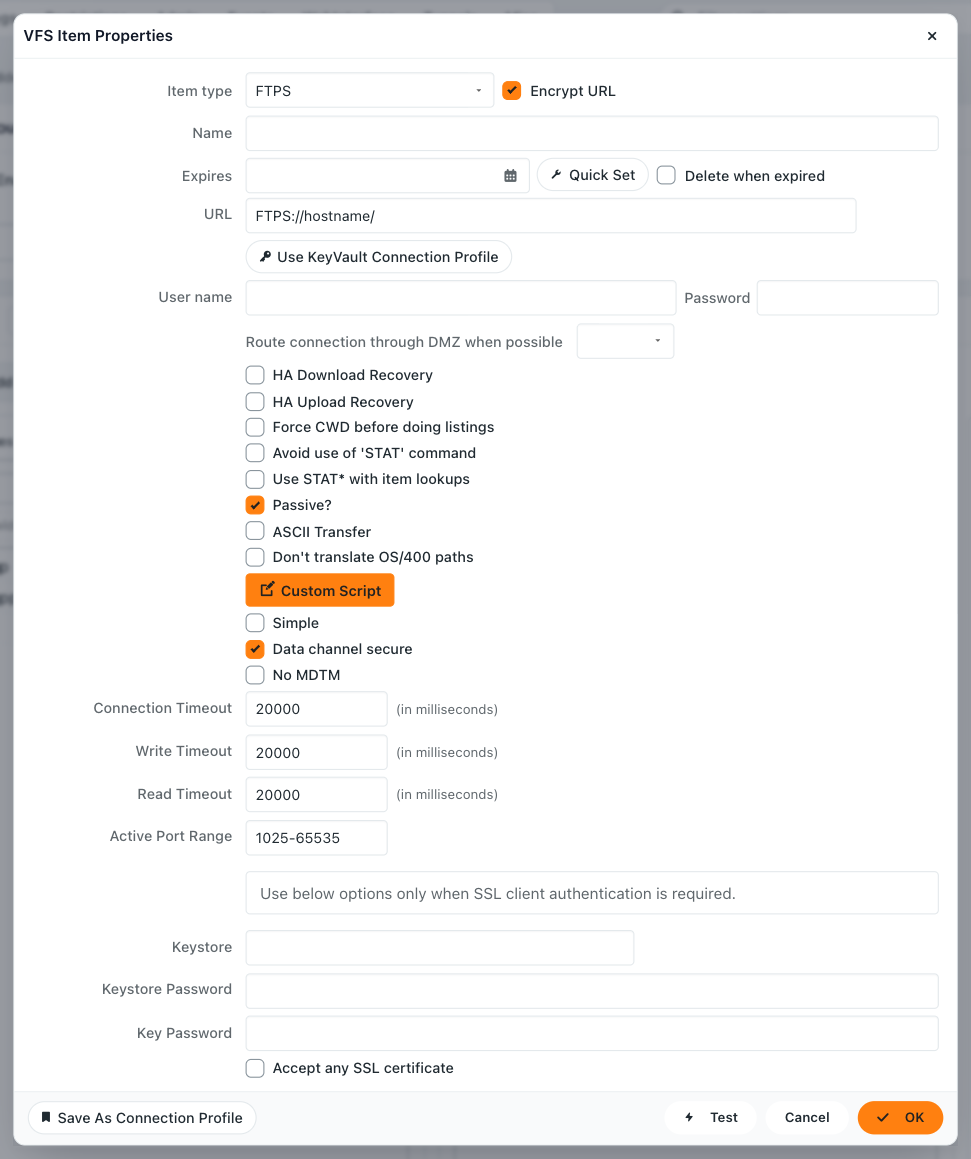
An item of a VFS can point at a folder on another FTP server. The user of CrushMFT sees it as a folder; the server logs in to the other server and passes listings and files through.
The three types#
| Item type | Is |
|---|---|
| FTP | plain FTP, nothing encrypted. With Encryption Mode set to TLS it becomes the same as FTPES. |
| FTPES | FTP that switches to TLS after connecting ("explicit"), on the usual port 21. The common secure form. |
| FTPS | FTP inside TLS from the first byte ("implicit"), usually on port 990 |
The address#
FTP://ftp.partner.example.com/ or, with a port and a folder, FTPES://ftp.partner.example.com:2121/out/. The folder at the end is the top of what the user sees.
User name and Password are the login on the other server; the dialog writes them into the address. With {username} and {password} there, each user is logged in to the other server with what they typed at this one.
Options of FTP#
| Option | What it does | New item |
|---|---|---|
| Passive? | passive mode: the server opens the data connections to the other server. This is what works through most firewalls. Without the tick the item uses active mode, in which the other server connects back to this one. | ticked |
| Active Port Range | for active mode: the ports on which this server waits for the other side's data connections. They must be open in the firewall towards this server. | 1025-65535 |
| ASCII Transfer | transfers text files as text, with line ends converted. Only for old systems that need it; it damages every file that is not plain text. | off |
| Force CWD before doing listings | changes into a folder before listing it, for servers that cannot list a path | off |
| Avoid use of 'STAT' command | never asks about a single file with STAT, for servers that answer it wrongly. The server lists the folder instead. |
off |
| Use STAT* with item lookups | asks with STAT name*, for servers that only then give details |
off |
| Don't translate OS/400 paths | on an IBM i (AS/400) server, paths are left as they are instead of being rewritten for its library file system | off |
| Simple | the plainest FTP: no UTF-8 switch, no setting of file dates, names without paths. For very old or very strict servers. | off |
| No MDTM | does not set or ask the date of files | off |
| Custom Script | commands to send before or after a step, such as after login | none |
Options of FTPS and FTPES#
| Option | What it does | New item |
|---|---|---|
| Data channel secure | the files and listings are encrypted too, not only the login. Without the tick only the commands and the password are protected, and the files travel in the clear. | ticked |
| Accept any SSL certificate | does not check the other server's certificate. For tests only: with it on, anybody in between can pose as the partner. | off |
| Keystore, Keystore Password, Key Password | a certificate of your own to show to the other server, when it asks clients for one |
Note
Data channel secure and Passive? open ticked, also on an item saved before they existed: that is what the server does when an item does not say. Untick one only when the other server needs it; the files then travel unencrypted, or in active mode.
Without Accept any SSL certificate, the other server's certificate must be one the server trusts: see SSL and, for pinning, Encryption.
The options every type has, such as the time-outs and Route connection through DMZ, are on Advanced options of a VFS item.
Firewalls#
FTP uses one connection for commands and a new one for every listing and file. In passive mode this server opens them all, outward, to ports the other server names: the firewall must let the server out to the partner's passive port range, not only to port 21. This is the usual reason for "login works, listing hangs".
Testing#
Test connects and lists. A port nothing listens on answered on the test server, as the address is shown with the password hidden:
Connection failed. java.io.IOException: Socket Error: VRL: ftp://127.0.0.1:12121/ … ERROR: java.net.ConnectException: Connection refused
| What you see | Usually |
|---|---|
| connection refused, or a time-out | host, port, or a firewall on the way |
| the login is refused | name or password; or the partner allows only certain addresses |
| login works, listing hangs | passive ports closed on the way out; try the other of passive and active |
| a certificate error | the partner's certificate is not trusted, or has another name than the address |
| names with wrong letters | the other server does not speak UTF-8: try Simple |
FTP sends passwords and files in the clear. Use FTPES or FTPS, or better SFTP, wherever the other side offers it.