How passwords are stored#
The Password tab of the Encryption section of Preferences decides three things: how the passwords of users are kept, how the server protects the passwords it must use itself, and what a new password must look like.
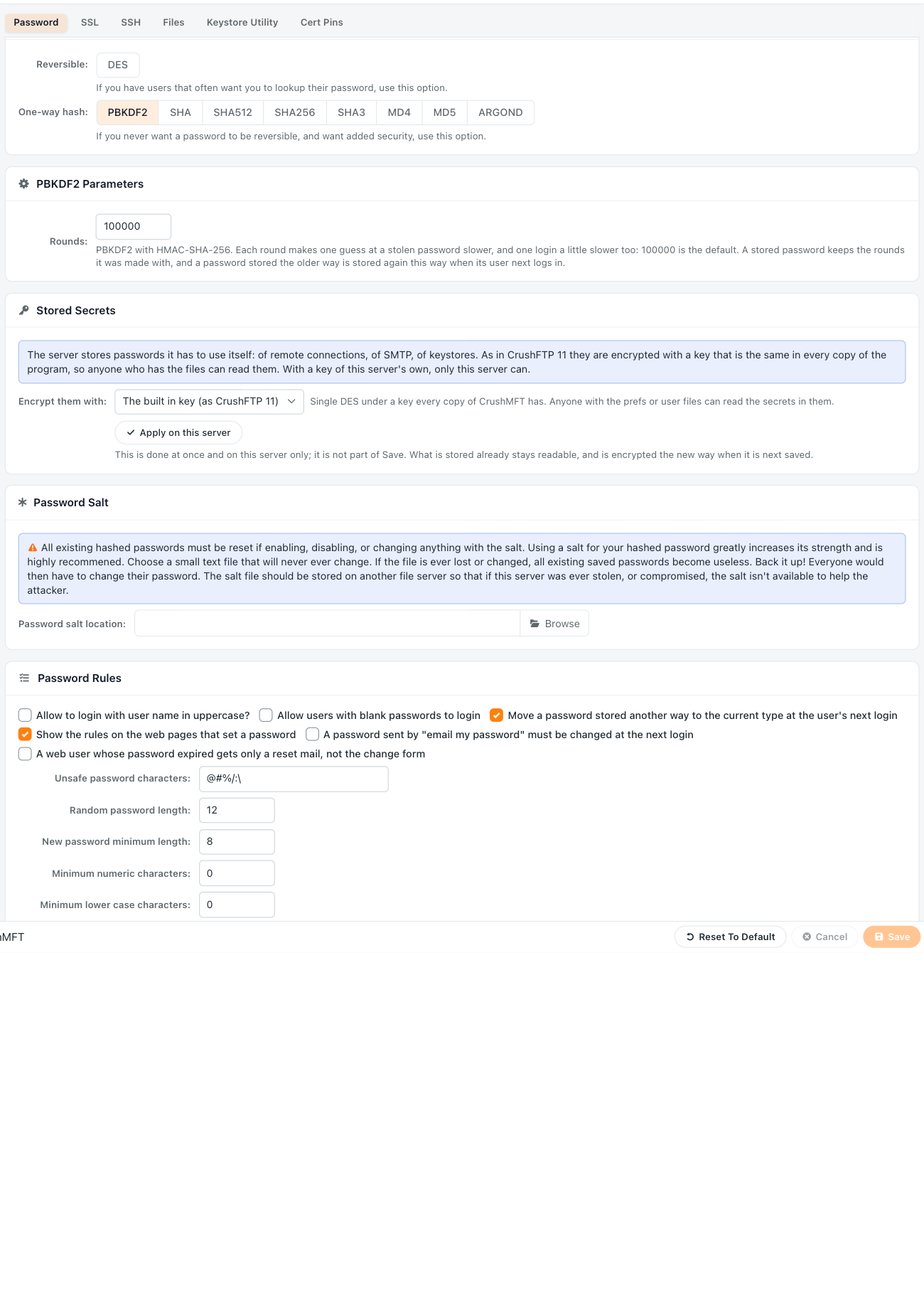
| Card | Holds |
|---|---|
| Password Encryption | how user passwords are stored |
| Stored Secrets | how the server's own stored passwords are encrypted |
| Password Salt | an extra secret mixed into hashed passwords |
| Password Rules | what a new password must look like |
Password Encryption#
A password can be stored in two ways.
| Way | Choices | What it means |
|---|---|---|
| One-way hash | PBKDF2, SHA, SHA512, SHA256, SHA3, MD4, MD5, ARGOND | only a fingerprint of the password is kept. Nobody can read the password back, not you and not someone who steals the files. This is the default, with PBKDF2. |
| Reversible | DES | the password itself is kept, encrypted. The server can show it or mail it to the user. So can anyone who has the files. |
Keep the default. The other one-way choices are there for servers that already hold passwords in those forms; MD4, MD5 and plain SHA are weak by today's measure. Choose Reversible only when you truly need to read passwords back, and know what that means.
Changing the choice does not change the passwords that are stored already. It is used for every password that is set from then on.
PBKDF2 Parameters#
| Setting | What it is | Default |
|---|---|---|
| Rounds | how many times the password is hashed, with HMAC-SHA-256. Each round makes every guess at a stolen password slower, and every login a little slower too. | 100000 |
A stored password keeps the rounds it was made with. A password that is stored in one of the older ways is stored again as PBKDF2 when its user next logs in, so a server moves over by itself as people use it.
Argon2 Parameters#
Shown when ARGOND is chosen.
| Setting | What it is | Default |
|---|---|---|
| Memory power of two | how much memory one hash uses, as a power of two: 4, 8, 12, 16 or 20 | 8 |
| Time cost | how many passes | 3 |
| Parallelism | how many threads | 4 |
| Hash length | the length of the result, in bytes | 16 |
Every login then uses that much memory on the server for a moment. On a server that many people log in to at once, or that is open to the internet, that is a way to wear it down.
Stored Secrets#
Besides the passwords of its users, the server keeps passwords it has to use itself: of storage on other servers, of the mail server, of keystores. These cannot be hashed, because the server needs to read them. This card decides how they are encrypted on disk.
| Encrypt them with | How | What it means |
|---|---|---|
| The built in key (as CrushFTP 11) | single DES, under a key that is the same in every copy of CrushMFT | anyone who has the settings or user files can read the secrets in them. The default. |
| A key file on this server | AES-256, under a random key in the file secret.key in the server's settings folder |
the server starts by itself. Without the file the secrets cannot be read: back it up apart from the settings, and copy it to every server of a cluster. |
| A passphrase given after every start | AES-256, under a key that only the passphrase opens | nothing on the disk can read the secrets. After every start the server cannot use them until an administrator gives the passphrase on the admin page. |
For a passphrase, type it twice. It must have 12 characters or more. It is stored nowhere, and nobody can recover it.
Apply on this server makes the change. It happens at once, on this server only, and is not part of Save. What is stored already stays readable, and is encrypted the new way when it is next saved.
Warning
With a key file, losing secret.key means losing every stored secret: each would have to be typed in again. With a passphrase, the server does not send mail, reach storage on other servers or open its keystores after a restart until someone has given the passphrase. Choose it only when someone is there to do that.
Password Salt#
A salt is a secret text that is mixed into every password before it is hashed. With it, the hashes in the user files are of no use to someone who does not have the salt as well.
| Setting | What it is | Default |
|---|---|---|
| Password salt location | a small text file that holds the salt. Browse picks it. | empty: no salt file |
Warning
Turning the salt on, turning it off or changing the file makes every hashed password that is stored useless: all users have to be given new passwords. The same happens when the file is lost or changed. Choose a file that will never change, and back it up.
Keep the file on another machine than the user files, such as a file server, so that someone who gets hold of this server does not get the salt with it.
Password Rules#
What a password must look like when a user sets a new one. A user or a group can have rules of their own in the User Manager; these are for everyone who has none.
| Setting | What it does | Default |
|---|---|---|
| Allow to login with user name in uppercase? | a user name typed at the web login is turned to upper case, for servers whose user names are all in capitals | off |
| Allow users with blank passwords to login | an account without a password can be used | off |
| Unsafe password characters | characters a new password may not contain, because they cause trouble in web addresses. A password with one of them is refused: "Password cannot contain URL unsafe chars". | @#%/:\ |
| Random password length | the length of the passwords the server makes up | 12 |
| New password minimum length | 8 | |
| Minimum numeric characters | how many digits a new password must have at least | 0 |
| Minimum lower case characters | 0 | |
| Minimum upper case characters | 0 | |
| Minimum special characters | 0 | |
| Password history count | how many of a user's earlier passwords the server remembers and refuses as the new one. 0: none. Only fingerprints of them are kept. | 0 |
The rules are checked when a password is set. Passwords that exist already are not looked at again.