SFTP servers#
An item of a VFS can point at a folder on another server that speaks SFTP, the file transfer of SSH. It is the most common way to connect a partner's system: one port, everything encrypted, logins by password or by key.
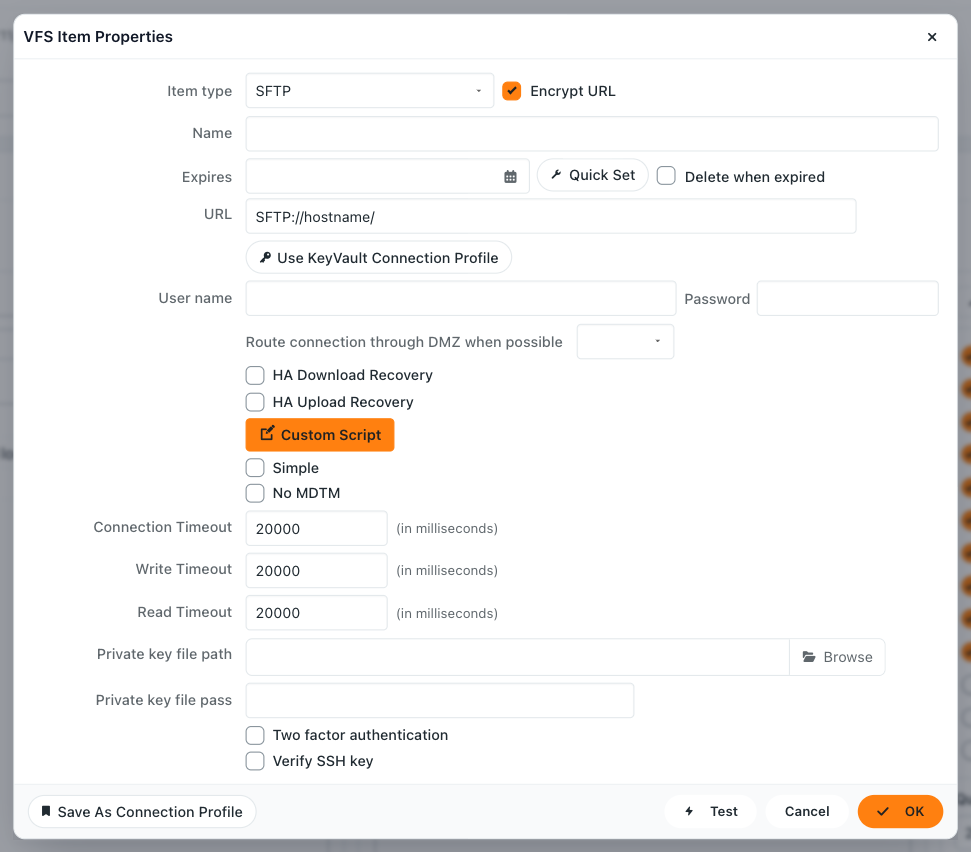
The address#
SFTP://sftp.partner.example.com/ or, with a port and a folder, SFTP://sftp.partner.example.com:2222/out/. Without a port it is 22. The folder at the end is the top of what the user sees.
Logging in#
| Field | What it is |
|---|---|
| User name, Password | the account on the other server |
| Private key file path, Browse | a private key file on this server's machine, for a login by key. {username} in the path stands for the user's name, so that one item can use a key per user. |
| Private key file pass | the passphrase of the key file, if it has one |
| Two factor authentication | the other server wants both: the key and the password. Without the tick, a key that is named is used alone. |
For a login by key:
- Make a key pair, on the server's machine or in the keystore utility.
- Send the public key to the partner, who adds it to the account.
- Name the private key file in the item, and leave the password empty.
- Press Test.
Keep private key files in a folder that only the server's account can read, and never inside a folder a user can reach.
With {username} and {password} in the address, each user is logged in to the other server with what they typed at this one.
Checking the other server's key#
Every SSH server has a host key that proves it is itself.
| Option | What it does | New item |
|---|---|---|
| Verify SSH key | the other server's host key is compared with the one in the known hosts file, and the connection is refused when it differs | off |
| Known host file | the file in which known host keys are kept; shown when Verify SSH key is on | |
| Add new key on first occurrence | a server that is not in the file yet is added at the first connection, and checked from then on | off |
Turn Verify SSH key on for partners over the internet. With Add new key on first occurrence, the first connection must be made at a moment you trust the network; after that a changed key is refused. When a partner replaces their host key on purpose, remove their line from the file.
Other options#
| Option | What it does |
|---|---|
| Simple | uses only the basic commands, for old or limited SFTP servers |
| No MDTM | does not set the date of uploaded files to the date of the original |
| Custom Script | commands to run before or after a step |
| HA Download Recovery, HA Upload Recovery, time-outs, Route connection through DMZ | see Advanced options of a VFS item |
The algorithms the server offers when it connects as a client are those of its SSH settings: see Ciphers. A very old server that only speaks algorithms you have turned off cannot be reached until you allow one of them.
Testing#
Test logs in and lists the folder. On the test server, a good item answered with a short "Success" notice, and these were the failures:
| Tried | Answer |
|---|---|
| a wrong password | "Connection failed. java.lang.Exception: SFTP login failed." after 3 seconds |
| a port nothing listens on | "Connection failed. java.io.IOException: Socket Error: VRL: SFTP://carol:****@127.0.0.1:12229/ … ERROR: java.net.ConnectException: Connection refused" |
The address in a message always has the password replaced by stars.
| What you see | Usually |
|---|---|
| "SFTP login failed" | name, password or key; a key the partner has not added yet; or the partner wants key and password |
| connection refused, or a time-out | host, port, or a firewall. Partners often let in only addresses they know: give them the address your server comes from, which with Route connection through DMZ is the DMZ's. |
| the host key is refused | the partner changed their key, or somebody is in between. Ask the partner for the new fingerprint before you accept it. |
| it works by hand and not from the server | the key file cannot be read by the server's account |