SAMLSSO#
SAMLSSO lets people sign in to the server's web interface through your organisation's identity provider, with SAML 2.0: Microsoft ADFS and Entra, Okta, Keycloak, Shibboleth, AWS IAM Identity Center and others. People sign in where they always do; the provider tells the server who they are, in a signed message; the server never sees a password.
It needs an Enterprise licence: "Enterprise only feature". The plugin is set up in Preferences › Plugins › SAMLSSO. It comes with the server.
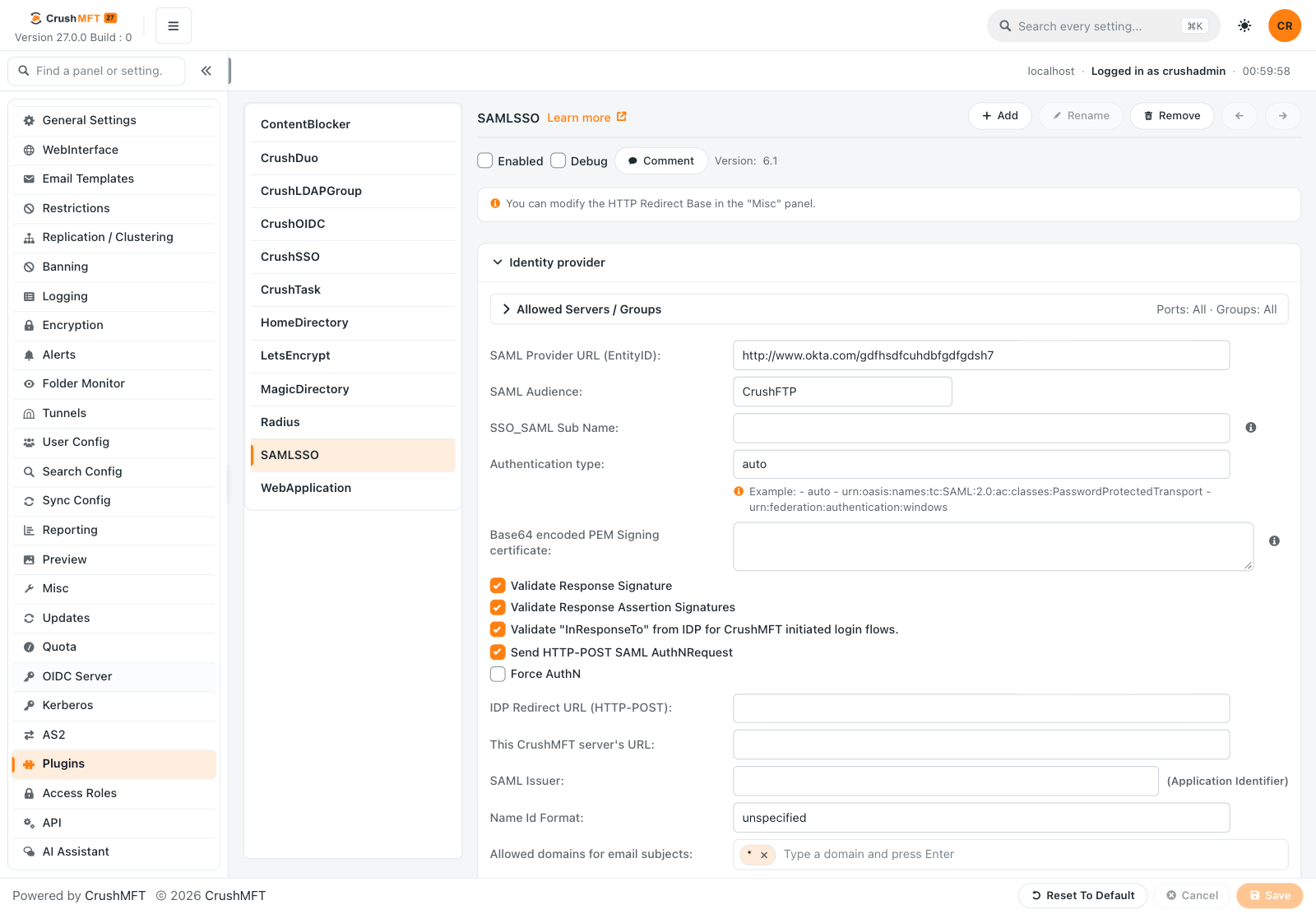
| Step by step for | Page |
|---|---|
| Microsoft ADFS | SAMLSSO with ADFS |
| Microsoft Entra ID (Azure AD) | SAMLSSO with Microsoft Entra |
| AWS IAM Identity Center | SAMLSSO with Amazon |
| groups from a directory | SAMLSSO with LDAP roles |
| folders from your own application | SAMLSSO with a web application |
If your provider also speaks OpenID Connect, CrushOIDC is the simpler choice. SAML is for where SAML is the rule.
The two addresses#
Everything in a SAML setup turns on two addresses of the server.
| Address | Is | Called at the provider |
|---|---|---|
https://files.example.com/?u=SSO_SAML&p=none |
where the provider sends the signed message, by a form the browser posts | the reply URL, or assertion consumer service (ACS) URL |
https://files.example.com/?u=SSO_SAML&p=redirect |
the way in: whoever opens it is sent to the provider to sign in | nothing. It is for your users: a link, a bookmark, or the button on the login page. |
Write the first one exactly, with nothing after none.
The way of a sign-in#
- Somebody opens the way-in address, or clicks the button on the login page.
- The server sends the browser to the provider, with a request that names the server.
- The person signs in at the provider.
- The provider sends the browser back to the first address above, with a signed message that names the person.
- The plugin checks the message: see what is checked.
- It builds the user, from the User Manager, from a directory, or from templates, and lets them in.
A sign-in can also start at the provider, from its portal page: then it begins at step 4.
At the provider#
You register the server as an application, a "service provider" or "relying party". The provider asks for some of these:
| The provider asks for | Give |
|---|---|
| the reply URL, ACS URL | https://files.example.com/?u=SSO_SAML&p=none |
| the identifier, entity ID, audience | a name for the server. Often its address, https://files.example.com/. The same text goes into SAML Issuer and SAML Audience. |
| the name ID | what identifies the person: the login name or the email address |
| attributes, claims | optional: groups, and whatever you want to map into the user |
And it gives you, usually as a "metadata" file in XML:
| From the provider's metadata | It goes into |
|---|---|
its entityID |
SAML Provider URL (EntityID) |
the Location of its SingleSignOnService with the HTTP-POST binding |
IDP Redirect URL (HTTP-POST) |
its X509Certificate, the long block of letters |
Base64 encoded PEM Signing certificate. Only the block, without the tags around it. |
Settings: the provider#
| Setting | Is | On a new server |
|---|---|---|
| Enabled, Debug | as for every plugin | off |
| the text field at the top | a note for yourself | empty |
| Allowed Server Port, Allowed User Groups | where this configuration works: see what login plugins share | all |
| SAML Provider URL (EntityID) | the provider's name for itself. The message must come from it. | a sample |
| SAML Audience | the name the message must be addressed to: the identifier you gave the provider. A message for somebody else is refused: "Audience mismatch". | CrushFTP |
| SAML Issuer "(Application Identifier)" | the name the server gives itself in its request | empty |
| IDP Redirect URL (HTTP-POST) | where the browser is sent to sign in | empty |
| This CrushMFT server's URL | the address of the server as users call it, ending in / |
empty |
| Base64 encoded PEM Signing certificate | the certificate the provider signs with | empty |
| Authentication type | how the server asks the provider to sign people in. auto leaves it to the provider. Otherwise a SAML class name: "urn:oasis:names:tc:SAML:2.0:ac:classes:PasswordProtectedTransport", "urn:federation:authentication:windows". The screen's hint for providers that ask for a second factor: use NO_PasswordProtectedTransport. |
auto |
| Name Id Format | the form of name the server asks for | unspecified |
| Name Qualifier | a qualifier some providers want in the request | empty |
| Allowed domains for email subjects | "Comma separated list of allowed domains that must appear after the first @ sign in a subject name. Patterns allowed." * allows all. For a provider that serves more than your organisation. |
* |
| SSO_SAML Sub Name | for more than one SAML configuration: see several providers. "Normally leave blank." | empty |
| Send HTTP-POST SAML AuthNRequest | the request goes to the provider as a posted form. Off: in the address. | on |
| Compress AuthNRequest | compresses the request, as the address form expects | off |
| Force AuthN | asks the provider to make the person sign in again, even if they already are signed in there | off |
| Sign SAML AuthNRequest, Sign Method, Digest Method, Canonicalization Method | the server signs its request, for providers that demand it. In FIPS mode SHA-1 is never used. | off; RSA_SHA256, SHA256, EXCLUSIVE |
An encrypted answer#
Some providers encrypt the message for the server. "This only needs to be filled out if the SAML assertion is encrypted."
| Setting | Is | On a new server |
|---|---|---|
| Decryption Keystore Path, Decryption Keystore Password, Decryption Key Password | the keystore with the server's key pair. Its certificate goes to the provider. | empty |
| Decryption Cipher | how the provider wrapped the key. A provider that wraps it with SHA-1 OAEP (xmlenc#rsa-oaep-mgf1p, which many still do) needs RSA/ECB/OAEPWithSHA1AndMGF1Padding here; a configuration saved with that keeps it. |
RSA/ECB/OAEPWithSHA-256AndMGF1Padding |
| Stream Cipher | how the message itself is encrypted | AES/CBC/NoPadding |
What is checked#
| Check | Setting | On a new server |
|---|---|---|
| the provider's signature over the whole answer | Validate Response Signature | on |
| the signature over each statement in it | Validate Response Assertion Signatures | on |
| that the answer belongs to a request this server made, and is used once | Validate "InResponseTo" from IDP for CrushMFT initiated login flows. | on |
| that the signature covers the part it is on, and uses an allowed method | always | |
| that the message is for this server: the audience | always | |
| that it is not too old and not from the future, with half a minute of give | always | |
| that the same message is not used twice | always |
Leave all three switches on. A provider-started sign-in has no request to belong to, and is still accepted.
The clocks of the server and the provider must agree. A refusal that speaks of "NotBefore" or "NotOnOrAfter" is a clock that is off.
The button#
| Setting | Is | On a new server |
|---|---|---|
| Show login with SAML on the login page | puts a button on the login page of the allowed listeners | off |
| Login button text | its text | "SSO Login" |
Without the button, give people the way-in address. To send everybody to the provider without their clicking, make that address the start page.
What the user gets#
The provider says who somebody is. What they see on the server is settled in one of these ways.
The User Manager decides#
SAMLSSO only used for Authentication (User manager then defines user's access.)
Each person exists in the User Manager under the name the provider sends. Create user from template username: makes that user at the first sign-in, as a copy of the user you name, and Run task/job after creating user: runs a job then.
Groups from the provider#
Have the provider send the person's groups as an attribute named group, and list the groups under LDAP roles user must be member of, by the names the provider sends. Each role can name a template user whose settings and folders its members get.
Set SAMLSSO Cache Time to -1: that tells the plugin not to ask any directory.
"Roles cannot be empty or no logins are allowed." To let in everybody the provider sends, without groups, add one role with the name -ALL_ROLES-.
Groups from a directory#
The lower half of the screen is a directory lookup, the same as in CrushLDAPGroup: Username For Queries, Password, LDAP Server URL, Search Base Location, Search Filter, the role settings, Test Connection Settings, Test Search, Test Search Role. After the provider has said who the person is, the plugin looks them up in the directory and reads their groups there. The roles are then the directory's groups, by their full names.
SAMLSSO Cache Time is the minutes a lookup is remembered; 20 on a new server.
A second way to the same end, with all the abilities of the directory plugin, is to hand the user over to it: SAMLSSO with LDAP roles.
The home folder and the rest#
| Setting | Is | On a new server |
|---|---|---|
| Username to use as template (except directory access) | the user whose settings everybody gets | default |
| HomeDirectory field, Create HomeDirectory folder if it doesn't exists, Use local folder if LDAP's HomeDirectory not found?, Path, Append username to path?, Create folder with username, Randomize home folder name., Create additional subfolders in home directory | the home folder, as in CrushLDAPGroup. "Username folder will be made in this location". | |
| Privs | the rights in it: see the permissions block | download, upload, view, delete, rename, resume, create and delete folders |
| Key Mappings (SAMLSSO -> CrushMFT) | copies attributes the provider sends into settings of the user | none |
Several providers#
Two configurations must be told apart, since both would answer at the same address. Give each a SSO_SAML Sub Name, such as _PUBLIC. Its addresses change with it:
| Without a sub name | With _PUBLIC |
|
|---|---|---|
| reply URL | ?u=SSO_SAML&p=none |
?u=SSO_SAML_PUBLIC&p=none_PUBLIC |
| way in | ?u=SSO_SAML&p=redirect |
?u=SSO_SAML_PUBLIC&p=redirect |
The same serves to tell a sign-in through a DMZ server from one on the inside.
With a DMZ#
The browser talks to the DMZ server; the internal server builds the user. Both need the same configuration of the plugin.
Things to know#
- The browser only. SAML needs a browser that can be sent to the provider. For FTP and SFTP programs, see the other ways to sign in.
- HTTP Redirect Base. "You can modify the HTTP Redirect Base in the "Misc" panel." If the sign-in is refused on the way back, set it to the server's address, or empty it: Preferences, Misc.
- Remembered wrong names. While you are testing, a name that failed a few times is refused for a while without being asked again, also when the provider now says yes: see Remember invalid usernames in Preferences, Misc.
- The provider's certificate ends, usually after one to three years. On that day every sign-in fails. Note the date, and put the new certificate in before it.
- Signing out of the server does not sign anybody out of the provider.
- Local administrators still sign in with a password on the login page. Keep one such account for the day the provider is down.
Not tried for this page#
No identity provider was connected to the test server. The page is written from the plugin's screen, from what the plugin's file says it checks, and from the earlier documentation.