SMB shares#
SMB is the file sharing of Windows, also offered by NAS devices and by Samba on Linux. An item of a VFS can point at a folder of an SMB share. The server speaks SMB itself: nothing is mounted on the machine, and it works the same on Windows, Linux and macOS.
The item types#
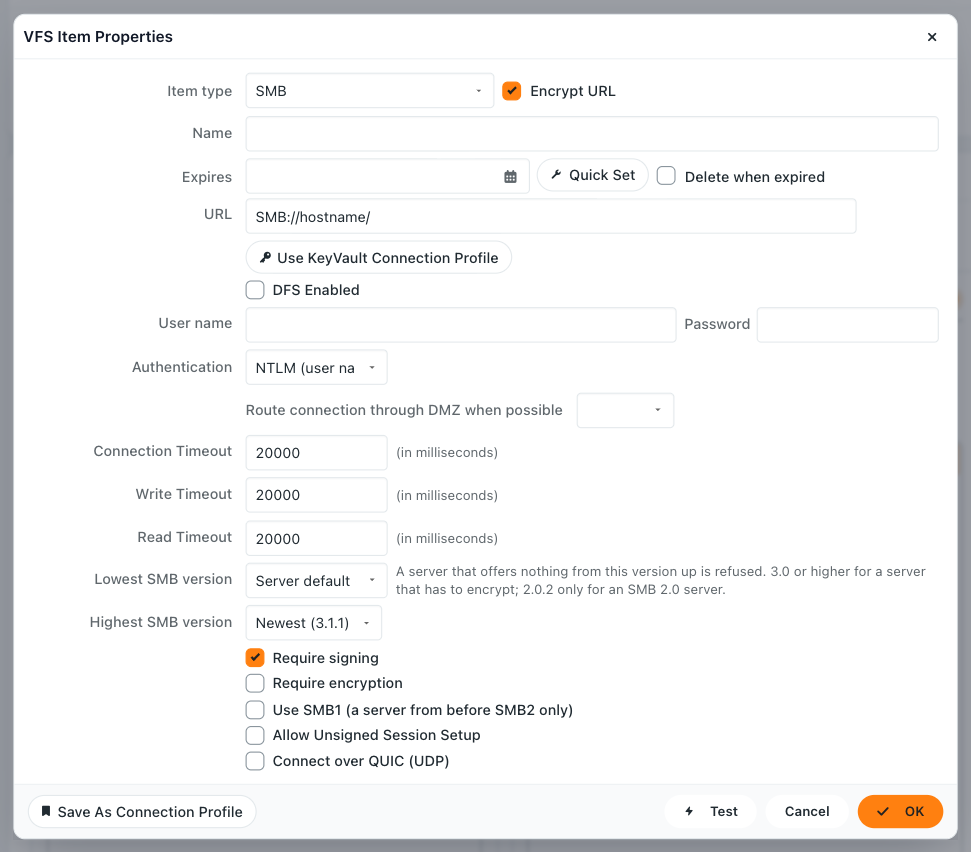
SMB, SMB1, SMB2 and SMB3 all use the same SMB client of the server and show the same fields. The four names are kept so that items of earlier versions go on working. Choose SMB for a new item; the SMB version is set with the fields below, not with the type.
The address#
SMB://fileserver01.example.com/projects/2026/ : the server, the share, and a folder in the share. The folder at the end is the top of what the user sees.
An address with only the server, SMB://fileserver01.example.com/, lists the server's shares.
The Browse window has a Port field for SMB. Leave it empty for the usual port, 445, or 443 for SMB over QUIC; fill it in for a file server that listens elsewhere, and the port becomes part of the address: SMB://fileserver01.example.com:4446/Projects/.
Logging in#
| Field | What it is |
|---|---|
| User name, Password | the account for the share. A domain account is written DOMAIN\name or name@domain. |
| Authentication | NTLM (user name and password), or Kerberos |
With Kerberos, the item does not hold a password. It names an entry of the Kerberos panel of the Preferences, and the server logs in with that entry's keytab, as that entry's principal. Kerberos is the way to go in a Windows domain that has turned NTLM off, and it is the only login for SMB when the server runs in FIPS mode.
With {username} and {password} in the address, each user is logged in to the share as themselves, with NTLM.
Versions and protection#
| Option | What it does | New item |
|---|---|---|
| Lowest SMB version | "A server that offers nothing from this version up is refused. 3.0 or higher for a server that has to encrypt; 2.0.2 only for an SMB 2.0 server." | Server default (2.1) |
| Highest SMB version | the newest version to offer | Newest (3.1.1) |
| Require signing | "Refuse a server that does not sign. On unless switched off; a guest or anonymous login cannot sign." | on |
| Require encryption | "Refuse a server that does not encrypt the session. Needs SMB 3.0 or newer." | off |
| Use SMB1 (a server from before SMB2 only) | "The connection then speaks SMB1 only: no encryption, and the version limits above do not apply." | off |
| Allow Unsigned Session Setup | "For one server known to leave its last login reply unsigned. It gives up the check that nothing was changed on the way." | off |
| DFS Enabled | follows the referrals of a DFS namespace to the server that really holds the folder | off in the dialog |
The lowest version the server allows at all is a setting of the server, smb_client_min_dialect, 2.1 unless you change it.
Warning
SMB1 is old and unprotected. Use it only for a device that speaks nothing else, in a network you trust, and plan to replace that device.
For a share over the internet or between sites, turn on Require encryption and set the lowest version to 3.0.
SMB over QUIC#
| Option | What it does |
|---|---|
| Connect over QUIC (UDP) | "SMB 3.1.1 inside TLS 1.3 on UDP, for a server reached where TCP 445 is blocked. The port is 443 unless the address names another, and the connection goes straight to the server, never through the DMZ or a proxy." |
| Certificate name | "The name the server's certificate is checked against. Empty uses the host; set it when the host is an address." |
This is how a Windows file server is reached over the internet without a VPN, when it offers SMB over QUIC.
The options every type has are on Advanced options of a VFS item.
Ports#
SMB uses TCP port 445 on the file server. SMB over QUIC uses UDP port 443. The server machine must be allowed to reach it; nothing needs to be open towards the CrushMFT server.
When it does not work#
| What you see | Usually |
|---|---|
| the login is refused | the account or the domain part of the name; an account that may not log on over the network; NTLM turned off in the domain: use Kerberos |
| "refused" although the login is right | the file server does not sign or encrypt as the item demands, or speaks only a version below the lowest |
| a guest share does not work | a guest cannot sign: turn Require signing off for this item |
| a folder of a DFS namespace is empty | DFS Enabled |
| a time-out | port 445 closed on the way |
On a server on Windows, with one account for all users, a share can also be used through Windows: see Windows shares by UNC path.