Reporting#
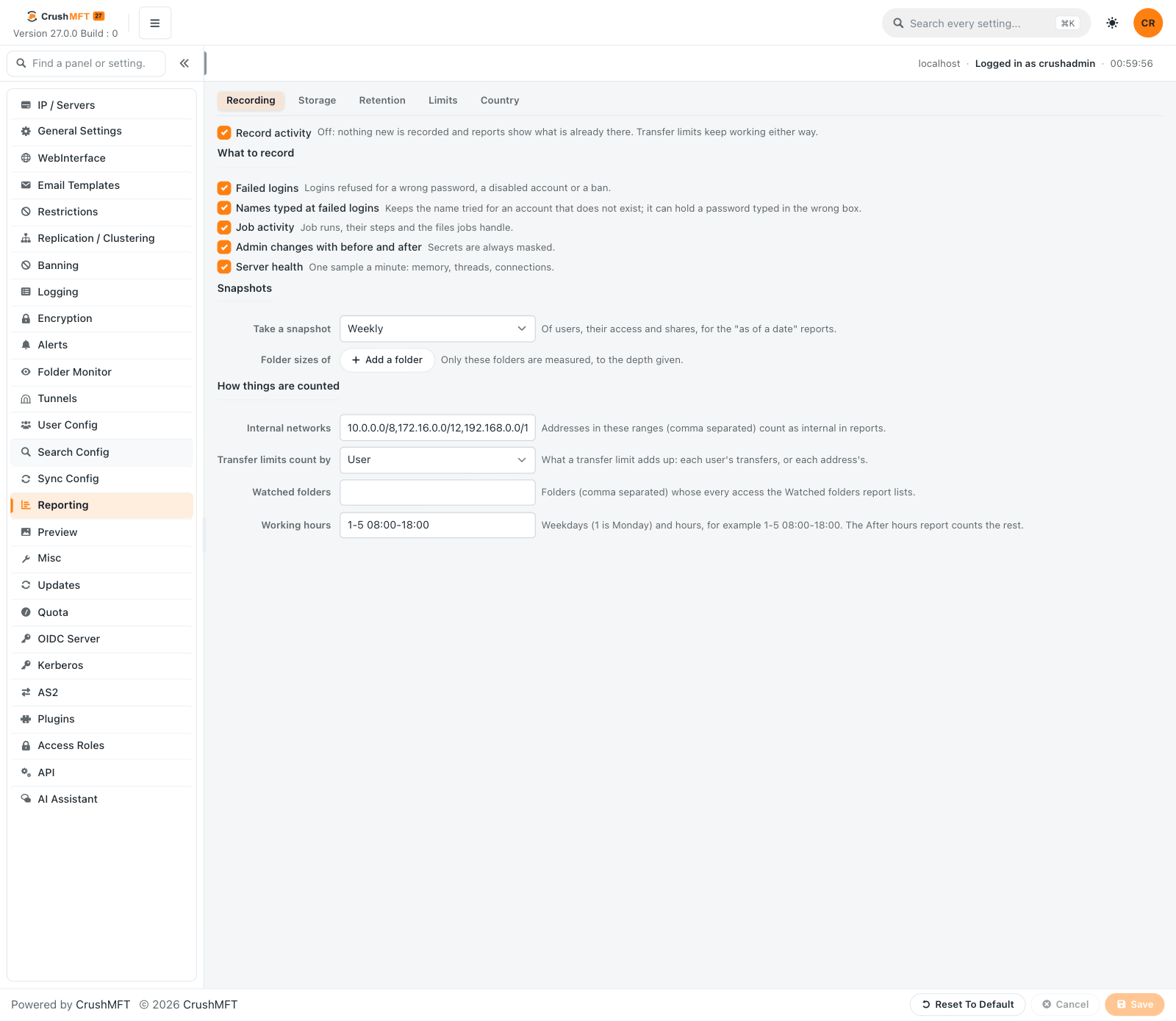
The server writes down what happens on it: logins, transfers, shares, job runs, changes made by administrators. The reports, the dashboards and the transfer limits are all worked out from that record. The Reporting section of Preferences decides what is recorded, where it is kept, and for how long.
| Tab | Holds |
|---|---|
| Recording | whether anything is recorded, what, and how some things are counted |
| Storage | where the record is kept: the server's own files, or a database of yours |
| Retention | how long events and totals are kept |
| Limits | sizes and time limits that most servers never change |
| Country | where the country of an address comes from |
Save at the bottom saves all tabs (saving). A value that is not right is marked, and nothing is saved until it is.
Recording#
| Setting | Key | What it does | Default |
|---|---|---|---|
| Record activity | activity_enabled |
Off: nothing new is recorded, and reports show what is already there. Transfer limits keep working either way. | on |
What to record#
The basics, such as logins and transfers, are recorded whenever recording is on. These can be left out:
| Setting | Key | What it records | Default |
|---|---|---|---|
| Failed logins | activity_failed_logins |
logins that were refused: a wrong password, a disabled account, a ban | on |
| Names typed at failed logins | activity_failed_names |
the name that was tried, also for an account that does not exist. Such a name can be a password that somebody typed into the wrong box: turn it off if that must never be stored. | on |
| Job activity | activity_jobs |
job runs, their steps and the files jobs handle | on |
| Admin changes with before and after | activity_admin_changes |
what an administrator changed, with the old and the new value. Secrets are always masked. | on |
| Server health | activity_samples |
one sample a minute: memory, threads, connections | on |
Snapshots#
Some reports answer "who had access on that day". For those the server takes a picture of the users, their access and their shares from time to time.
| Setting | Key | What it does | Default |
|---|---|---|---|
| Take a snapshot | activity_snapshot |
Never, Daily or Weekly | Weekly |
| Folder sizes of | activity_snapshot_folders |
folders whose size is measured with each snapshot, each with the depth to go down to. Only these folders are measured. Add a folder adds a line. | none |
How things are counted#
| Setting | Key | What it does | Default |
|---|---|---|---|
| Internal networks | activity_internal_nets |
addresses in these ranges, separated by commas, count as internal in reports | 10.0.0.0/8, 172.16.0.0/12, 192.168.0.0/16, 127.0.0.0/8, 169.254.0.0/16, ::1 |
| Transfer limits count by | quota_key |
what a transfer limit adds up: each User's transfers, or each Address's | User |
| Watched folders | activity_watched_folders |
folders, separated by commas, whose every access the Watched folders report lists | empty |
| Working hours | activity_work_hours |
weekdays (1 is Monday) and hours. The After hours report counts everything outside them. | 1-5 08:00-18:00 |
Storage#
| Keep the data in | Means |
|---|---|
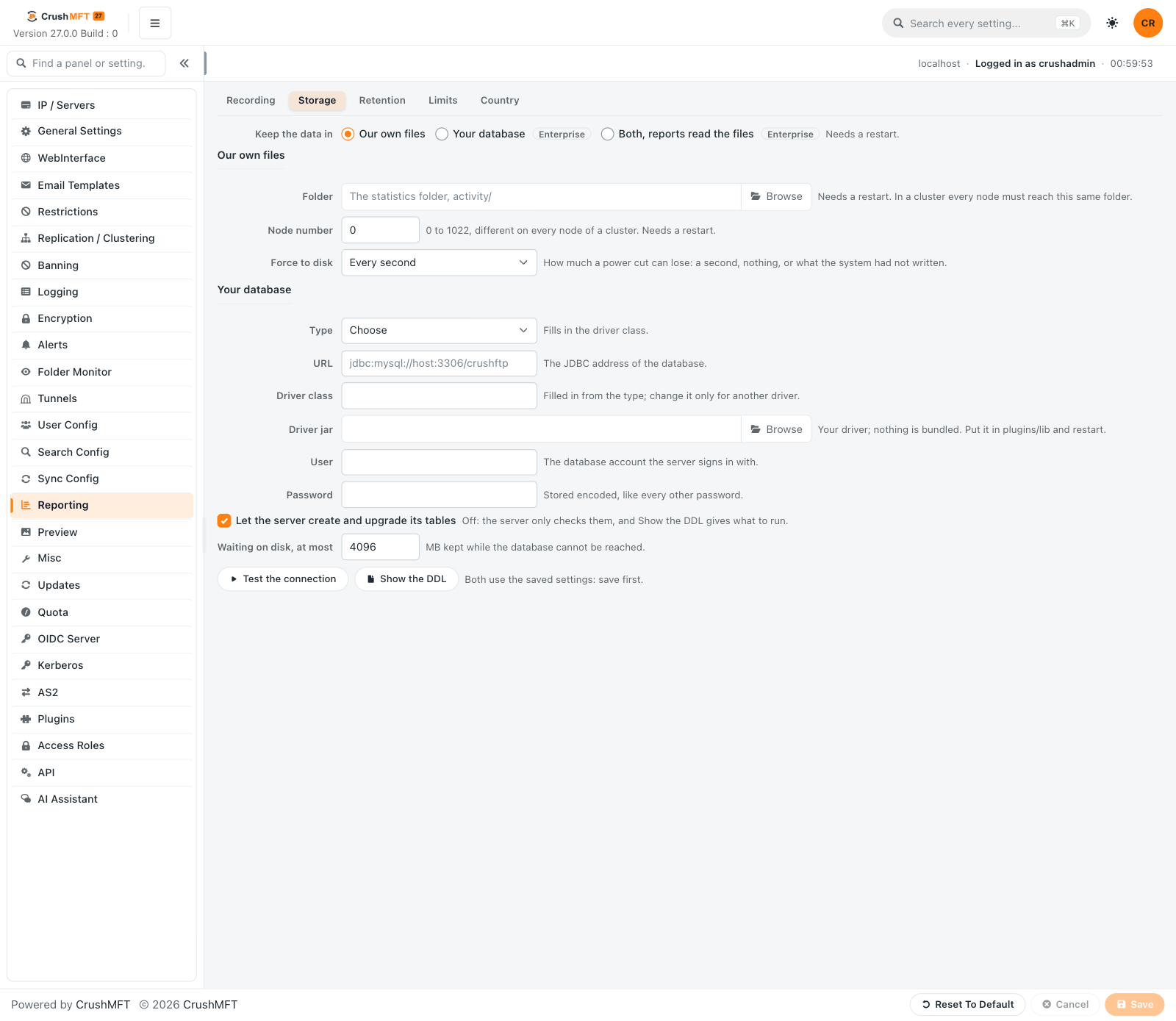
| Our own files | the server keeps the record in files of its own. Nothing else is needed. This is how a new server is set. |
| Your database | the server writes the record into a database of yours. Needs an Enterprise licence. |
| Both, reports read the files | it writes to both; the reports use the files, the database is for your own tools. Needs an Enterprise licence. |
The key is activity_backend. A change needs a restart. The data recorded so far stays where it is: nothing is moved, and after the restart the reports read only what the new place holds. Without an Enterprise licence the server keeps using its own files whatever is chosen.
Our own files#
| Setting | Key | What it is | Default |
|---|---|---|---|
| Folder | activity_path |
where the files are. Empty: the folder activity in the server's folder. In a cluster every node must reach this same folder. Needs a restart. |
empty |
| Node number | activity_node_id |
0 to 1022, different on every node of a cluster. Needs a restart. | 0 |
| Force to disk | activity_sync |
how much a power cut can lose: Every second (a second), After every event (nothing), When the system decides (what the system had not written yet) | Every second |
Your database#
| Setting | Key | What it is | Default |
|---|---|---|---|
| Type | activity_sql_type |
MySQL, MariaDB, SQL Server, Oracle or PostgreSQL. Fills in the driver class. | not chosen |
| URL | activity_sql_url |
the JDBC address of the database, such as jdbc:mysql://db.example.com:3306/crushftp |
empty |
| Driver class | activity_sql_driver |
filled in from the type; change it only for another driver | empty |
| Driver jar | activity_sql_driver_file |
your driver. None comes with the server: put it into plugins/lib and restart. |
empty |
| User, Password | activity_sql_user, activity_sql_pass |
the database account. The password is stored encoded. | empty |
| Let the server create and upgrade its tables | activity_sql_manage_schema |
Off: the server only checks the tables, and Show the DDL gives you what to run yourself | on |
| Waiting on disk, at most | activity_sql_journal_max_mb |
MB of events the server keeps on its own disk while the database cannot be reached, to write them when it is back | 4096 |
Test the connection and Show the DDL use the saved settings: save first. With no database set, both answer "no database is set (activity_sql_url)".
Retention#
| Setting | Key | What it does | Default |
|---|---|---|---|
| Keep every event for | activity_detail_days |
days each single event is kept. Beside it the tab shows how much room the events use now. | 1095 (three years) |
| A different number per kind of data | activity_detail_days_by_stream |
opens one field per kind of data: logins, files, jobs, shares, admin changes, the snapshots and so on. An empty field takes the number above. | off |
| Keep the totals for | activity_rollup_days |
days the hourly and daily totals are kept. Reports use them once the events are gone, so a long report still has numbers, without the single lines. | 3650 (ten years) |
Limits#
Most servers never change these.
| Setting | Key | What it limits | Default |
|---|---|---|---|
| Events waiting, at most | activity_queue_max |
events that may wait to be written. Beyond it new ones are dropped, and counted. | 200000 |
| Write to disk every | activity_flush_seconds, activity_flush_rows |
seconds or events, whichever comes first | 300 seconds, 100000 events |
| Threads per report | activity_query_threads |
0: half the processor cores, at most 4 | 0 |
| Time limit | activity_query_timeout |
seconds for a report that was started on a screen | 120 |
| Groups in memory | activity_query_max_groups |
beyond this, totals are worked out on disk | 1000000 |
| Reports at once | report_max_running |
reports started on screens that may run at the same time. Schedules get two more. | 4 |
| Rows in an export | report_export_max_rows |
the most rows an export holds, for those allowed to export | 5000000 |
Country#
The country of an address comes only from your ipstack key, which is set in Misc. It is not a reporting setting. Without a key the tab says so: the country is empty everywhere, and the country filters and reports say so too.