Quota#
A quota limits how much a user may keep in a folder. The limits themselves are set per user, in the User Manager. The Quota section of Preferences decides how the server finds out how much of a quota is used: by counting the folder at the moment it needs to know, or by counting all folders in the background and remembering the totals.
Two ways of counting#
| Counting when asked | Background scanning | |
|---|---|---|
| Quota Async Scanning Enabled | off, as on a new server | on |
| When a folder is counted | when a user with a quota on it lists or uploads. The answer is kept for 5 minutes. | on a schedule, for all users, whether they are logged in or not |
| What a user waits for | the count of their folder, if it is not known | nothing: the answer comes from memory |
| Folders on other storage (S3, SFTP, and so on) | not counted: only folders on the server's own disks are | counted, unless you leave them out |
| Fits | few users with quotas, small folders | many users, large folders, quotas on remote storage, a cluster |
Both ways are about quotas that count what is really in the folder. A quota that is counted down with each upload instead is not counted down while background scanning is on, so use the kind that counts the real content with it.
With background scanning:
- A folder that has not been scanned yet counts as empty. Right after it is turned on, a quota can let through more than it should until the first scan has finished.
- Between two scans, what users upload and delete through the server is added to and taken off the remembered total at once. Files that change in some other way, such as a copy on the disk itself, are seen at the next scan.
- When a scan finishes, uploads that are running get the new numbers.
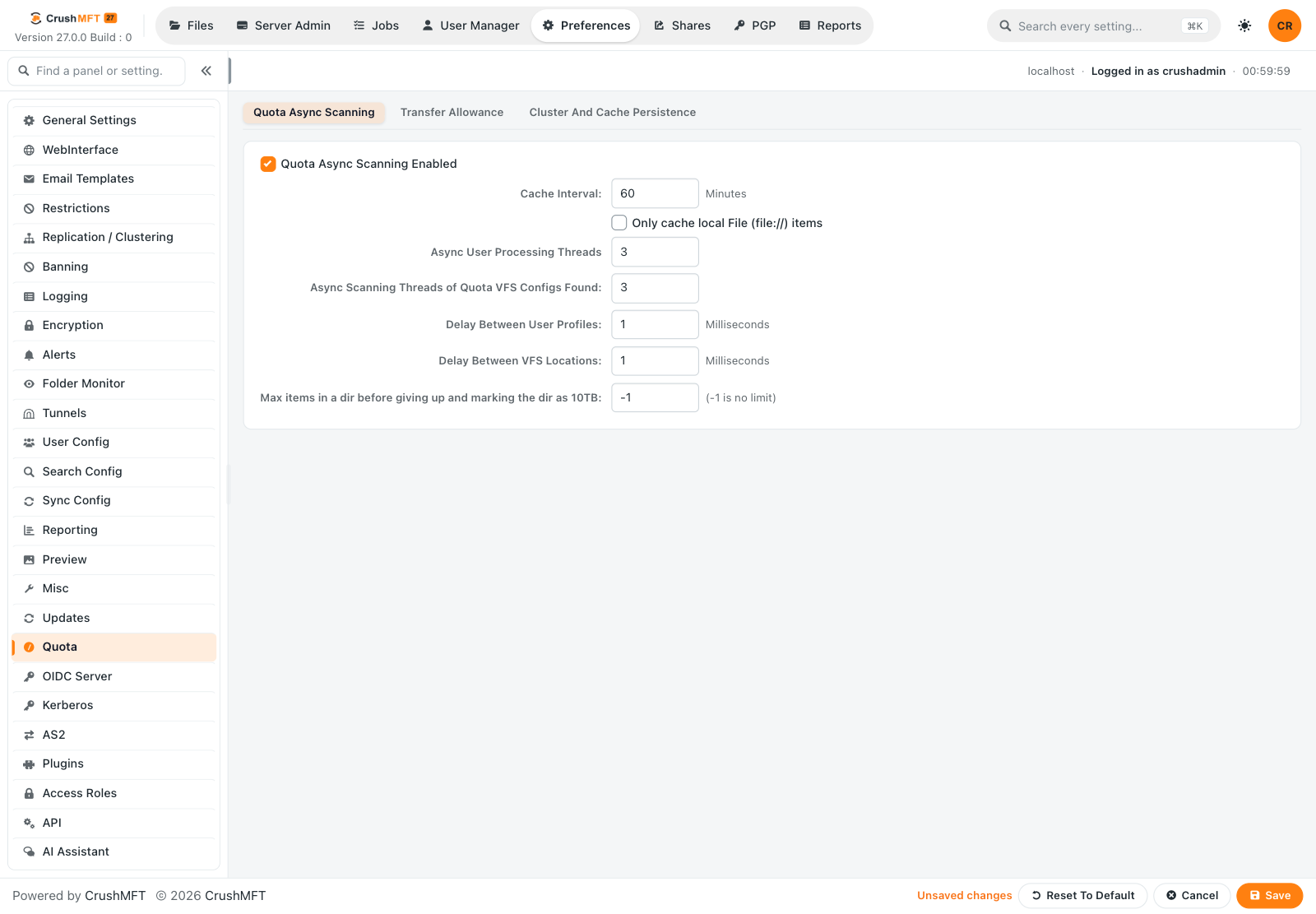
Quota Async Scanning#
| Setting | Key | What it does | Default |
|---|---|---|---|
| Quota Async Scanning Enabled | quota_async |
turns background scanning on. While it is off, the settings below are kept and not used, which the page says in a notice. | off |
| Cache Interval | quota_async_cache_interval |
how many minutes after the start of one scan the next one starts | 60 |
| Only cache local File (file://) items | quota_async_local_only |
leaves folders on other storage out of the count: what is in them already is not counted against a quota | off |
| Async User Processing Threads | quota_async_user_threads |
how many users are worked on at the same time | 3 |
| Async Scanning Threads of Quota VFS Configs Found | quota_async_threads |
how many folders are counted at the same time | 3 |
| Delay Between User Profiles | quota_async_user_delay |
a pause after each user is loaded, to keep the scan from taking the whole machine, in milliseconds: 1000 is one second | 1 |
| Delay Between VFS Locations | quota_async_vfs_delay |
a pause before the folders of a user are looked at, in milliseconds | 1 |
| Max items in a dir before giving up and marking the dir as 10TB | max_items_dir_quota |
when a folder has more items than this, the server stops counting it and takes it as holding 10 TB, so that a quota on it is full. -1: no limit. | -1 |
More threads make a scan faster and load the disks and the storage more. With many users on remote storage, each folder that is counted is a listing over the network: keep the threads low and the interval long.
The scan slows itself when the machine is busy: it waits 2 seconds before a folder when the server's processor load is above 50%, 5 seconds above 80% and 10 seconds above 90%.
Transfer Allowance#

| Field | What it does | On a new server |
|---|---|---|
| Show what is left of the transfer allowance in web listings | a user who has a daily or monthly transfer allowance sees in the web interface what is left of it. It costs a look-up for each listing. | off |
The key is calculate_transfer_usage_listings.
Cluster And Cache Persistence#
These are used only while background scanning is on.
| Setting | Key | What it does | Default |
|---|---|---|---|
| Send Quota Results to Clustered Servers | quota_async_send_shared_quota |
after each scan, sends the totals to the other servers of the cluster, so that all of them answer with the same numbers and only one has to scan | on |
| Operating Mode For Cluster Servers | quota_async_operating_mode |
which servers scan, see below | any |
| Persist Quota Cache to Disk for Faster Restarts | quota_async_persist_disk |
writes the totals to a file after each scan | off |
| Path for storing the quota XML cache | quota_async_persist_disk_path |
that file. Browse picks it. | ./quota_async_cache.XML, in the server's folder |
| Operating mode | What the server does |
|---|---|
| any | scans when its time comes, unless another server of the cluster answers that it is scanning right now: then it leaves this round out and waits for that server's totals |
| master | always scans |
| slave | never scans. It uses the totals other servers send, and the cache file. |
With the file, a server that starts knows the totals at once, where it would otherwise treat every folder as empty until the first scan is through. A server reads the file at its start whenever it is there, and again when the file changes, so servers that reach the same file share the totals through it as well. Only a server in the mode any or master writes it. After a start with a file, the first scan comes one interval later; without a file it starts at once.
The path must name a file. The page refuses a path that is empty ("Path is required."), that ends in a slash, or that has no file name with an ending ("Path must reference a filename."), and does not save until it is right.
Starting a scan by hand#
Make an empty file named quota_update in the server's folder. The server sees it within seconds, starts a scan and removes the file.
Seeing what a scan did#
- The dashboard of Server Admin shows the numbers of the last scan: how long it took, how many users with quotas it found, how many folders it tracks and how many items it counted.
- The log has the details under the kind QUOTA, which is not logged on a new server: tick it in What is logged.
QUOTA|11/20/2026 15:33:08.437|QuotaWorker:scan started.
QUOTA|11/20/2026 15:33:08.444|QuotaWorker:Scanning VFS for key:MainUsers:alex:/FILES/
QUOTA|11/20/2026 15:33:09.485|QuotaWorker:NEW_RECORD:MainUsers:alex::record key=VIRTUAL:///FILES, URL=virtual:///files:SIZE=959.69 MB (1006315154) Secs:938ms, Listed Item Count=20
QUOTA|11/20/2026 15:33:20.486|QuotaWorker:scan complete.  Success=true  Seconds=17 User XML Loading=0secs VFS XML Loading=0secs, CrossRef lookup secs=0 secs, memoryQuota.size=2, memoryQuota.ram=330 B
QUOTA|11/20/2026 15:33:20.487|QuotaWorker:writing cache to disk file...START
QUOTA|11/20/2026 15:33:20.489|QuotaWorker:writing cache to disk file...COMPLETE
Here the user alex has a quota of 2 GB on a folder that holds 959.69 MB. A client that asks for the quota right after gets 1,141,168,494 bytes left of 2,147,483,648.
A folder that could not be listed is logged with QUOTA_ERROR: and counts as 10 TB, like one with too many items.
Settings that are not on the page#
These are in prefs.XML only.
| Key | What it does | Default |
|---|---|---|
quota_async_native_du |
true: a folder on the server's own disk is not walked by the server but measured with the command du -sk (Linux, macOS), which is faster on very large folders. If the command's answer cannot be read, the server counts the folder itself. |
false |
quota_async_native_count |
with the one above: also counts the items, with find |
false |
quota_async_backoff_high_cpu_usage |
the slowing down when the processor is busy, described above | true |
Saving#
Save at the bottom saves both parts (saving). No restart is needed: turning scanning on starts the first scan right away, and a new interval counts from the next round.