WebDAV servers#
WebDAV is file access over the web's own protocol: listing, uploading, renaming and deleting, on top of HTTP. Many web servers, document systems and online storage services offer it. The item types WEBDAV and WEBDAVS of a VFS point at a folder on such a server.
| Item type | Is |
|---|---|
| WEBDAV | WebDAV over plain HTTP. Passwords travel unprotected: only inside a network you trust. |
| WEBDAVS | WebDAV over HTTPS. The one to use. |
The address#
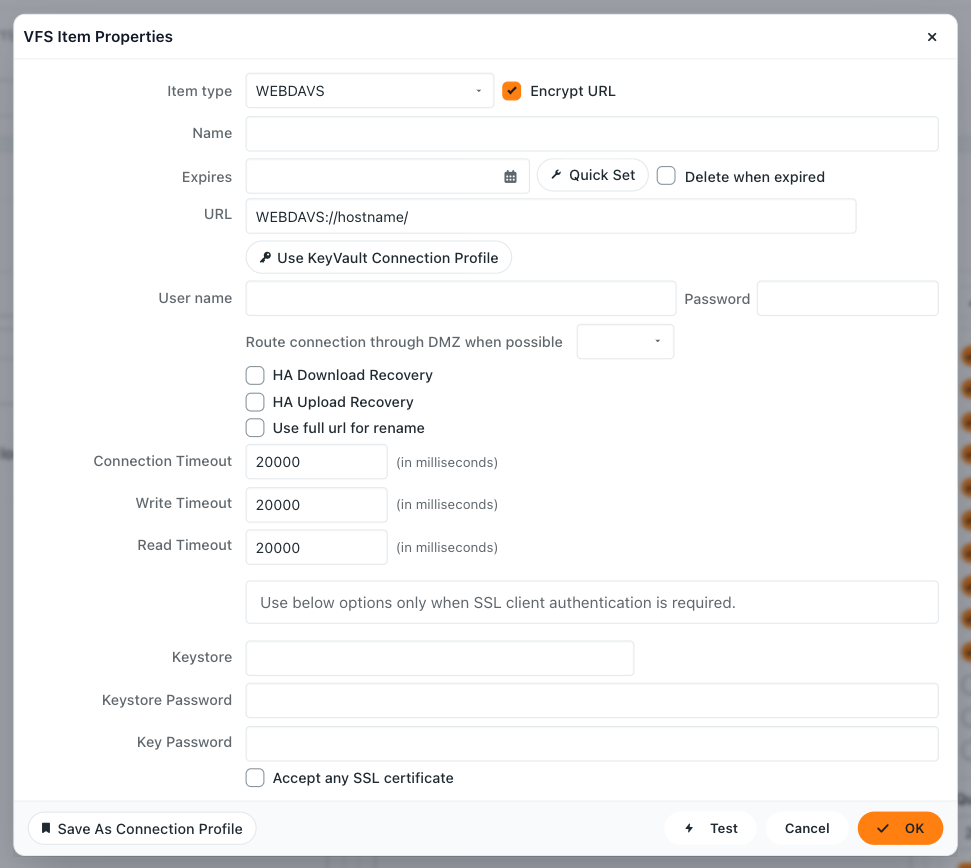
WEBDAVS://dav.example.com/remote.php/dav/files/acme/ : the host, and the path at which the service offers WebDAV. That path differs from product to product; the service's documentation names it. The folder at the end is the top of what the user sees.
User name and Password are the login there. Many services want an "app password" made for this purpose rather than the password a person signs in with, above all when the account has a second factor.
Options#
| Option | What it does | New item |
|---|---|---|
| Use full url for rename | when renaming or moving, the new place is sent as a whole address with host, instead of as a path. Some servers accept only one of the two forms: turn it on when renames fail and everything else works. | off |
| Accept any SSL certificate | WEBDAVS only: does not check the certificate. For tests only. | off |
| Keystore, Keystore Password, Key Password | WEBDAVS only: a certificate of your own to show, when the server asks for one |
The options every type has are on Advanced options of a VFS item.
What to expect#
WebDAV is simple and not fast:
- A broken upload usually starts again from the beginning: resuming is not part of what most WebDAV servers offer.
- A move between two folders can be a copy and a delete on the other side, and take as long.
- Listings of folders with many thousands of files are slow.
For large files and many of them, prefer SFTP or the storage's own type where there is one, such as SharePoint or Box.
Testing#
Test logs in and lists. On the test server, an item pointing at the server's own WebDAV with a second user's login answered with the "Success" notice.
| What you see | Usually |
|---|---|
| the login is refused | an app password is needed; or the account may not use WebDAV |
| not found, or "method not allowed" | the path in the address is not the service's WebDAV path |
| a certificate error | the name in the address, or trust: see SSL |
| renames fail | Use full url for rename |
CrushMFT is a WebDAV server itself: an item of this type can point at another CrushMFT server. Between CrushMFT servers, the type HTTPS does more.