Azure Storage: blobs, file shares, Data Lake#
An item of a VFS can point at storage of a Microsoft Azure storage account: a blob container, a file share, or a Data Lake Storage Gen2 file system.
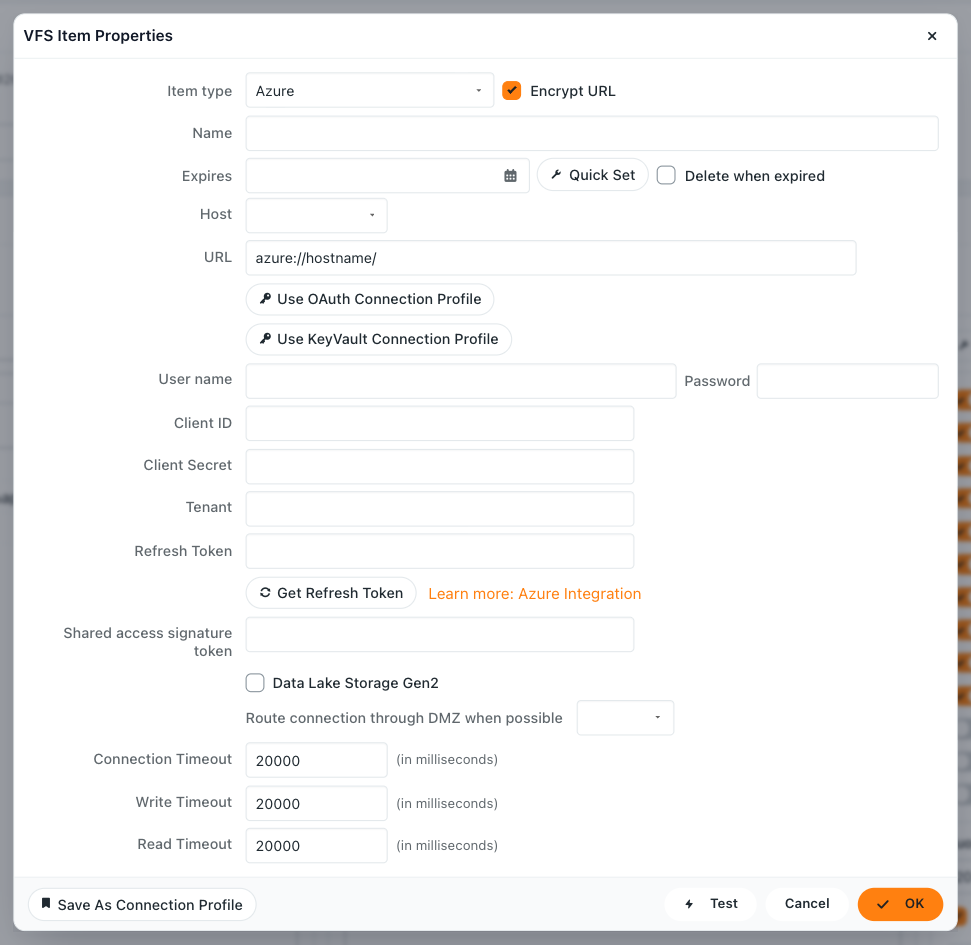
Which storage#
Host chooses the service, and with it the host name of the address:
| Host | Service | Address |
|---|---|---|
| Blob share | Blob Storage: objects in a container | azure://ACCOUNT:KEY@blob.core.windows.net/container/ |
| File share | Azure Files: a share with real folders | azure://ACCOUNT:KEY@file.core.windows.net/share/ |
| China Blob share | Blob Storage in Azure China | …@blob.core.chinacloudapi.cn/container/ |
| Private Blob, Private File Share | the same two through a private endpoint in your own network | …@privatelink.blob.core.windows.net/…, …@privatelink.file.core.windows.net/… |
The first folder of the address is the container or the share; a folder after it narrows the item to that folder.
Tick Data Lake Storage Gen2 for a storage account with the hierarchical namespace turned on. Folders are then real, and renaming one is a single quick step instead of a copy of every blob.
Who#
| Way | Fill in |
|---|---|
| the account key | User name: the name of the storage account. Password: one of its two access keys. The key opens the whole account. |
| a shared access signature | User name: the account. Shared access signature token: a SAS token. It can be limited to one container, to some permissions and to a time; it stops working when that time is over. |
| an app registration | Client ID, Client Secret and Tenant of an app in Microsoft Entra ID, then Get Refresh Token, which opens Microsoft's sign-in and fills in Refresh Token. The server then acts with the rights that app and user were given on the storage, through Azure's role assignments. |
| an OAuth profile | Use OAuth Connection Profile: the sign-in is kept in a connection profile and shared by items: see Special types |
| a key from a vault | Use KeyVault Connection Profile |
For anything that lasts, prefer the app registration or an OAuth profile with a role such as "Storage Blob Data Contributor" on the one container. Account keys are all-powerful and are rarely rotated; a SAS token ends on a date that somebody has to remember.
Blob or file share?#
| Blob | File share | Data Lake Gen2 | |
|---|---|---|---|
| folders | made up from names | real | real |
| renaming a folder | copies every blob | quick | quick |
| largest file | very large | large | very large |
| cost | lowest | higher | as blob |
| other programs use it as | objects, over HTTPS | a network drive, over SMB | both |
For users who work in the folders, a file share or Data Lake Gen2 behaves like they expect. For archives and hand-over of files to other systems, blobs are the usual choice.
A file share can also be reached with the server's SMB client, at ACCOUNT.file.core.windows.net, where port 445 is open towards Azure.
The options every type has are on Advanced options of a VFS item.
When it does not work#
| What you see | Usually |
|---|---|
| the signature or the login is refused | the key was regenerated; the SAS token ran out; the clock of the machine |
| "AuthorizationPermissionMismatch" | the app or the SAS token lacks a permission, such as list, write or delete |
| the host cannot be reached | the storage account's firewall: allow the server's address, or use the private endpoint |
| renaming folders is very slow | a blob container without the hierarchical namespace |
A login to Azure that stops working can raise an alert: see When a storage login stops working.