Backblaze B2#
An item of a VFS can point at a bucket of Backblaze B2 Cloud Storage. There are two ways: B2's own interface, with the item type Backblaze(b2), and B2's S3-compatible interface, with the item type S3.
Which way#
| Backblaze(b2) | S3 | |
|---|---|---|
| set up | key and bucket, nothing else | the endpoint of the bucket, and the settings for compatible storage |
| resuming a broken upload | no | yes |
| keeping the date of the original file | no | with metadata |
| renaming a folder | copies every file | copies every file |
For an archive that is written once, either works. For users who upload large files over weak lines, use the S3 way: see S3-compatible storage. The endpoint is on the bucket's page at Backblaze, of the form s3.us-west-004.backblazeb2.com, and the key must be made with "Allow access to S3-compatible API".
An application key#
In the Backblaze account, under App Keys, add an application key:
- Give it a name.
- Restrict it to the one bucket, and to a folder if you like.
- Choose read and write, or read only.
- Create it and copy the keyID and the applicationKey. The application key is shown once.
Do not use the account's master key.
The item#
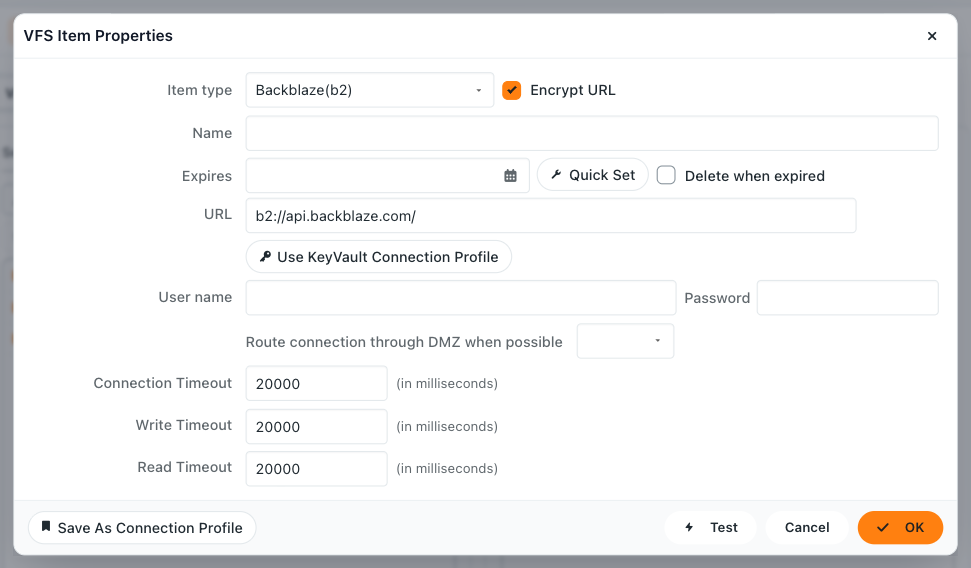
| Field | What it is |
|---|---|
| URL | b2://api.backblaze.com/BUCKET/, with a folder after the bucket to give the user only that |
| User name | the keyID |
| Password | the applicationKey |
| Use KeyVault Connection Profile | takes the key from a vault: see Special types |
Together they make b2://KEYID:APPLICATIONKEY@api.backblaze.com/BUCKET/.
The options every type has are on Advanced options of a VFS item.
What to expect#
B2 is object storage, like S3: there are no real folders, and a "folder" is the beginning of file names.
- Renaming or moving a folder copies each file and deletes the original. On large folders it takes long.
- With the type Backblaze(b2), an upload that breaks off starts again from the beginning, and files show the date they were uploaded.
- A key that is restricted to a bucket cannot list the account's buckets: name the bucket in the address.
A server that reaches the internet through a proxy or a strict firewall must be let out to api.backblazeb2.com and to the download and upload hosts B2 names when the server logs in.
When it does not work#
| What you see | Usually |
|---|---|
| "unauthorized" at login | keyID and applicationKey swapped or cut; the key was deleted |
| the bucket is "not found" | the key is restricted to another bucket; or the name's upper and lower case |
| uploads are refused, listings work | a read-only key |