Local folders#
The simplest item of a VFS points at a folder on the machine the server runs on: a folder of its disk, or of anything the machine has mounted as a disk. In the list of item types it is called File.
Making one#
In the VFS editor of a user, the left side, Server's Files, shows the folders of the server machine. Go to the folder and drag it to the right side, User's Stuff. The item gets the folder's name; rename it if the user should see another one.
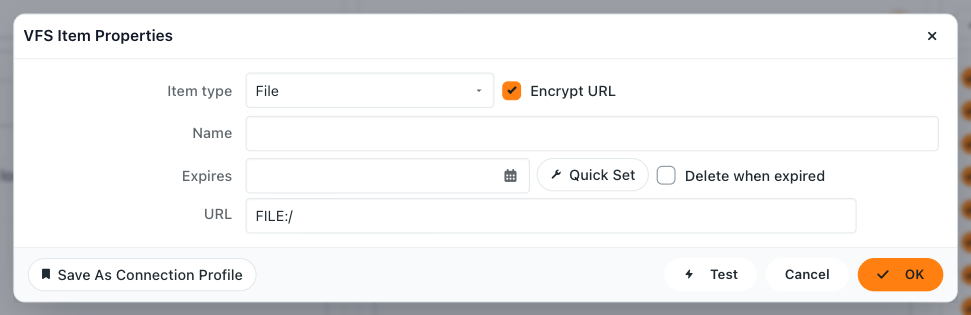
Or press New Remote Item, leave Item type on File, and type the address:
| System | Address |
|---|---|
| Linux, macOS | FILE://srv/data/reports/ for the folder /srv/data/reports/ |
| Windows | FILE://D:/data/reports/ for D:\data\reports\ |
An address always uses forward slashes and ends with one. The folder is the top of what the user sees: they can go down from it, never above it.
An address can also be a single file. The user then sees just that file.
A folder per user#
The address can have variables in it, which the server fills in at login:
| In the address | Becomes |
|---|---|
{username} |
the name the user logged in with |
{user_email}, {user_first_name}, and the like |
that value of the user |
One item on a template, FILE://srv/home/{username}/, so gives every user who inherits from it a folder of their own. Turn on Create home folder paths at login in Misc to have missing folders made at the first login. The plugin HomeDirectory does more of the same: see Plugins.
What the server needs#
The server reads and writes local folders as the system account it runs as. That account needs the rights on the folder:
- On Linux and macOS, the folder must be readable, and writable for uploads, by the server's account. Owners and permissions of what users upload can be set: see POSIX owner and permissions.
- On Windows, a service does not see the drive letters that were mapped by a person who is logged in. Use the address of the share instead: see Windows shares by UNC path.
The permissions of the item narrow what the server's account could do; they cannot widen it.
Network disks#
A disk that the machine mounts, such as an NFS mount on Linux or a volume of a storage system, is a local folder for the server. It works, with two things to know:
- When the mount is away, the folder is empty or missing. A user then sees an empty folder, and with Create home folder paths at login the server may make folders on the machine's own disk under the mount point. Let the system fail hard on a missing mount.
- File changes made by other machines are seen, but the server is not told of them: a folder monitor finds them by looking.
The server can also talk to SMB and NFS servers itself, without the machine mounting anything: see SMB shares and NFS exports.
Things to know#
- Upper and lower case in names behave as the disk does: a Linux disk has
Report.pdfandreport.pdfas two files, Windows and most Macs as one. - A link on the disk that leads out of the folder is followed. Do not keep such links in folders users can write to.
- The fastest storage is local storage. Put work folders, such as those of jobs, on a local disk.