SNMP traps#
An alert can tell your network monitoring by SNMP: each time it fires, the server sends a trap to every receiver you have set up. The receivers are in the SNMP Traps panel at the bottom of the Alerts section of Preferences.
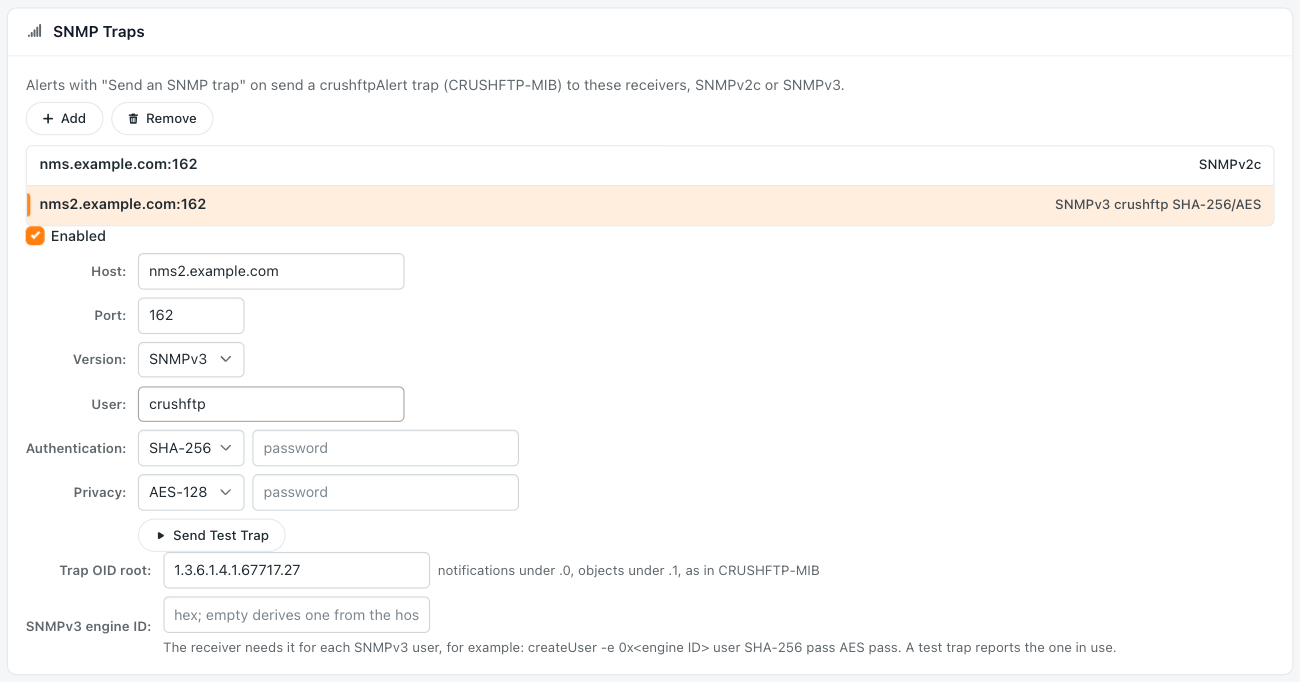
Setting it up takes two steps:
- Add at least one receiver here.
- Tick Send an SNMP trap to every SNMP receiver on each alert that should send traps.
A trap counts for the alert's Max of … alerts per hour, like a mail does.
Receivers#
A new server has none: "No SNMP receivers." Add adds one and opens it, Remove removes the selected one. Each receiver is shown with its host and port and how it is spoken to.
| Setting | What it is | Default |
|---|---|---|
| Enabled | untick to stop sending to this receiver without removing it | on |
| Host | the name or address of the machine that receives the traps | empty |
| Port | its UDP port | 162 |
| Version | SNMPv3, with a user and encryption, or SNMPv2c, with a community name and nothing encrypted | SNMPv3 |
| Send Test Trap | sends a trap to this receiver now, see below |
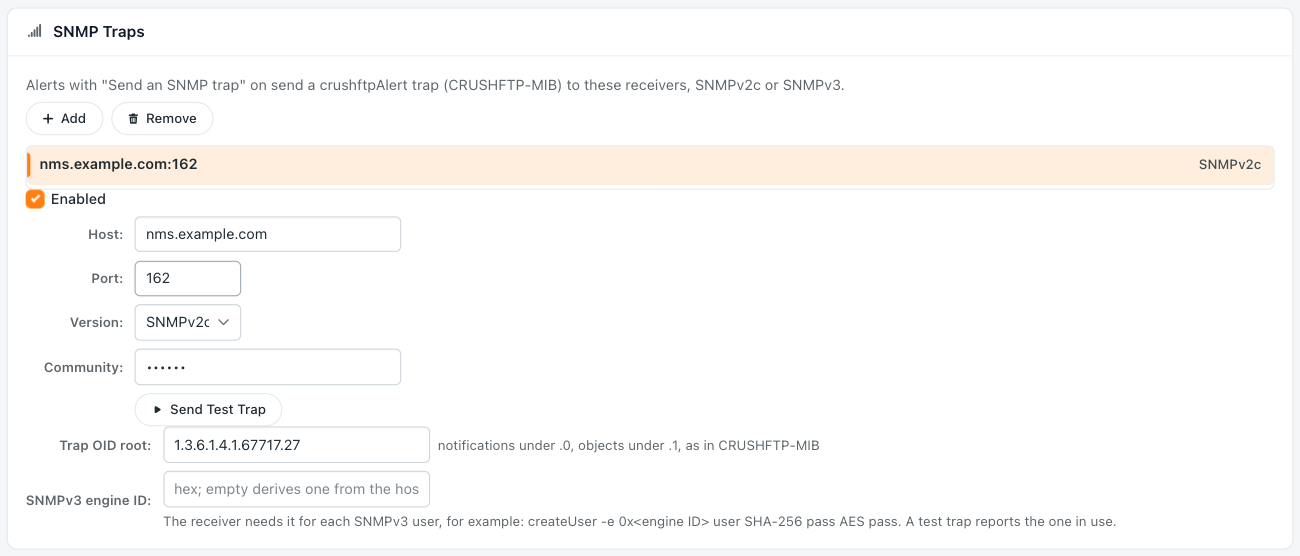
With SNMPv2c:
| Setting | What it is |
|---|---|
| Community | the community name the receiver expects, often public |
With SNMPv3:
| Setting | What it is | Default |
|---|---|---|
| User | the SNMPv3 user name, as it is set up on the receiver | empty |
| Authentication | how traps are signed: none, MD5, SHA, SHA-224, SHA-256, SHA-384 or SHA-512, and the password for it | SHA-256 |
| Privacy | how traps are encrypted: none or AES-128, and the password for it | AES-128 |
The community and the two passwords are stored encrypted.
The panel checks a receiver when you save or test:
| Message | Why |
|---|---|
| "An SNMP receiver needs a host." | Host is empty |
| "The SNMP receiver port must be a number." | |
| "An SNMPv3 receiver needs a user name." | |
| "SNMPv3 privacy needs an authentication protocol too." | Privacy is on while Authentication is none |
Sending a test trap#
Send Test Trap sends one trap to the selected receiver, as it is on the screen, saved or not. The answer says what was sent:
SUCCESS: v2c trap of 355 bytes sent to nms.example.com:162. UDP cannot confirm delivery: check the receiver.
As it says, the server cannot know whether the trap arrived: SNMP traps are sent without an answer. Look at the receiver. The test trap has the type "SNMP Test", the subject "Test trap from CrushMFT" and the severity info.
With SNMPv3 the answer also names the engine ID and the user:
SUCCESS: v3 trap of 466 bytes sent to nms.example.com:162 (engine ID 8001088505a1b2c3d4e5f60718, user crushftp). UDP cannot confirm delivery: check the receiver.
The two settings for all receivers#
| Setting | What it is | Default |
|---|---|---|
| Trap OID root | the number all of the server's SNMP names start with. The trap itself is under .0, what it carries under .1. Change it only when it collides with something else in your monitoring, and change the MIB file to match. |
1.3.6.1.4.1.67717.27 |
| SNMPv3 engine ID | the identity the server signs SNMPv3 traps with, in hex. Empty: the server makes one from its host name. | empty |
An SNMPv3 receiver must be told the engine ID of every sender, together with the user. With the trap receiver of Net-SNMP, for example, in snmptrapd.conf:
createUser -e 0x<engine ID> crushftp SHA-256 "authentication password" AES "privacy password"
authUser log crushftp
A test trap tells you the engine ID in use. Set SNMPv3 engine ID yourself when the host name of the server may change: the receiver would not know the new one.
For SNMPv2c the receiver only needs the community:
authCommunity log public
What a trap carries#
Every trap is a crushmftAlert. With the default root its number is 1.3.6.1.4.1.67717.27.0.1, and it carries nine values:
| Name | Number, after the root | Holds |
|---|---|---|
crushmftAlertType |
.1.1 |
the alert type, as in the Alert type list |
crushmftAlertSubject |
.1.2 |
the subject of the alert, with its variables filled in |
crushmftAlertMessage |
.1.3 |
the body of the alert, with its variables filled in, cut at 2048 characters |
crushmftAlertHost |
.1.4 |
the host name of the server that raised the alert |
crushmftAlertUser |
.1.5 |
the user the alert is about, or empty |
crushmftAlertIp |
.1.6 |
the address of the client the alert is about, or empty |
crushmftAlertAction |
.1.7 |
the server's short key for the alert, such as disk, ip_banned_logins or low_memory |
crushmftAlertSeverity |
.1.8 |
warning for alerts, info for test traps |
crushmftAlertTime |
.1.9 |
when the alert fired, as a date and time in UTC |
So what the trap says is what the alert's Subject and Body say. Write them for the people who read the monitoring.
The MIB file#
The names above are defined in the file CRUSHMFT-MIB.txt. Load it into your monitoring so that it shows names in place of numbers. 67717 is the enterprise number of CrushFTP, LLC.