Job engines#
Jobs are not run by the server itself. They are run by a job engine: a program of its own beside the server. A job that needs a lot of memory, or one that hangs, then cannot take the file server down with it, and an engine can be restarted without anybody's transfer breaking.
A server has one engine from the start, and you do not have to do anything for it. This page explains the parts, and the Engines section of the Jobs app.
The words#
| Word | Is |
|---|---|
| run | one execution of a job |
| orchestrator | the part of the server that decides which run goes to which engine, and keeps the schedules |
| engine | a program that executes runs. It connects to the orchestrator, never the other way round. |
| runner | a process inside an engine in which runs execute. An engine has one shared runner for ordinary runs and starts further runners for jobs that get a runner of their own. |
So: the orchestrator hands a run to an engine, and the engine puts it into a runner.
Where engines can be#
| Engine | Use |
|---|---|
| on the server itself | the normal case. Started and watched by the server. |
| on another machine | to take the work off the server, or to run jobs where the files are |
| on every server of a cluster | each server brings an engine; one of them holds the orchestrator |
| a job server | a machine that only runs jobs and serves no users |
The Engines section#
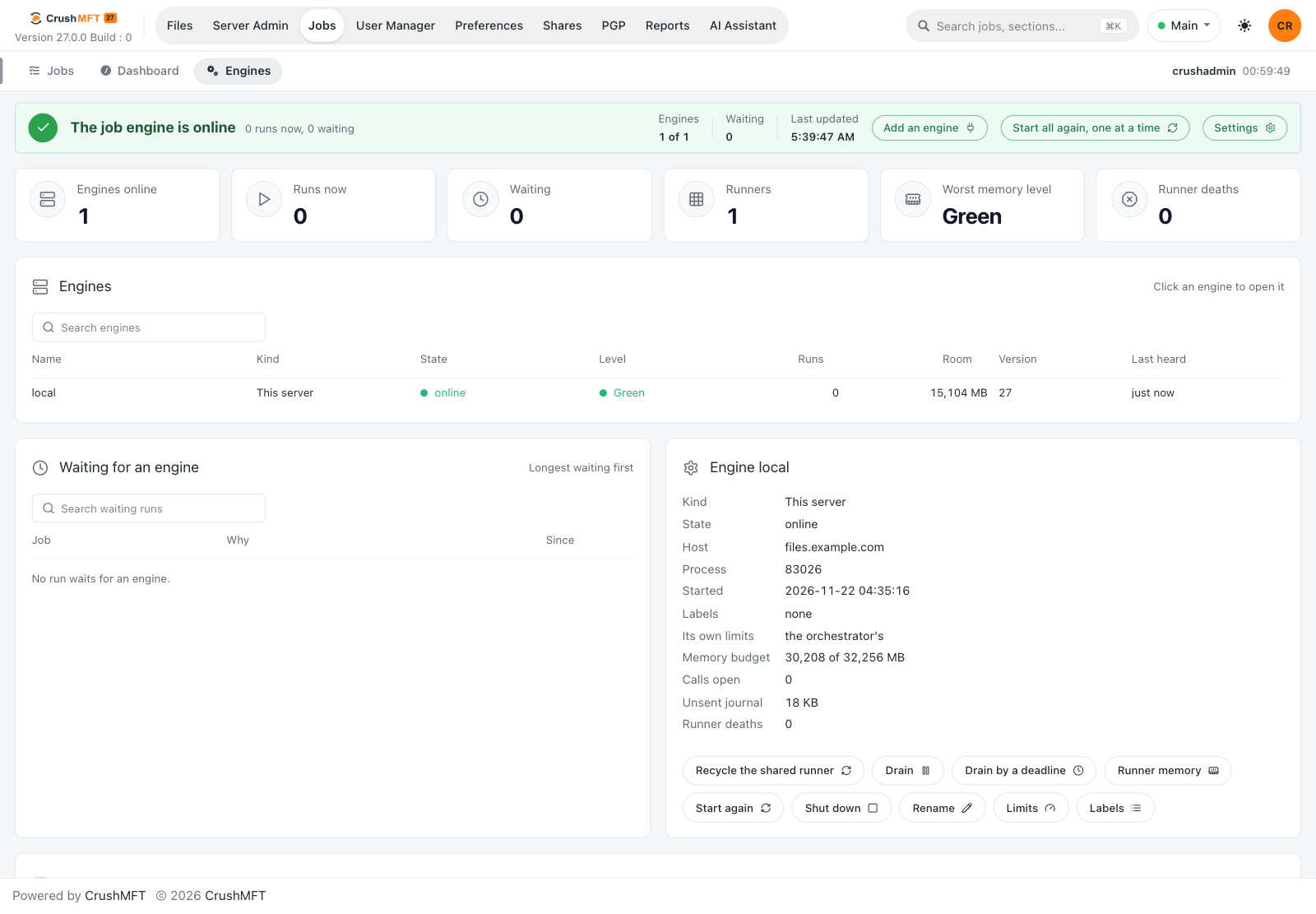
The headline says how things are: "The job engine is online — 0 runs now, 0 waiting".
| Tile | Shows |
|---|---|
| Engines online | how many of the known engines answer |
| Runs now | runs under way |
| Waiting | runs that could not start yet |
| Runners | processes that execute runs |
| Worst memory level | Green, Yellow or Red: see How an engine stays healthy |
| Runner deaths | runners that ended without being told to |
The table lists the engines:
| Column | Is |
|---|---|
| Name | |
| Kind | This server, another machine, a server of the cluster |
| State | online, not answering, draining, offline |
| Level | its memory level |
| Runs, Room | runs it has, and how much more it can take |
| Version | |
| Last heard | when it last reported |
Waiting for an engine lists the runs that have not started, with Job, Why and Since. The reasons: the job is already running and is set to a single instance; there is no room on the engine; the engine it must run on is not answering; it needs an engine with a label that none has.
Add an engine enrols an engine on another machine. Start all again, one at a time restarts every engine in turn, each when the one before is back, so that jobs keep running throughout.
One engine#
A click on an engine opens it.
| Part | Shows |
|---|---|
| the head | Host, Process, Started, Labels, its limits, Memory budget, Calls open, Unsent journal |
| Runners | one row each: Shared · r1 or the job a runner belongs to, Memory held, the share of time spent tidying memory (GC), Threads, Age, Runs, Level |
| Runs on this engine | as under Active Jobs |
| What happened | changes of level with the numbers behind them, runs that were moved, runners that were recycled or died, with the reason |
| Over time | memory, GC and runs over the last hour and day |
The actions:
| Action | What it does |
|---|---|
| Recycle the shared runner | starts a fresh shared runner. Runs in the old one finish there, or move if they can; new runs go to the new one. For a runner that has grown. |
| Drain | the engine takes no new runs and finishes the ones it has. For maintenance. Drain by a deadline moves what is left at that time to other engines. |
| Runner memory | the memory of the shared runner. No run is ended for it; it holds from the next recycle. |
| Limits | how many runs the engine takes at once, and how much memory its runners may use together |
| Labels | marks such as linux or warehouse, by which a job chooses an engine |
| Rename | |
| Start again | restarts the engine. Runs with Save state resume. |
| Shut down | stops it. Its runs go to other engines if there are any, else they wait. |
What a job can ask for#
In a job's Setup: a runner of its own and its memory, its size, what happens when its engine is lost, and the engine or labels it must run on. A job that asks for nothing runs in the shared runner of any engine with room.
Settings#
| Server setting | Is | Unless you change it |
|---|---|---|
job_engine_max_runs |
the most runs in the shared runner at once | 200 |
jobs_memory_param |
the memory of the shared runner | |
job_engine_own_heap_mb |
the memory of a runner of its own, when the job does not say | 1024 |
job_engine_memory_mb |
the memory all runners of the engine may have together | the shared runner and two runners of their own; in a container, worked out from the container's limit |
job_engine_max_resumes |
how often a run is resumed after its runner or engine was lost | 2 |
job_engine_cancel_grace_seconds |
how long a stopped run is given to end before Stop now is offered | 60 |
Limits and runner memory can be set per engine in the Engines section.
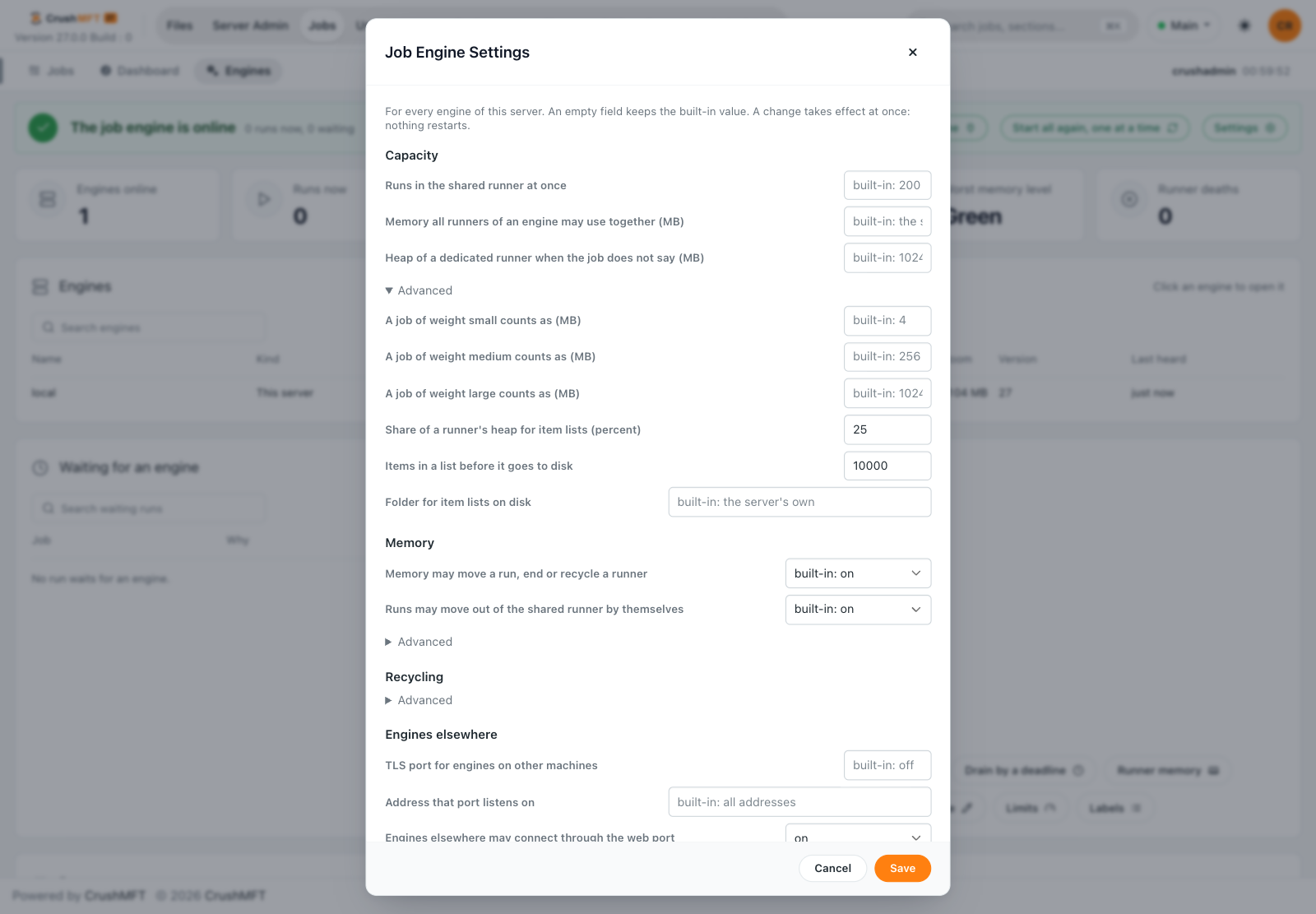
Settings at the top of the Engines section opens these and the other settings of this server's engines as one form. An empty field keeps the built-in value, which the field shows. A change takes effect at once: nothing restarts. The fields that are seldom changed are under Advanced in each part.
When the engine is down#
- Nothing runs. Schedules that come due are held and run once when an engine is back.
- The file server is not touched: logins, transfers and the admin pages go on.
- The server starts its own engine again by itself. The alert Job Engine Not Responding tells you when that does not work: Alerts.
- Events of users that run a job wait for the engine as any run does.
Coming from CrushFTP 11#
Version 11 could run jobs in the server itself or in a separate "job broker", and it spread jobs over a cluster with the setting "distributed jobs". In CrushMFT 27 the engine is always a program of its own, a cluster always has one orchestrator, and both older settings are gone. Jobs need no change.