Schedules#
Setup, in the bar of the designer, holds everything about a job that is not a task: its name, when it runs, how long it may run, where it runs, and what it keeps.
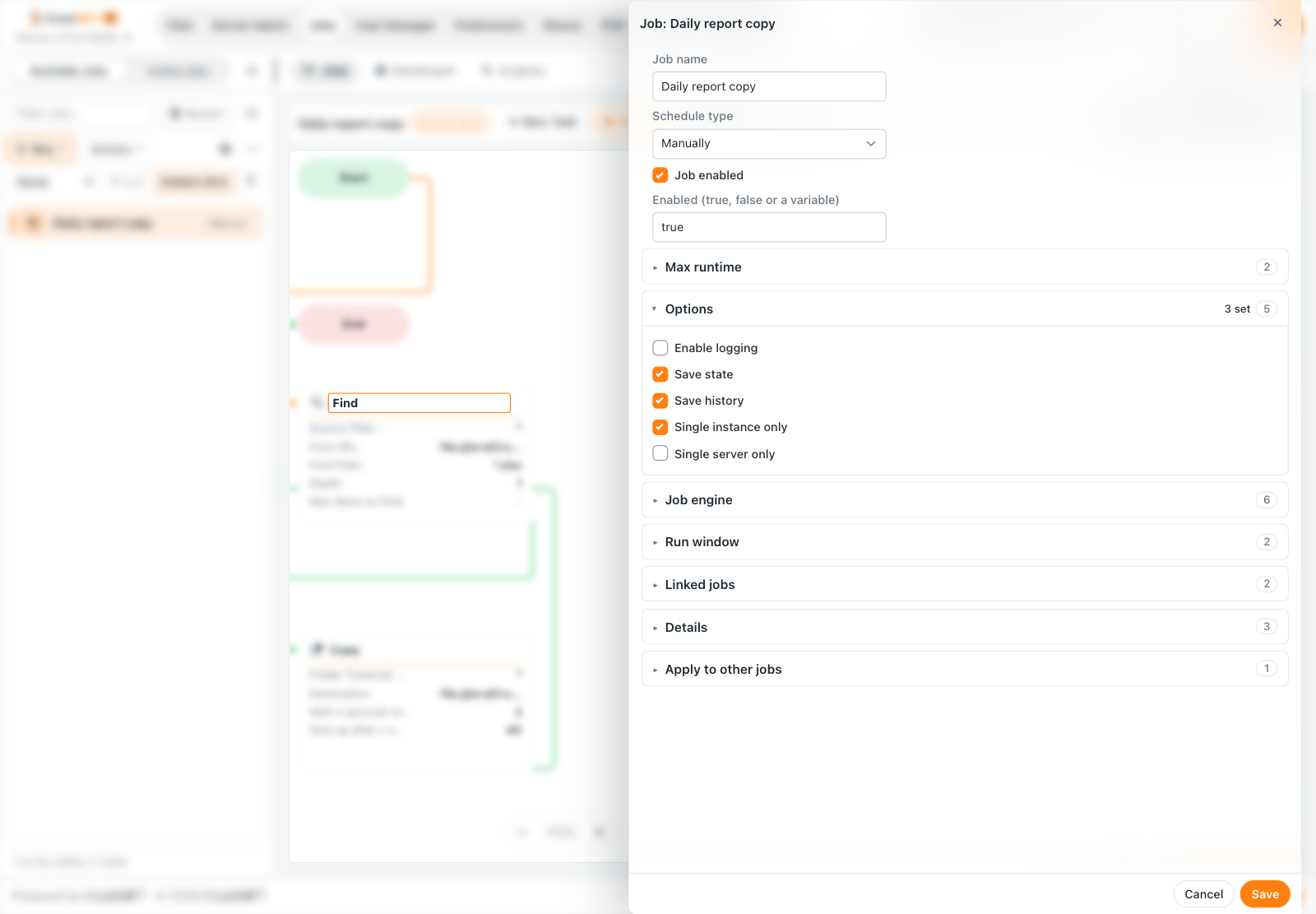
General#
| Setting | What it does |
|---|---|
| Job name | |
| Schedule type | Manually, Minutely, Daily, Weekly, Monthly |
| Job enabled | the schedule is in force. A job that is not enabled can still be started by hand, by an event and by the API. |
| Enabled (true, false or a variable) | the same switch as text, so that a server variable can decide. A job with a variable here is marked Variable in the list. |
Schedule#
| Type | Fields | Runs |
|---|---|---|
| Manually | none | only when it is started |
| Minutely | Repeat every … minutes | every so many minutes, day and night |
| Daily | Repeat every … days, Run at | at the times given, every so many days |
| Weekly | Repeat every … weeks, Week days, Run at | on the ticked days |
| Monthly | Repeat every … months, Days of month, Run at | on the given days of the month |
Run at takes one time or several, separated by commas: 8:00 AM, 6:30 PM. A time may be written as 09:00 AM, 9:00 pm or 13:45. Times are in the time zone of the server.
Add times helps with long lists:
| Button | What it does |
|---|---|
| Add | adds the time in the field beside it |
| Paste list | "Times, separated by commas:" for a whole list at once |
| Repeat every... | "Repeat every X minutes": fills in a time every so many minutes between From and To. Remove existing time entries starts the list afresh. |
Repeat every... is how a job runs every 15 minutes during office hours only: a Daily or Weekly schedule with the times from 8:00 to 18:00, on the ticked week days.
Run window, further down, gives a schedule a beginning and an end: Starting from and Ending at, each a date and a time. Before the first the job does not run; after the second it is switched off.
Things to know about schedules#
- One catch-up. When the server was down at the time a job was due, the job runs once when the server is back, not once for every time it missed.
- The hour that does not exist. On the night the clocks go forward, a job due in the skipped hour runs at the jump.
- An end date switches the job off. A job whose Ending at has passed is disabled, not deleted.
- Seconds. A minutely job can be made to run more often than once a minute by the API: a negative amount is a number of seconds, and 5 seconds is the least.
- A run that is still going. With Single instance only ticked, a job that is due while its last run is still going is skipped. Without it, a second run starts beside the first.
When nothing runs#
Schedules are held while one of these is true, and go on afterwards:
| Why | Where |
|---|---|
| Job scheduler enabled is off | Jobs settings |
| an update or a restart of the server is waiting | |
| the server was told to stop logins | Dashboard |
a file named jobs_blocked is in the server's folder |
a switch for whoever runs the machine |
| the licence is not Enterprise |
The Dashboard's Up next shows what is due in the next hour: see Overview.
Max runtime#
Max runtime, in hours and minutes. A run that takes longer is stopped. Leave both at 0 for no limit. Give every job that talks to another server a limit: a connection that hangs then costs one run, not every run after it.
Options#
| Option | What it does | Unless you change it |
|---|---|---|
| Enable logging | each run writes a log of its own | on |
| Save state | the run notes where it is after each task, so that it can be resumed after a restart or on another engine | on |
| Save history | the finished run is kept, and can be looked at under Active Jobs and in the Dashboard | on |
| Single instance only | one run of this job at a time | off |
| Single server only | in a cluster: one run at a time on all servers together | off |
Job engine#
Where and how the job's runs are executed. Leave these alone unless a job is unusually heavy or must run on a certain machine. See Job engines.
| Setting | Choices |
|---|---|
| Runner | Automatic; The shared runner; A runner of its own: a process for this job alone |
| Memory for its own runner (MB) | |
| Size | Automatic, Small, Medium, Large: how much room a run of this job is counted as |
| If its engine is lost | Resume it on another engine, or Fail the run |
| Run on engines with labels | only engines that carry these labels: see Engines on other machines |
| Run on the engine named | one engine by name |
Linked jobs#
| Setting | What it does |
|---|---|
| Link after start | a job whose tasks run first, before this job's own first task |
| Link before end | a job whose tasks run last, on every way to End, after a failure too |
The linked job's tasks run inside this run and on its items, as with a Link task. See How a job flows.
Details#
| Setting | What it does |
|---|---|
| Note | a line about the job, for people. It is {scheduleNote} in the job's tasks. |
| Allowed usernames | "Users allowed to monitor": admins with limited rights who may watch this job's runs. Pick chooses them from the users and groups. |
| Log file name | the name pattern of this job's log, in place of the server's default |
| Show XML | the job as it is stored, for a look. Do not edit a job's file by hand: a job is signed when it is saved, and a file that was changed outside the app is not run until it is approved. |
Apply to other jobs#
Copies one setting of this job to All jobs in the list or to the Ticked jobs: for example the same Max runtime for every job of a folder. The setting is chosen under Setting; nothing else of the other jobs changes.
The schedule by API#
PATCH /jobs/{name}/schedule changes a schedule without touching the tasks. See Jobs in the API.