Box#
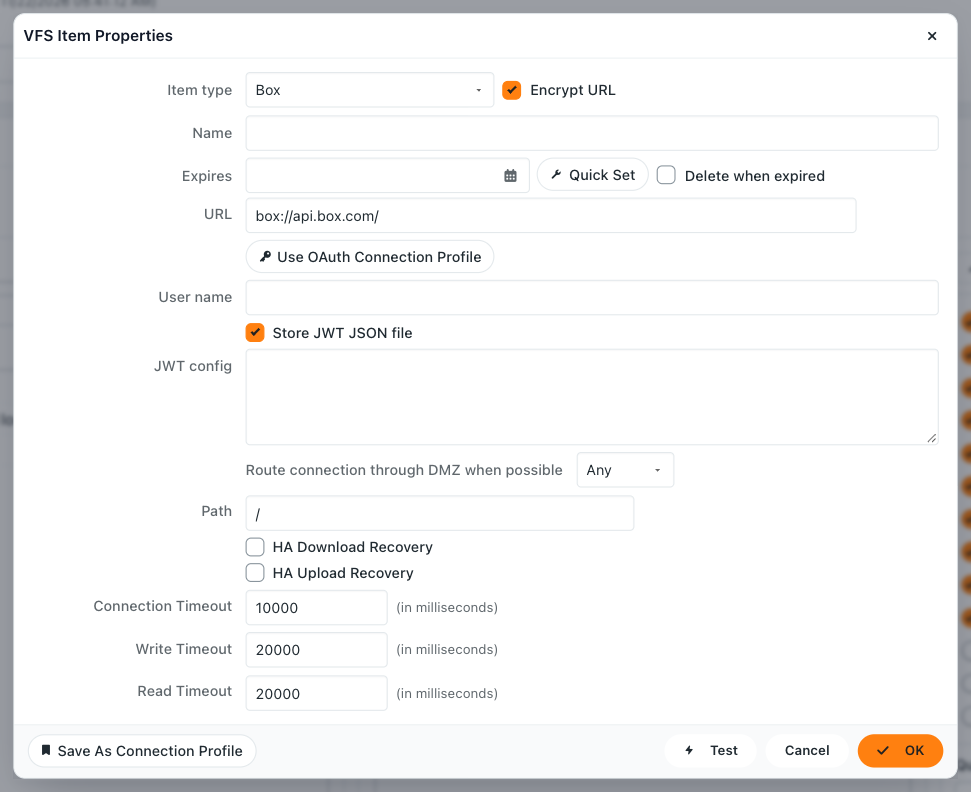
An item of a VFS of the type Box points at the files of a Box account, or at a folder of it. The server reaches Box as a custom app of your Box enterprise, which proves itself with a key pair (JWT).
At Box: a custom app#
- In the Box Developer Console, Create New App, of the type Custom App, with the authentication Server Authentication (with JWT).
- On the Configuration tab:
- under App Access Level, choose App + Enterprise Access;
- under Application Scopes, tick Write all files and folders stored in Box, and Manage users;
- under Advanced Features, tick Make API calls using the as-user header. It lets the app act as a user of your enterprise.
- Under Add and Manage Public Keys, press Generate a Public/Private Keypair. Box downloads a JSON file with the app's settings and its private key. Keep it safe: it is the app's whole identity, and Box does not show the key again.
- Save the changes.
- On the Authorization tab, press Review and Submit. An administrator of your Box enterprise must then approve the app in the Admin Console. Every later change of the app's configuration needs that approval again.
In the item#
| Field | What it is |
|---|---|
| URL | box://api.box.com/ |
| User name | the Box user the server acts as: the login (mail address) of a user of your enterprise. Their files are what the item shows. |
| JWT config | the content of the JSON file from step 3 |
| Store JWT JSON file | on: the JSON is kept with the item. It is on for a new item. |
| Path | a folder of that user's Box, to give the CrushMFT user only that. / is all of it. |
| Use OAuth Connection Profile | uses a sign-in kept in a connection profile instead: see Special types |
Press Test when the app is approved.
What to expect#
- An upload that breaks off starts again from the beginning.
- Files get the date of the upload: a client cannot set the original's date.
- Box takes a file whole. A large upload, of more than 25 MB, is first collected on the server's own disk, in the folder
boxof the server's folder, and sent on from there. Plan disk space for the largest files that are in transit at the same time, and expect the user's program to wait at the end of an upload while the file goes on to Box. - Box does not tell upper and lower case apart in names.
A server behind a proxy or a strict firewall must be let out to api.box.com and upload.box.com.
The connection is routed through a DMZ server when one is there: see Route connection through DMZ in Advanced options of a VFS item.
When it does not work#
| What you see | Usually |
|---|---|
| "unauthorized_client", or the app "is not authorized" | the app is not approved in the Admin Console, or was changed since |
| "invalid_grant" | the JSON is of another app or was cut; the machine's clock is off by more than a minute |
| the folder is empty | User name names nobody of the enterprise; or the as-user feature is off, and the item shows the app's own, empty, account |
| uploads fail on a full disk | the box folder of the server |
A login that stops working can raise an alert: see When a storage login stops working.