PGP in the browser#
The PGP app of the admin pages is the server's key ring: the place where PGP keys are made, imported, looked at, exported and retired, in the browser, with no PGP program installed anywhere.
The keys kept there can be used wherever the server works with PGP: in a PGP task of a job, in the encryption of a folder (VFS: Advanced), and in the PGP setup of a user (Restrictions).
PGP in two sentences#
A public key encrypts and can be given to anybody. The matching private key decrypts, and must stay with its owner.
So the key ring holds two kinds of key: your own pairs, private and public, to decrypt what partners send you; and the public keys of partners, to encrypt what you send them.
Opening it#
PGP in the app bar at the top of the admin pages. An account sees the app if its roles allow it.
The list#
| Control | Does |
|---|---|
| Filter keys... | shortens the list to the keys whose name holds what you type. "No key matches the filter." |
| Add | makes or imports a key |
| Remove | retires the ticked keys |
| Reload | reads the key ring again |
| "Total 1 PGP keys." | how many there are |
| Show deleted | also lists the retired keys, marked Deleted |
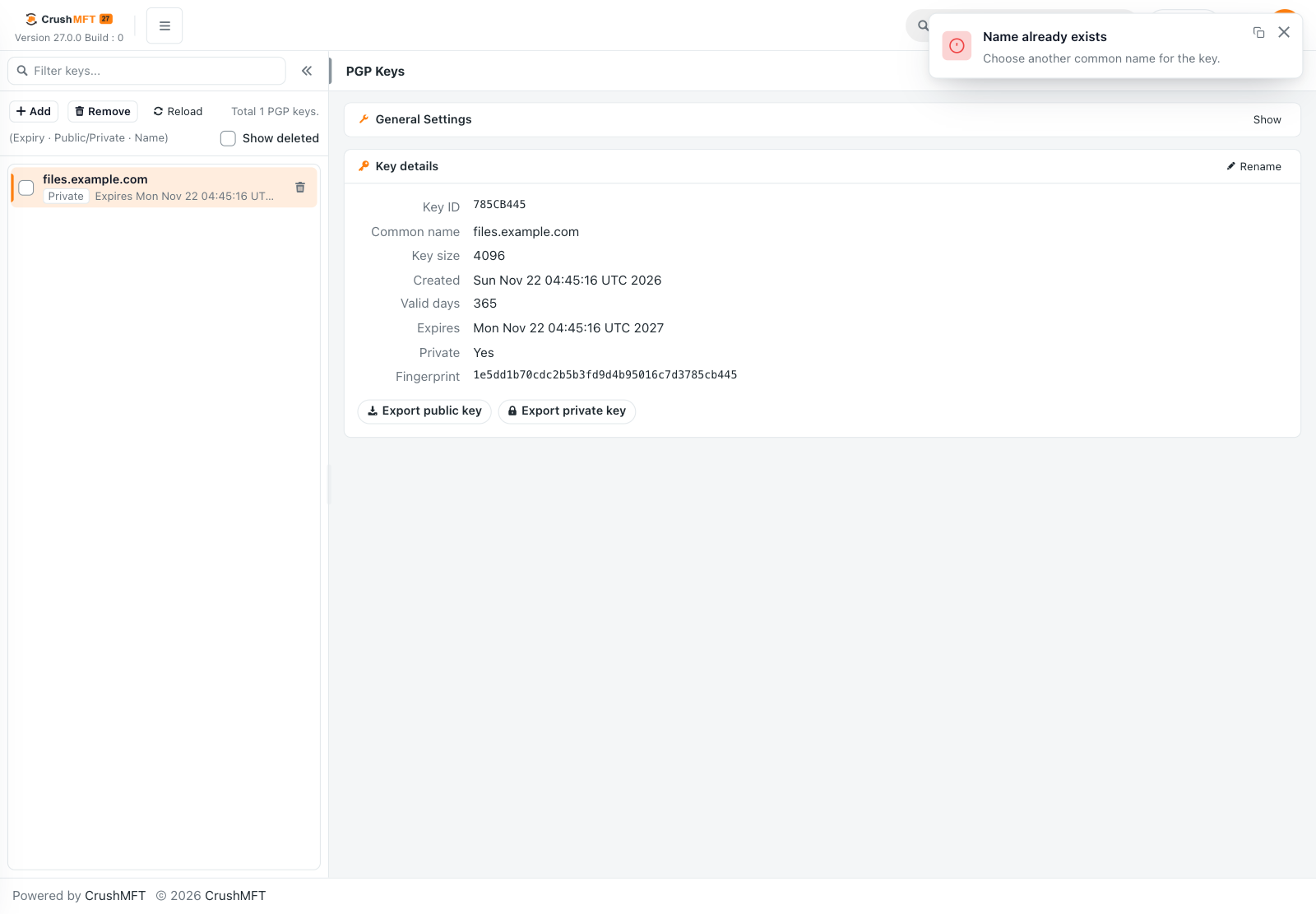
Each key shows its name, Private if the ring holds its private half, and when it expires. A new server has none: "No PGP keys yet."
A click on a key shows its details on the right. Before that: "Choose a key from the list for more details."
Adding a key#
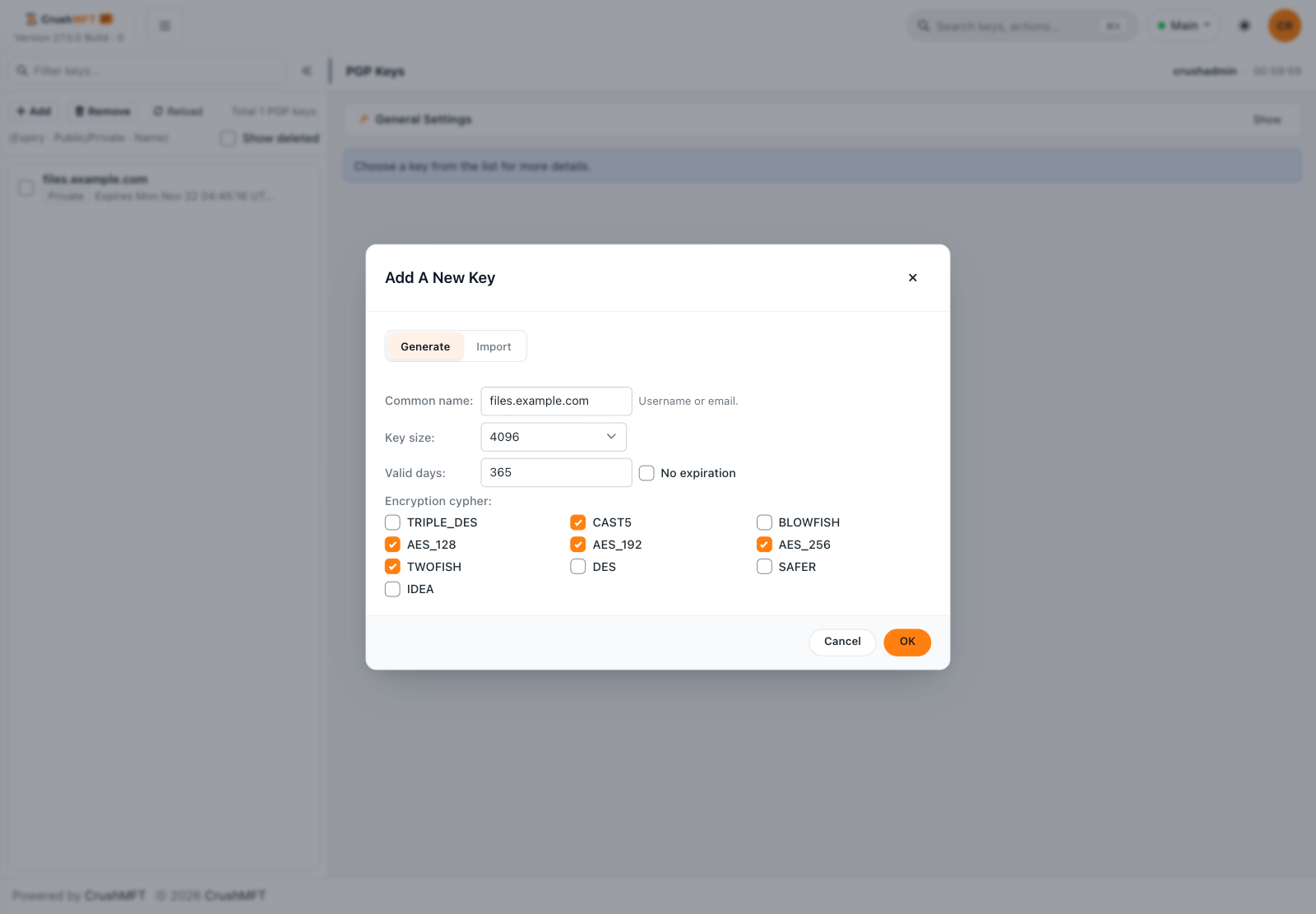
Add opens Add A New Key, with two tabs.
Generate#
Makes a new pair, for your own side.
| Field | Is | On a new key |
|---|---|---|
| Common name | whose key it is: "Username or email." Partners see this name on your public key. | empty. "A common name is required." |
| Key size | 2048 or 4096 bits | 4096 |
| Valid days | how long the key is valid | 365 |
| No expiration | the key never ends | off |
| Encryption cypher | the ciphers the key says its owner accepts: TRIPLE_DES, CAST5, BLOWFISH, AES_128, AES_192, AES_256, TWOFISH, DES, SAFER, IDEA | CAST5, AES_128, AES_192, AES_256, TWOFISH. "Choose at least one encryption cypher." |
OK makes the pair and puts it into the ring: "Key added. The keystore has been updated." A 4096 bit key takes some seconds.
A name can be used once: "Name already exists. Choose another common name for the key."
Import#
Brings in a key that exists: a partner's public key, or a pair of your own that was made elsewhere.
| Field | Is |
|---|---|
| Paste key here | the key as text, from -----BEGIN PGP to -----END PGP. "Paste a key to import." |
| Key name | a name to keep it under, if you want another than the one in the key |
| Key password | for a private key: its password. A public key needs none. |
A key's details#
| Line | Is |
|---|---|
| Key ID | the short number PGP programs call the key by, such as 53B0EE06 |
| Common name | its name |
| Key size | in bits |
| Created, Valid days, Expires | its life |
| Private | Yes when the ring holds the private half: a key of your own. No for a partner's public key. |
| Fingerprint | the long number to compare with a partner, by phone, to be sure the key is theirs |
| Button | Does |
|---|---|
| Rename | "Enter a new name for the key:". The name is how the key is chosen elsewhere, so change the places that use it too. |
| Export public key | downloads the public half as a file. This is what you give to partners. |
| Export private key | "A private key should be kept safe and never shared. Download it anyway?", then "Enter the password for this key:". The file you get is protected with the password you type there. |
Retiring a key#
Tick keys and press Remove: "Are you sure you wish to remove selected 1 key(s)?"
A removed key is not destroyed. It moves to a second ring of retired keys and is no longer offered, but files that were encrypted with it can still be decrypted. Show deleted lists them.
Removing a key that is already Deleted destroys it for good, and the app says so at length: every file that was encrypted with that key can then never be recovered. Leave retired keys where they are unless you are certain.
General Settings#
Show opens the settings of the key ring itself.
| Setting | Is |
|---|---|
| KeyStore password | the password that protects the whole ring. "Protect this. Without it every PGP key in the store is unreadable." The field holds the password in its stored, encrypted form; type a new one to replace it. |
| Keystore path | the file the ring is kept in. On a new server: pgp.keystore in the server's folder. |
Save rewrites the ring with the new password or at the new place: "Data saved. Your changes are saved."
Note
Each server gives its ring a random password of its own at its first start and keeps it in its settings, prefs.XML, as a stored secret: sealed with the server's own key when it has one (see Secrets on disk). A ring that still has the password earlier versions gave every installation gets the new password at the next start, after a copy of it is put into the backup folder as pgp_, the date and _before_new_password. A password you type here is kept. The keys in the ring are protected by this one password, not each by its own.
Using a key of the ring#
Wherever a form asks for a PGP key and has Browse, the browse window offers the kind PGP next to files. It lists the keys of the ring; picking one writes its address into the field:
| Address | Means |
|---|---|
PGP://files.example.com |
the key of that name |
PGP://AUTO/ |
whichever key of the ring fits. For decrypting, the server takes the key the file was encrypted for. The Auto button writes it. |
A key from the ring needs no key password in the form: the ring holds it.
The older way still works: a key as a file on the server, with its path and its password typed into the form. The ring is better: no key files lying in folders, one place to see what expires when, and one place to retire a key.
Things to know#
- Expiry matters. A partner's program refuses to encrypt for a key that has expired. The list shows the date of every key; make the next one in time and send partners its public half.
- Every change is backed up. Before the ring is rewritten, the copy before it is put into the server's
backupfolder aspgp_and the date and time; the copy of the retired keys ends in_deleted. A key removed by mistake twice over can still be found there. - In a cluster the ring is passed to the other servers when PGP keys is ticked in Replication. The ring brings its password along, and the server that receives it keeps that password. Replication is off on a new server: then each server has its own ring, or they share one file on common storage through Keystore path.
- A ring shared on common storage opens only with the password of the server that last gave it one, since every server makes its own at its first start. The other servers say so in their log and leave the ring alone. Type a password of your own here on one server, then the same password on each of the others.
- Back the ring up with the server, together with its settings. The file named under Keystore path, the file beside it with
.deletedat the end, which holds the retired keys, andprefs.XML, which holds the ring's password (withsecret.key, when the server has one). The ring alone opens nowhere. - Dates are shown in the server's time zone, as the server writes them.
For people who use the WebInterface#
There is nothing to do. Where an administrator turned PGP on for a folder, the server encrypts what you upload as it stores it, and decrypts what you download as it sends it. You see ordinary files.
Two cases are different:
- A folder that hands out encrypted files. If your administrator set a folder to encrypt downloads for you, you get files that end in
.pgpand open them with your own PGP program and your private key. Your public key went to the administrator beforehand. - You are asked to upload encrypted files. Encrypt them with the public key the administrator gave you, in your own PGP program, and upload the result like any file.
The WebInterface itself does not encrypt or decrypt in your browser.
For administrators#
| What | Where |
|---|---|
| encrypting and decrypting files in a job | PGP task |
| encrypting what one folder stores, or what leaves it | VFS: Advanced |
| encrypting everything a user stores | Restrictions: PGP Key Setup |
| a server that brought a server-wide PGP key from an earlier version | PGP keys |
| passing the ring to the other servers of a cluster | Replication |
Tried for this page#
On a test server: the app with no keys, the Add A New Key window, a 4096 bit pair made with a validity of 365 days (it appeared in the list as Private with its expiry date), its details, and General Settings. Not tried: importing a key, exporting, renaming and removing one, a changed keystore path, and using a key of the ring from a task or a folder.
The ring's own password (2026-11-21, on a test server built from the sources, through the API): a ring with two keys under the old shared password got a password of the server's own at the next start, with both files copied to backup first; a key test encrypted and decrypted; a restart changed nothing; a ring put back from that copy was given the server's password again at the next start; a server whose settings still had the old password and whose ring did not open with it changed nothing; the password was sealed once the server had a key file; a typed password was kept; a ring that another server had given its own password opened again once the same password was typed here, and a password that opened nothing changed nothing. Not tried: a cluster with replication, a DMZ, FIPS mode, a ring on remote storage.