Search Config#
The Search Config section of Preferences decides how the server answers a search: by walking the folders each time, or from an index it keeps. It also says what a search looks at: names, keywords, the inside of files.
What a search and the index are, and how they behave in a cluster, is in Search and the file index. This page is the form.
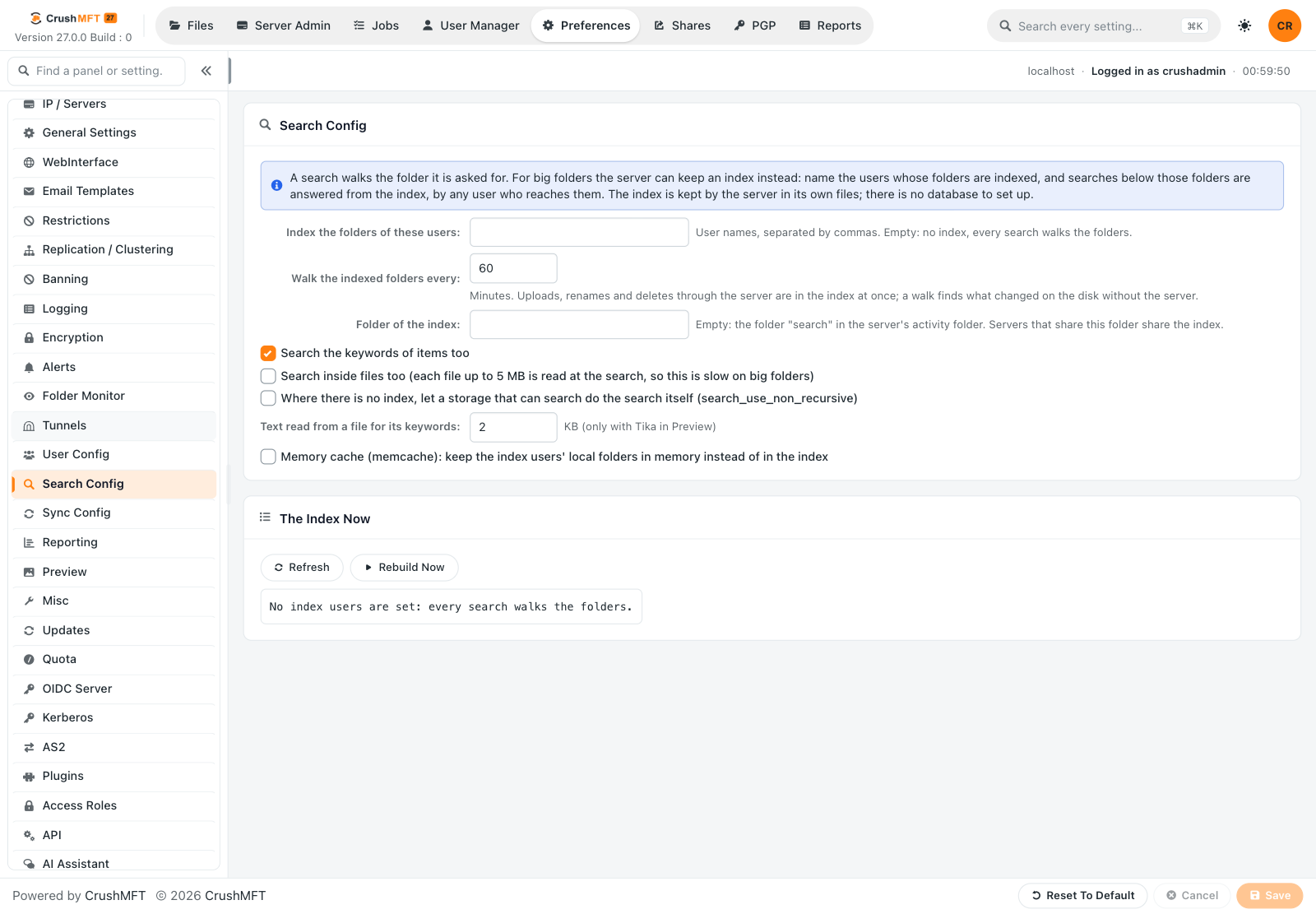
The section says of itself: "A search walks the folder it is asked for. For big folders the server can keep an index instead: name the users whose folders are indexed, and searches below those folders are answered from the index, by any user who reaches them. The index is kept by the server in its own files; there is no database to set up."
The settings#
| Setting | Key | What it does | On a new server |
|---|---|---|---|
| Index the folders of these users | search_index_usernames |
"User names, separated by commas. Empty: no index, every search walks the folders." The folders that these users' own folders point at are indexed. Any user who reaches such a folder, through whatever account, is then answered from the index. | empty |
| Walk the indexed folders every | search_index_interval |
"Minutes. Uploads, renames and deletes through the server are in the index at once; a walk finds what changed on the disk without the server." | 60 |
| Folder of the index | search_index_path |
"Empty: the folder "search" in the server's activity folder. Servers that share this folder share the index." | empty |
| Search the keywords of items too | search_keywords_also |
a search also finds items by the keywords given to them | on |
| Search inside files too | search_file_contents_also |
a search also looks into the files: "each file up to 5 MB is read at the search, so this is slow on big folders" | off |
| Where there is no index, let a storage that can search do the search itself | search_use_non_recursive |
for folders on storage that has a search of its own, the question is passed on to it and the server does not walk | off |
| Text read from a file for its keywords | search_max_content_kb |
how much text is taken out of a file to become its keywords, in KB. "Only with Tika in Preview": it needs the text extraction that the preview settings turn on. | 2 |
| Memory cache (memcache) | memcache |
"keep the index users' local folders in memory instead of in the index". The older way to make searches fast: the list of items is held in the server's memory. It costs memory in step with the number of files. | off |
Changes count when you press Save at the bottom (saving). Nothing is restarted.
Whose folders to index#
Name the users whose folders are large and searched often. A user named here is a pointer to folders, not a permission: what is indexed is the folders that user's account leads to, and everybody who reaches those folders gains by it.
So one template user whose folders are "everything", named here, indexes everything. Users who only reach a part of it are answered from the index for their part, and see only what they may see.
Folders that are small are not worth naming: a walk of a few hundred items is quick.
The Index Now#
Under the settings, the state of the index: one row for each indexed folder.
| Column | Is |
|---|---|
| Folder | the place that is indexed, by its address |
| State | ready, or what the index is doing |
| Items | how many files and folders it holds |
| Last walk, It took | when the folder was last walked, and for how long |
| Changes since | uploads, renames and deletes that were written into the index since that walk |
| Note | a reason, when a folder could not be walked |
| Button | Does |
|---|---|
| Refresh | reads the state again |
| Rebuild Now | "Walk every indexed folder now and write the index again? Searches are answered from the present index until the new one is ready." Then: "The server starts the walk within a few seconds." |
Without index users: "No index users are set: every search walks the folders." Just after naming some: "No folder is indexed yet. The server walks the index users' folders within a minute of the change."
On a test server, one user was named whose folder holds 36 items. Four seconds after the save the server's log said "Search index: 1 of 1 locations walked, 36 items, 1 seconds.", and the row in the picture appeared: ready, 36 items, 1.3 s. A search for "report" as that user then found the folder and the file whose names hold the word.
Things to know#
- A search with the index on never finds less than one with it off. Below an indexed folder it is answered from the index; anywhere else the folders are walked as before.
- What happens through the server is in the index at once: an upload, a rename, a delete, a new folder. Only what changes on the disk behind the server's back waits for the next walk. If other programs write into the folders, lower the minutes; if not, 60 is plenty.
- The index is files, in the folder named above. Nothing has to be installed, and there is no database to look after. The files can be deleted while the server is stopped; the next walk writes them again.
- Taking a user out of the list removes their folders' index.
- Searching inside files reads the files at each search, with or without an index. On big folders, give files keywords instead.
- In a cluster, the servers share one index when the folder of the index is on storage they all reach: Search and the file index.
Coming from an earlier version#
Earlier versions kept the index in a database, and this section had three more tabs for it: the database, its table script, and a query window. They are gone, with their settings. Nothing of the old index is carried over: the first walk writes the new one. See Search and the file index.
Not tried for this page#
Run on a test server: one index user, the walk, the state shown, and a search by name answered from the index. Not tried: Rebuild Now, a second server on the same index, a folder that is not on the server's disk, searching inside files, and the memory cache.