Google Drive#
An item of a VFS of the type GDrive points at Google Drive: the "My Drive" of an account, a folder of it, or a shared drive. The server signs in to Google once, with OAuth, and keeps a token; the password of the Google account is never stored.
At Google: an OAuth client#
-
In the Google Cloud console, under APIs & Services, enable the Google Drive API for your project.
-
Under Credentials, create an OAuth client ID of the type Web application.
-
Under Authorized redirect URIs, enter the address of your server's web interface followed by
?command=register_gdrive_api:https://files.example.com/?command=register_gdrive_apiIt must be exactly the address in your browser while you make the item: http or https, host name, port.
-
Copy the Client ID and the Client secret.
-
On the OAuth consent screen, publish the app. Left in "Testing", it works only for the test users you list, and its sign-ins end after a week.
In the item#
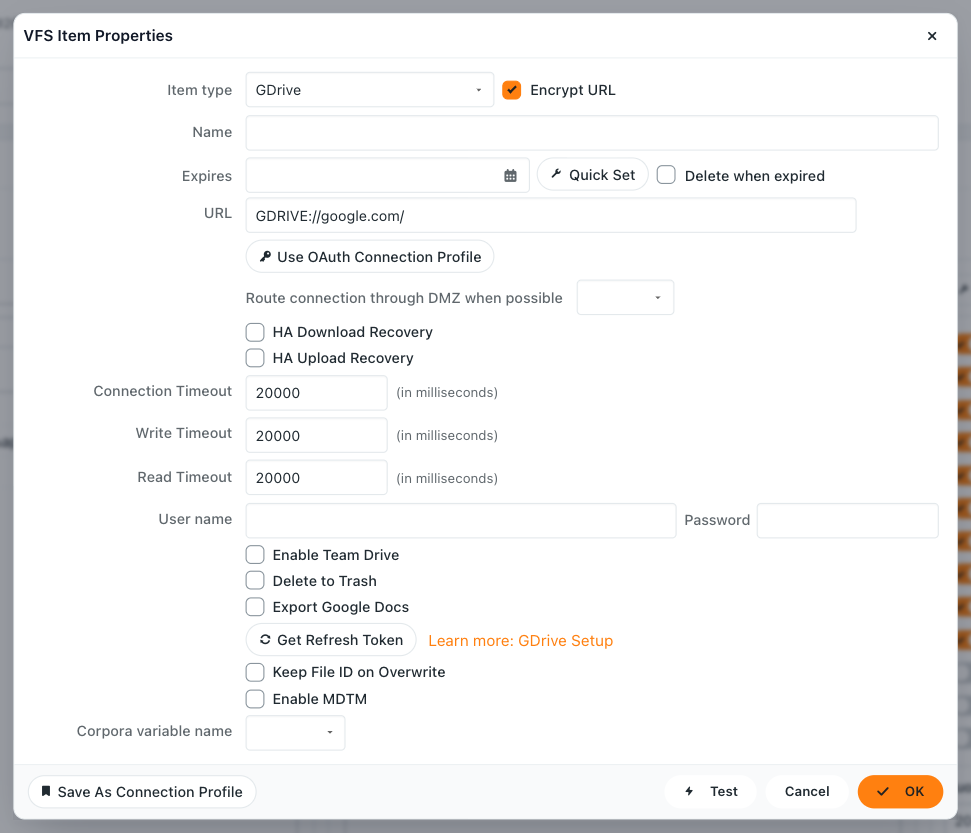
- Choose the item type GDrive. The address is
GDRIVE://google.com/; add a folder to give the user only that. - Press Get Refresh Token. Enter the Client ID and the Client Secret. If the server is published under a path of a reverse proxy, enter that path under Reverse Proxy Path.
- A Google window opens. Sign in with the account whose Drive it shall be, and allow the access.
- The window closes and the item is filled in: User name and Password now hold the client and the token.
- Press Test.
Instead of the steps 2 to 4, an item can use a sign-in that is kept in a connection profile, with Use OAuth Connection Profile: see Special types. That is also the way to use a service account.
Options#
| Option | What it does | New item |
|---|---|---|
| Enable Team Drive | the item shows the shared drives the account can reach, instead of "My Drive" | off |
| Corpora variable name | where Google searches when it lists: user (the account's own files), drive (one shared drive), allDrives, or domain (everything shared with the whole organization). Leave it empty unless listings miss files. | empty |
| Delete to Trash | deleted files go to the trash of the Drive, where they can be restored, instead of being removed for good | off |
| Export Google Docs | Google's own documents, sheets and slides have no file content to download. With this on they are converted on download to the matching office format. | off |
| Keep File ID on Overwrite | an upload over an existing file becomes a new version of that same file, so that links to it and its sharing stay. Off: the old file is replaced by a new one. | off |
| Enable MDTM | lets a client set the date of an uploaded file to the original's | off |
The options every type has are on Advanced options of a VFS item.
What to expect#
- Drive allows several files of the same name in one folder. Over the server, a user sees one name once; avoid duplicates on the Drive side.
- Google limits how many requests an account may make in a time. Jobs that move thousands of small files run into it and are slowed down.
- A token is revoked when the account's password is reset, when access is removed in the Google account, or after six months without use. Then press Get Refresh Token again.
A server that reaches the internet through a proxy or a strict firewall must be let out to oauth2.googleapis.com and www.googleapis.com.
When it does not work#
| What you see | Usually |
|---|---|
| "redirect_uri_mismatch" in the Google window | the redirect URI of the client is not exactly your browser's address plus ?command=register_gdrive_api |
| "access blocked: app not verified", or it works for a week only | the app is in "Testing", or the account is not a test user |
| the folder is empty | Enable Team Drive for shared drives; Corpora for files that are only shared with the account |
| Google documents download as nothing | Export Google Docs |