What is logged#
The Log File Options tab of the Logging section of Preferences is a checklist of the kinds of lines the server writes to its log. A kind that is not ticked is not written: not to CrushMFT.log, not to the session logs, and not to a log target that gets the debug log.
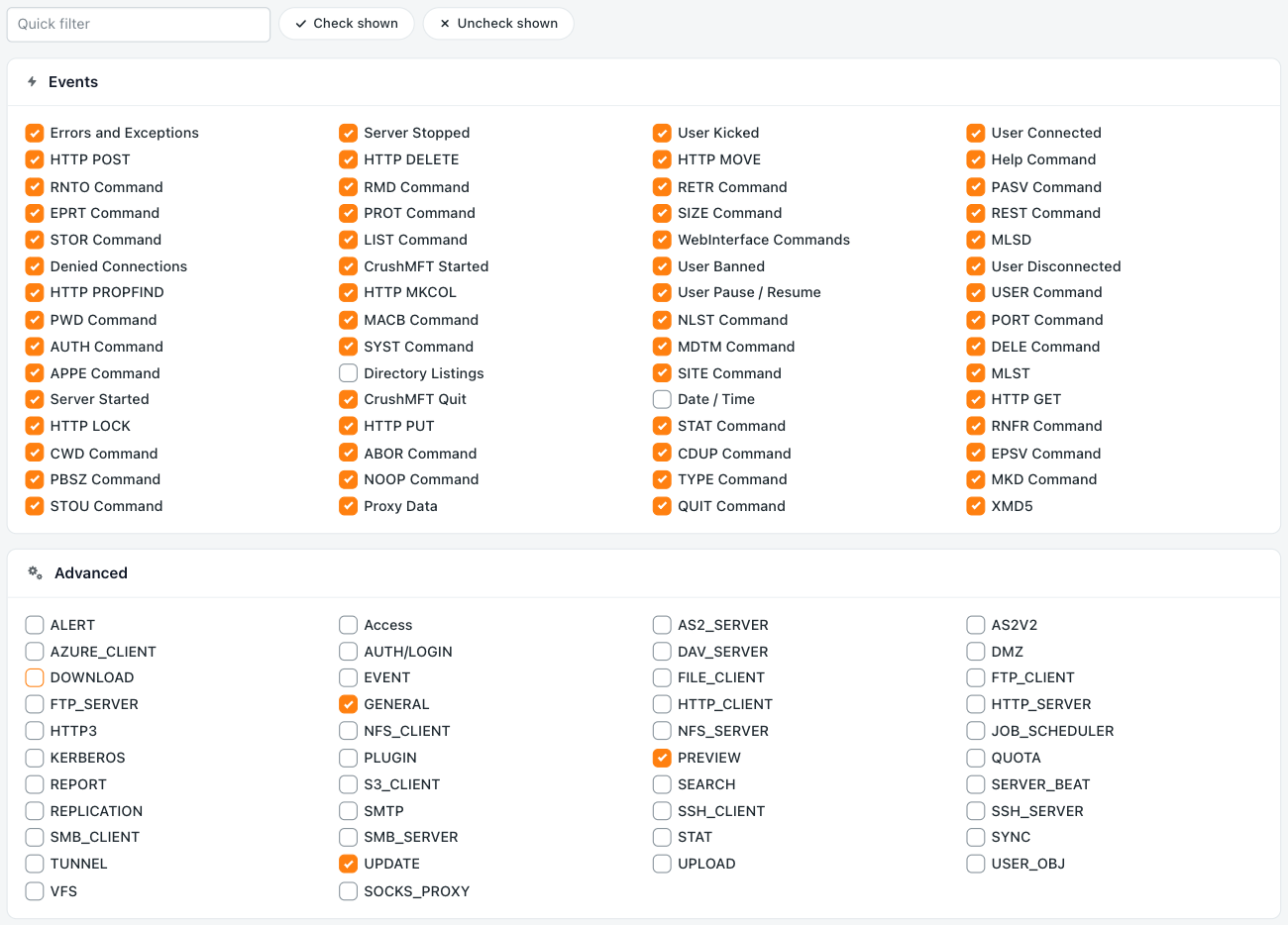
Two things are not decided here:
- how detailed the lines are: that is Log debug level on the Settings tab;
- the events a log target sends in a SIEM format: those are chosen on the target.
Finding and ticking#
| Control | What it does |
|---|---|
| Quick filter | shows only the kinds whose name has what you type in it |
| Check shown | ticks every kind that is shown |
| Uncheck shown | unticks every kind that is shown |
With the filter empty, the two buttons act on everything. Type HTTP and Uncheck shown to turn off all web request lines at once.
Events#
The first list is the commands and happenings that clients cause. On a new server all are ticked but Directory Listings and Date / Time.
| Group | Kinds |
|---|---|
| the server itself | CrushMFT Started, CrushMFT Quit, Server Started, Server Stopped, Errors and Exceptions, Date / Time |
| connections | User Connected, User Disconnected, Denied Connections, User Banned, User Kicked, User Pause / Resume |
| logging in, over FTP | USER Command, AUTH Command, PBSZ Command, PROT Command, SYST Command, QUIT Command |
| moving about and listing | CWD, CDUP, PWD, LIST, NLST, MLSD, MLST, STAT, SIZE, MDTM Command, Directory Listings |
| transfers | RETR (download), STOR (upload), APPE, STOU, REST, ABOR, TYPE, PASV, EPSV, PORT, EPRT Command, Proxy Data |
| changes to files | DELE, RNFR, RNTO, MKD, RMD, MACB Command, XMD5 |
| the web | HTTP GET, HTTP POST, HTTP PUT, HTTP DELETE, HTTP MOVE, HTTP MKCOL, HTTP PROPFIND, HTTP LOCK, WebInterface Commands |
| other | SITE Command, HELP Command, NOOP Command |
The names are those of FTP commands because that is where the log began, but they stand for the action on other protocols too: a download by SFTP is logged under RETR Command as well, an upload under STOR Command.
Directory Listings writes every listing a client gets into the log, file by file. That is a great deal: tick it only to find a fault.
Date / Time is kept from earlier versions. Nothing is logged under it; every line carries its date and time anyway, in the form set in Misc.
Advanced#
The second list is the parts of the server. Each writes lines about its own inner working, for finding faults. On a new server only GENERAL and UPDATE are ticked.
| Group | Parts |
|---|---|
| the listeners | FTP_SERVER, SSH_SERVER, HTTP_SERVER, HTTP3, DAV_SERVER, SMB_SERVER, NFS_SERVER, AS2_SERVER, SOCKS_PROXY |
| connections out to storage | FILE_CLIENT, FTP_CLIENT, SSH_CLIENT, HTTP_CLIENT, S3_CLIENT, AZURE_CLIENT, SMB_CLIENT, NFS_CLIENT, VFS |
| users and logins | AUTH/LOGIN, USER_OBJ, KERBEROS, Access, QUOTA |
| transfers and files | UPLOAD, DOWNLOAD, SEARCH, PREVIEW, SYNC, TUNNEL |
| automation | EVENT, JOB_SCHEDULER, PLUGIN, ALERT, REPORT, SMTP |
| several servers | DMZ, REPLICATION, SERVER_BEAT |
| the server | GENERAL, STAT, UPDATE |
Tick a part when you are looking into that part, usually together with a higher Log debug level, and untick it afterwards. For a mail that does not arrive, tick SMTP; for storage on S3 that fails, S3_CLIENT; for a login through LDAP or SAML that fails, AUTH/LOGIN and PLUGIN.
Saving#
The ticks are part of Save at the bottom of the page (saving), and count from then on. Lines that were not written cannot be had back.