The Cluster section#
Cluster is the third section of Server Admin. It shows every server, every DMZ and every job engine that belongs together, on one page, whichever server you are logged in to: what is up, what is linked to what, where the load is, and what needs attention. It is also where a cluster is made and changed.
It works for a single server too: such a server sees itself, its DMZs and its job engine.
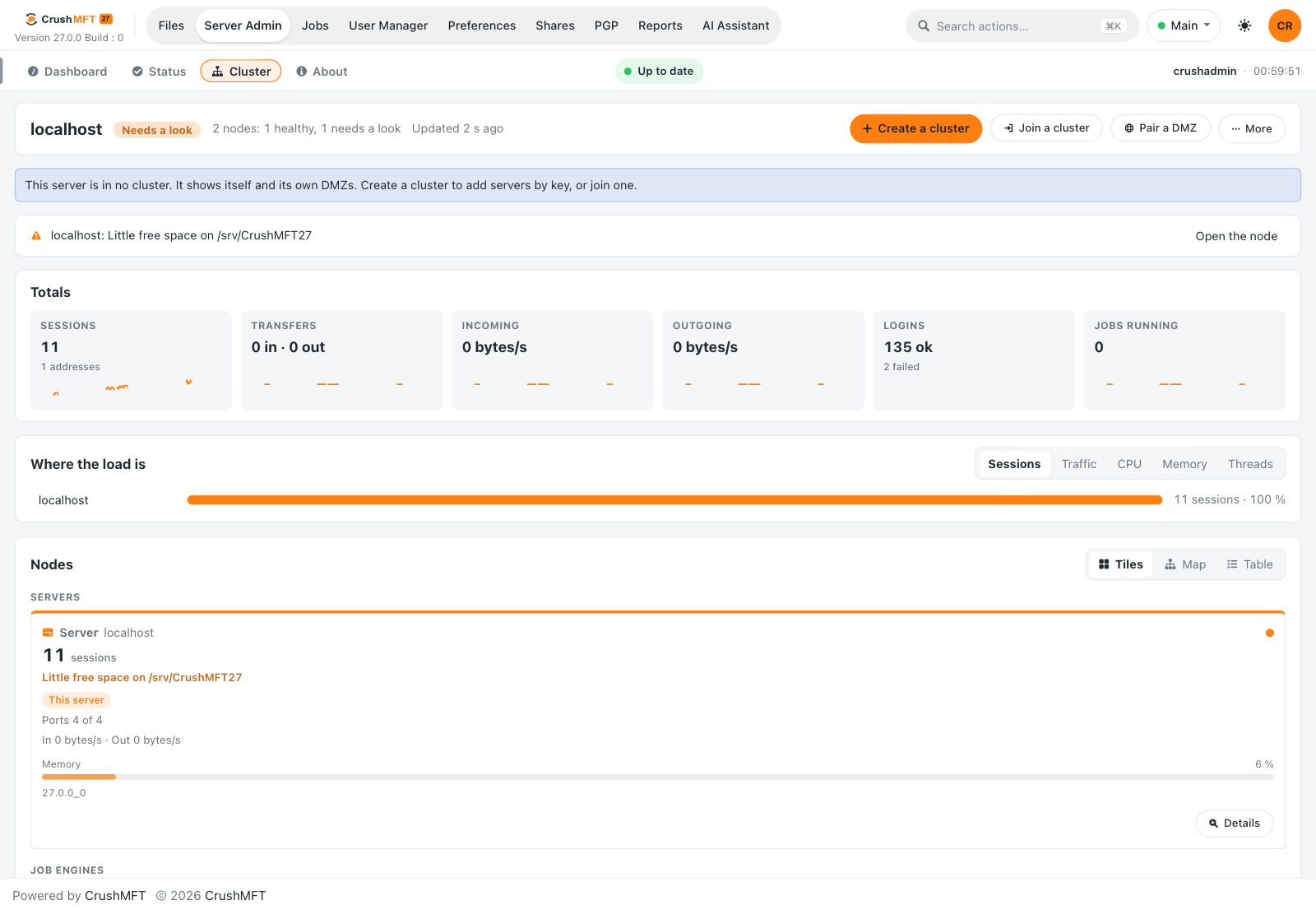
Clusters need an Enterprise licence. Without one the page says so: "Clusters need an Enterprise licence. With one, this page shows every server, DMZ and job engine of the cluster, their health and where the load is."
The head#
| Part | Shows |
|---|---|
| the name | of the cluster, or of this server when it is in none |
| the state | Healthy, Needs a look, Needs attention or Down: the worst state of any node |
| the count | "2 nodes: 1 healthy, 1 needs a look" |
| the age | "Updated 3 s ago". Every node reports every 5 seconds. "Not current" when this server has heard nothing new. |
The buttons depend on where the server stands:
| Server | Buttons |
|---|---|
| in no cluster | Create a cluster, Join a cluster, Pair a DMZ, More |
| in a cluster | Add a server, Pair a DMZ, Members, More |
| left a cluster, or was removed | Make a new identity |
and a line says which: "This server is in no cluster. It shows itself and its own DMZs. Create a cluster to add servers by key, or join one."
A server that still replicates with others the old way, by address and shared secret, is offered a shortcut: "Bring them into a cluster, so they trust each other by key." See Joining a server.
Problems#
Under the head, one line per thing that needs a look, with the node's name and a button: Open the node, Compare fingerprints, Pair it. On the test server: "localhost: Little free space on /srv/CrushMFT27".
Things that show here: a node that is down or reached by some servers only; a link that is not pinned; a member nobody has verified yet; a disk running full; logins stopped; a key change under way; a node that does not run in FIPS mode while others do.
Totals#
For the whole cluster, now: Sessions and from how many addresses, Transfers in and out, Incoming and Outgoing speed, Logins that worked and failed, Jobs running. Where DMZs carry part of it: "of which through DMZs …".
Where the load is#
One bar per server, by Sessions, Traffic, CPU, Memory or Threads: "localhost · 1 sessions · 100 %". It answers at a glance whether the load balancer spreads evenly, and which server is the busy one.
Nodes#
Three views of the same nodes:
| View | Shows |
|---|---|
| Tiles | a tile per node, grouped as Servers, DMZs and Job engines |
| Map | the nodes with the links between them: see The map and the node detail |
| Table | a line per node with name, role, state, sessions, traffic, memory, threads, version, and how old its last report is. The columns sort. |
A server's tile shows its sessions, its problem if it has one, its Ports ("4 of 4" running), its traffic, its memory and its version. Marks on a tile:
| Mark | Means |
|---|---|
| This server | the one you are logged in to |
| Holds the shared IP | with ServerBeat: the one that has the address now |
| Not pinned | a link to it still runs the old way |
| Unverified | it came in without a code; nobody has compared its fingerprint yet |
| via … | a DMZ: the server it is linked through |
| Standing by for … | a server that also has that DMZ set up and would take it over |
| Logins stopped | |
| Key change under way |
Details on a tile opens the node: the node detail. A DMZ's tile also has Open DMZ Dashboard.
More#
| Entry | What it does | Page |
|---|---|---|
| Rename the cluster, approvals | the cluster's name, and whether each join waits for an admin's approval | Joining a server |
| Pinned replication, Require pinned replication | makes the servers replicate by their keys only | Replication |
| Copy users and settings from … | copies what exists on another server to this one | Joining a server |
| Update every server, one at a time | updates the whole cluster without taking it down | below |
| Bring in the servers this one replicates with | makes members of old-style replication peers | Joining a server |
| This server's port and addresses | the cluster port and how the others reach this server | Trust between servers |
| Change this server's key | Changing a key, removing a server | |
| Leave the cluster | Changing a key, removing a server |
Members#
Members lists who belongs: each node with its role, its fingerprint, its state, its addresses, when and how it joined, and whether it is verified. Below: the nodes that were Removed, the Open codes that could still be used to join, and joins Waiting for approval.
At the bottom, "The newest change of the list" says how far a change has travelled: "It has reached 3 of 3 servers."
Updating every server#
Update every server, one at a time:
Each of the cluster's servers checks for the newest version and switches to it, one at a time: the next server starts when the one before reports its update done. This server goes last. The round stops at the first server whose update fails, and the servers after it are not touched. Users stay connected on every server, as at any update.
The dialog shows each server as Waiting, Updating, Done, Failed or Not touched.
Things to know#
- Any server answers for all. Every server holds the newest report of every node. Log in to whichever is reachable.
- A DMZ is seen through its server. A DMZ reports to the server it is linked to, and that server tells the others.
- An hour of history per node is kept in memory, for the small charts. Longer history is in the Reports app: Server health, per node.
- The same by program: the
/clusteroperations of the API. - Who may see it: the page follows the roles. Changing the cluster is for full administrators.