Memory, RFile, OAuth, KeyVault and other special items#
Most item types of a VFS are storage somewhere. A few are not: two hold a sign-in or a secret for other items to use, and the rest are tools.
| Type | What it is |
|---|---|
| OAuth | a sign-in with tokens, kept once and used by other items |
| KeyVault | a password or key that is fetched from a vault when it is needed |
| Memory | a file system in the server's memory, for speed tests |
| RFile | local files, used as the Windows user who logged in |
| others | zip:, text:, sql: |
OAuth#
An item of the type OAuth is not a folder. It describes how to get a token from an identity service. It is meant to be saved as a connection profile; other items then use it with Use OAuth Connection Profile, and so do the mail settings in SMTP.
One sign-in, kept in one place, serves every item that needs it. Only a full administrator can save an OAuth profile.
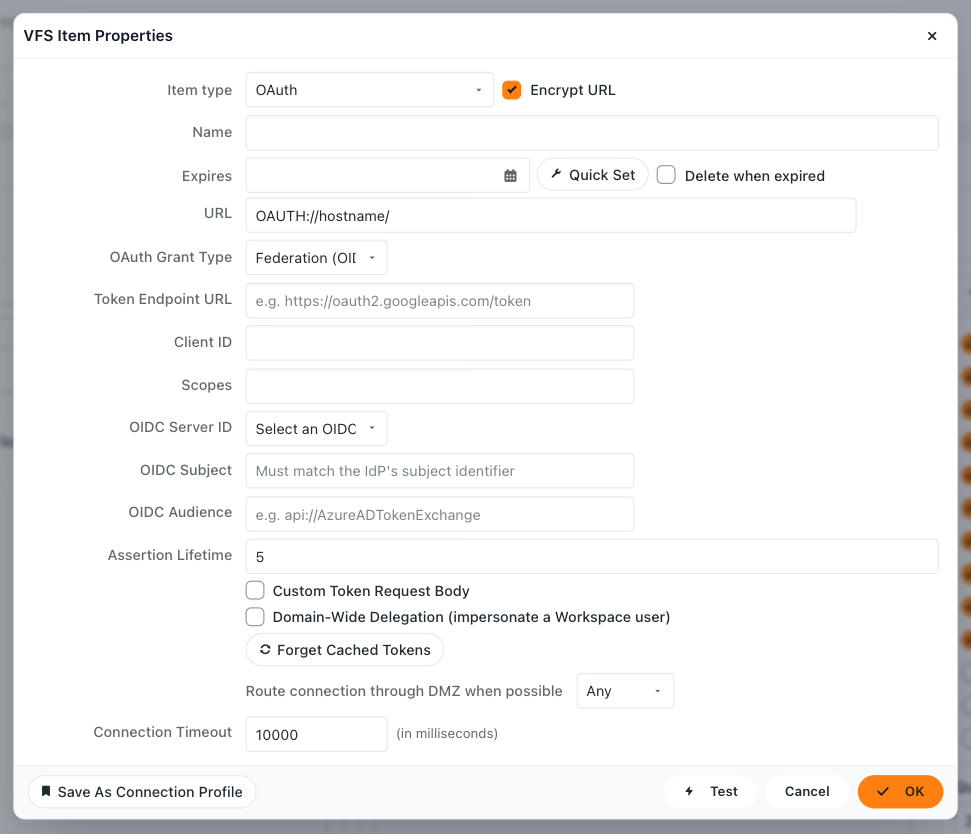
OAuth Grant Type decides how the token is got:
| Grant type | Means |
|---|---|
| Refresh Token | a person signed in once; the server renews the token with the refresh token it was given |
| Client Credentials | the server shows a client ID and a secret, with nobody signed in |
| Microsoft / Azure - Client Credentials (Certificate) | the same against Microsoft, proven with a certificate. Certificate Thumbprint: "Azure portal: App registration > Certificates & secrets > Certificates > Thumbprint." |
| Client Credentials (Private Key) | proven with a signature of a private key |
| JWT Assertion | the server signs a short statement about itself and trades it for a token: the way of Google service accounts |
| Federation (OIDC) | the server makes an identity token with its own OIDC server, and the other service trusts that issuer. No secret is stored anywhere. |
| Amazon / AWS - Web Identity (no token exchange) | the same towards AWS: the identity token is handed to AWS as it is |
| Azure VM Lookup, Google VM Lookup | on a server that runs in that cloud: the token of the machine's own identity. Nothing is stored. |
| Field | What it is |
|---|---|
| Token Endpoint URL | "Where CrushMFT POSTs the authorization code and refresh token. Not the IdP login URL." |
| Client ID, Scopes | the client, and what the token is asked for |
| OIDC Server ID | for the federated types: which issuer of this server signs |
| OIDC Subject | "Must match the sub claim the identity provider expects." |
| OIDC Audience | "Must match the aud the IdP expects. Azure: api://AzureADTokenExchange." |
| Assertion Lifetime | how many minutes a signed statement is good for. 5. |
| Custom Token Request Body | lets you write the request for the token yourself, for services that want it their own way |
| Domain-Wide Delegation (impersonate a Workspace user) | for Google Workspace: the service account acts as a user of your domain. Service Account: "The service account that signs for the user." Impersonate User: "A user of a Workspace domain you administer." |
| Forget Cached Tokens | "Forgets what this one item cached: its access token, a rotated refresh token, and the secret a wallet profile is holding. Worth pressing after changing a scope." |
KeyVault#
An item of the type KeyVault names one secret in a vault for secrets. An ordinary item that says Use KeyVault Connection Profile then stores no password: at each login the server fetches the secret and uses it. The password is changed in the vault, for every system at once, and CrushMFT never has it on disk.
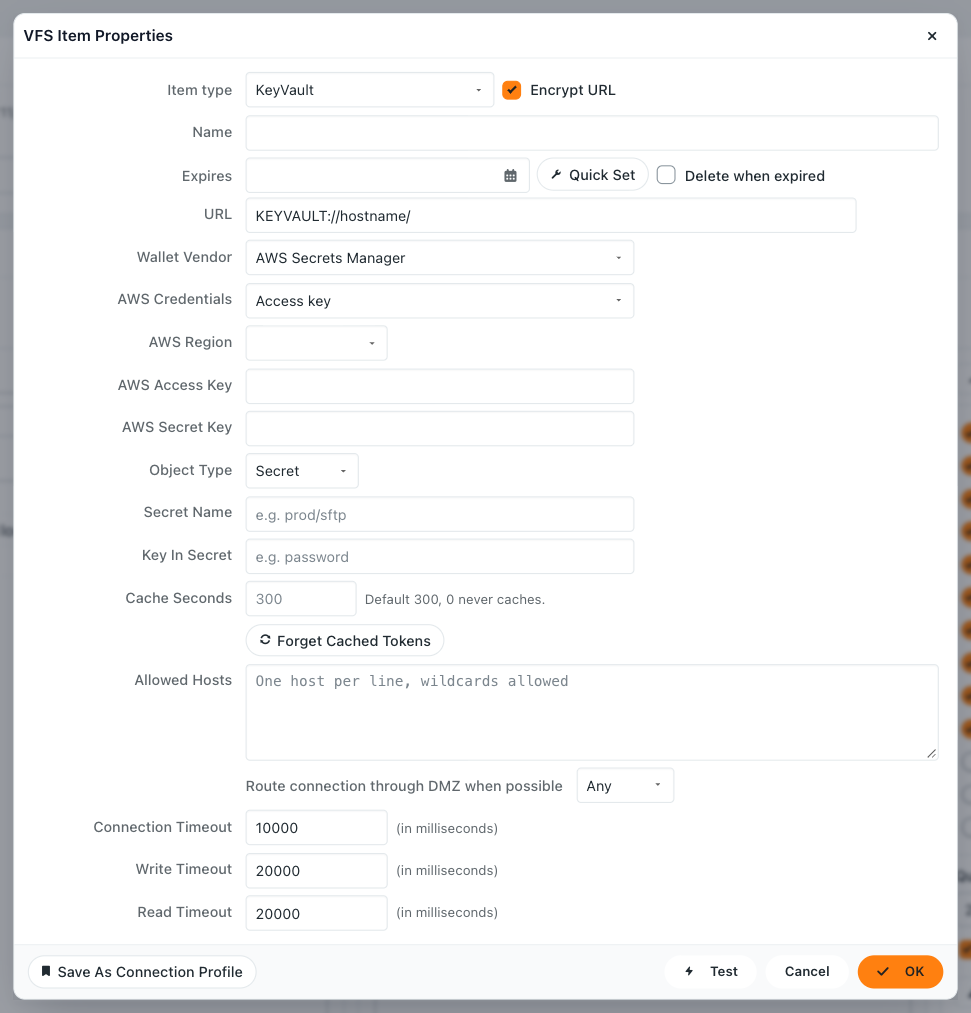
| Field | What it is |
|---|---|
| Wallet Vendor | AWS Secrets Manager, Azure Key Vault, or Google Secret Manager |
| Secret Name | "The secret's own name in the wallet, exactly as it is stored there: prod/sftp in Secrets Manager, sftp-password in Key Vault." |
| Key In Secret | "The Key of one of the secret's key/value pairs. Leave empty only when the secret holds a single plain value rather than pairs." |
| Object Type | Secret or Certificate. "A Certificate serves key material through ssh_private_key and is refused as a password, which keeps a wrong pick from sending private key material to another server." |
| Cache Seconds | "How long a fetched secret is reused before the wallet is asked again." "Default 300, 0 never caches." |
| Allowed Hosts | one host per line, wildcards allowed. "This profile supplies its secret only to these hosts, and an empty list supplies it to nothing." It ties the secret to the systems it is for: an item that points elsewhere gets nothing. |
How the server gets into the vault depends on the vendor:
| Vendor | Fields |
|---|---|
| AWS | AWS Region, and AWS Credentials: "Access key uses the stored key directly. Assume role signs an STS request with that key and becomes the role … Web identity stores no key at all: the OAuth profile mints an OIDC token and STS exchanges it." With a role: Role ARN. |
| Azure | Vault Name: "The vault's own name, not its URL: for https://contoso-kv.vault.azure.net/ this is contoso-kv." An OAuth profile provides the token; "its scope should be https://vault.azure.net/.default". |
| Project ID: "The project the secret lives in." An OAuth profile provides the token; its service account needs the role "Secret Manager Secret Accessor" on the secret. "The newest version is always read, so a rotated secret needs no change here." |
Only a full administrator can save a KeyVault profile.
Memory#
A file system that lives in the server's memory. "Its purpose is testing raw transfer speed with the disk taken out of the picture. It is not durable storage, nothing is ever written anywhere, and everything is lost" when the server stops.
Give a test user an item MEMORY://hostname/, upload and download, and you measure the network and the server without any disk. All memory items of a server share one space. Do not leave one with a real user: what is uploaded fills the server's memory.
RFile#
For a server on Windows whose users are Windows accounts. An item rfile://hostname/C:/data/ reaches local files not as the server's own account but as the user who logged in: the server starts a small helper process under that user's name, and all file access of the session goes through it.
- Files a user makes belong to that user in Windows.
- What a user can reach is decided by the Windows permissions (ACLs) of the folders, as if they sat at the machine.
It needs three things: the helper psexec.exe (from Microsoft's Sysinternals, or the compatible PAExec under that name) in the server's folder; a Java that those users are allowed to run; and a service account for CrushMFT that is not "Local System", because Windows does not let that account start a process as an ordinary user. This is an Enterprise feature.
Where it is enough that one account does everything, use an ordinary local folder.
Kinds you meet in jobs#
These are not in the list of item types, and you meet them as addresses in jobs and in the log:
| Address | Is |
|---|---|
zip: |
the inside of a zip file, read as a folder: what Explore zip contents of the web interface shows |
text:, sql: |
items that a task made itself, such as lines of a text or rows of a query. They have no file behind them: a task that tries to transfer one stops with "Download not supported for protocol …! Exclude items with protocol …". Take them out with an Exclude task before a Copy. |
custom. |
a storage class of your own: see Custom VFS |